Flutter Radio Player
A Flutter plugin for playing streaming radio with background playback, lock screen controls, and platform-native media integrations.
Android
iOS
Support SDK 21+
iOS 14+
Features
Background audio playback with no extra configuration
Lock screen and notification media controls
ICY/Shoutcast metadata extraction
Multiple source queue with next/previous/jump-to navigation
Volume control with stream updates
Artwork support (asset paths and remote URLs)
watchOS, WearOS, CarPlay, and Android Auto integration
Swift Package Manager and CocoaPods support on iOS
Quick Start
Installation
flutter pub add flutter_radio_player
Minimal Example
import 'package:flutter_radio_player/flutter_radio_player.dart' ;
final player = FlutterRadioPlayer ();
await player.initialize ([
const RadioSource (url: 'https://example.com/stream' ),
], playWhenReady: true );
Working with Sources
Define your radio stations using the RadioSource model:
const sources = [
RadioSource (url: 'https://example.com/stream' ),
RadioSource (
url: 'https://example.com/jazz' ,
title: 'Jazz FM' ,
artwork: 'assets/jazz_cover.jpg' ,
),
RadioSource (
url: 'https://example.com/rock' ,
title: 'Rock Radio' ,
artwork: 'https://example.com/rock_cover.png' ,
),
];
await player.initialize (sources, playWhenReady: true );
Field
Type
Description
urlStringStream URL (required)
titleString?Display name for lock screen
artworkString?Asset path or URL for album artwork
Working with Playback Controls
await player.play ();
await player.pause ();
await player.playOrPause ();
await player.nextSource ();
await player.previousSource ();
await player.jumpToSourceAtIndex (2 );
await player.setVolume (0.8 );
final volume = await player.getVolume ();
await player.dispose ();
Working with Streams
Listen to real-time player state changes using streams:
Playback State
player.isPlayingStream.listen ((bool isPlaying) {
print (isPlaying ? 'Playing' : 'Paused' );
});
Now Playing / ICY Metadata
player.nowPlayingStream.listen ((NowPlayingInfo info) {
print ('Now playing: ${info.title} ' );
});
The nowPlayingStream automatically extracts ICY metadata from Shoutcast/Icecast streams. If the stream provides metadata (e.g., artist and song title), it will appear here without any extra configuration.
Volume Changes
player.volumeStream.listen ((VolumeInfo vol) {
print ('Volume: ${vol.volume} , Muted: ${vol.isMuted} ' );
});
Full Example
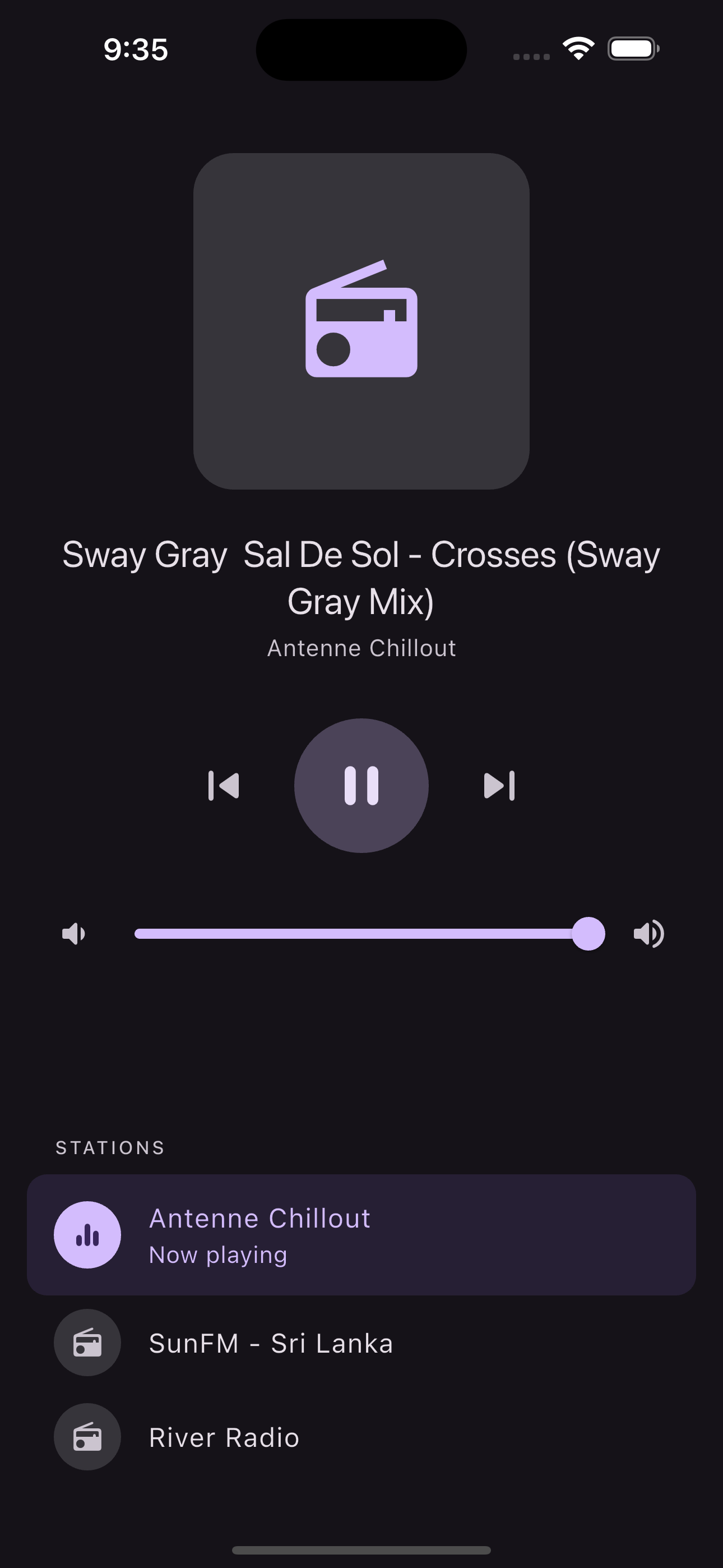
A complete player widget with play/pause, skip controls, metadata display, and volume slider:
import 'package:flutter/material.dart' ;
import 'package:flutter_radio_player/flutter_radio_player.dart' ;
class RadioPlayerWidget extends StatefulWidget const RadioPlayerWidget ({super .key});
@override
State <RadioPlayerWidget > createState () => _RadioPlayerWidgetState ();
}
class _RadioPlayerWidgetState extends State <RadioPlayerWidget > final _player = FlutterRadioPlayer ();
double _volume = 0.5 ;
@override
void initState () {
super .initState ();
_player.initialize ([
const RadioSource (
url: 'https://s2-webradio.antenne.de/chillout?icy=https' ,
title: 'Antenne Chillout' ,
),
const RadioSource (
url: 'https://radio.lotustechnologieslk.net:2020/stream/sunfmgarden?icy=https' ,
title: 'SunFM - Sri Lanka' ,
),
], playWhenReady: true );
}
@override
void dispose () {
_player.dispose ();
super .dispose ();
}
@override
Widget build (BuildContext context) {
return Column (
mainAxisAlignment: MainAxisAlignment .center,
children: [
StreamBuilder <NowPlayingInfo >(
stream: _player.nowPlayingStream,
builder: (context, snapshot) {
final title = snapshot.data?.title ?? 'No track info' ;
return Text (title, style: Theme .of (context).textTheme.titleLarge);
},
),
const SizedBox (height: 24 ),
StreamBuilder <bool >(
stream: _player.isPlayingStream,
builder: (context, snapshot) {
final isPlaying = snapshot.data ?? false ;
return Row (
mainAxisAlignment: MainAxisAlignment .center,
children: [
IconButton (
iconSize: 36 ,
onPressed: _player.previousSource,
icon: const Icon (Icons .skip_previous_rounded),
),
IconButton (
iconSize: 48 ,
onPressed: () => isPlaying ? _player.pause () : _player.play (),
icon: Icon (isPlaying ? Icons .pause_rounded : Icons .play_arrow_rounded),
),
IconButton (
iconSize: 36 ,
onPressed: _player.nextSource,
icon: const Icon (Icons .skip_next_rounded),
),
],
);
},
),
const SizedBox (height: 16 ),
Row (
children: [
const Icon (Icons .volume_down_rounded),
Expanded (
child: Slider (
value: _volume,
onChanged: (value) {
setState (() => _volume = value);
_player.setVolume (value);
},
),
),
const Icon (Icons .volume_up_rounded),
],
),
],
);
}
}
See the example app for the full runnable project.
Platform Setup
Android
Add the following permissions to your AndroidManifest.xml:
<uses-permission android:name ="android.permission.INTERNET" />
<uses-permission android:name ="android.permission.FOREGROUND_SERVICE" />
<uses-permission android:name ="android.permission.FOREGROUND_SERVICE_MEDIA_PLAYBACK" />
FOREGROUND_SERVICE and FOREGROUND_SERVICE_MEDIA_PLAYBACK are already declared by the plugin. INTERNET must be declared by the host app.
If your radio streams use plain HTTP (not HTTPS), opt in to cleartext traffic. Either add the attribute to your <application> tag:
<application
android:usesCleartextTraffic ="true"
... >
Or, preferred, whitelist only the streaming domains via a network security config (res/xml/network_security_config.xml):
<network-security-config >
<domain-config cleartextTrafficPermitted ="true" >
<domain includeSubdomains ="true" > your-stream-host.example.com</domain >
</domain-config >
</network-security-config >
Then reference it from your <application> tag: android:networkSecurityConfig="@xml/network_security_config".
iOS
Enable Audio, AirPlay, and Picture in Picture under your target's Signing & Capabilities > Background Modes in Xcode:
If your radio streams use plain HTTP, add the following to your Info.plist:
<key > NSAppTransportSecurity</key >
<dict >
<key > NSAllowsArbitraryLoads</key >
<true />
</dict >
Swift Package Manager is supported alongside CocoaPods (Flutter 3.24+). No additional configuration is needed.
API Reference
Methods
Method
Description
initialize(sources)Set sources and optionally auto-play
play()Resume playback
pause()Pause playback
playOrPause()Toggle play/pause
setVolume(double)Set volume (0.0 to 1.0)
getVolume()Get current volume
nextSource()Skip to next source
previousSource()Skip to previous source
jumpToSourceAtIndex(i)Jump to source at index
dispose()Release player resources
Streams
Stream
Type
Description
isPlayingStreamStream<bool>Playback state changes
nowPlayingStreamStream<NowPlayingInfo>Track metadata updates
volumeStreamStream<VolumeInfo>Volume and mute changes
Models
Model
Fields
RadioSourceurl (String), title (String?), artwork (String?)
NowPlayingInfotitle (String?)
VolumeInfovolume (double), isMuted (bool)
Architecture
This is a federated plugin split into four packages:
Platform communication uses Pigeon for type-safe code generation.
Migration from v3
See the Migration Guide for detailed upgrade instructions.
Support the Plugin
If you find this plugin useful:
Give it a star on GitHub
Leave a like on pub.dev
Buy me a coffee via USDT-TR20: TNuTkL1ZJGu2xntmtzHzSiH5YdVqUeAujr
Contributing
Contributions are welcome. Please open an issue first to discuss what you would like to change.
License
MIT