搜索插件、代码仓与 APP 分类

插件详情v0.0.5

flutter_shine

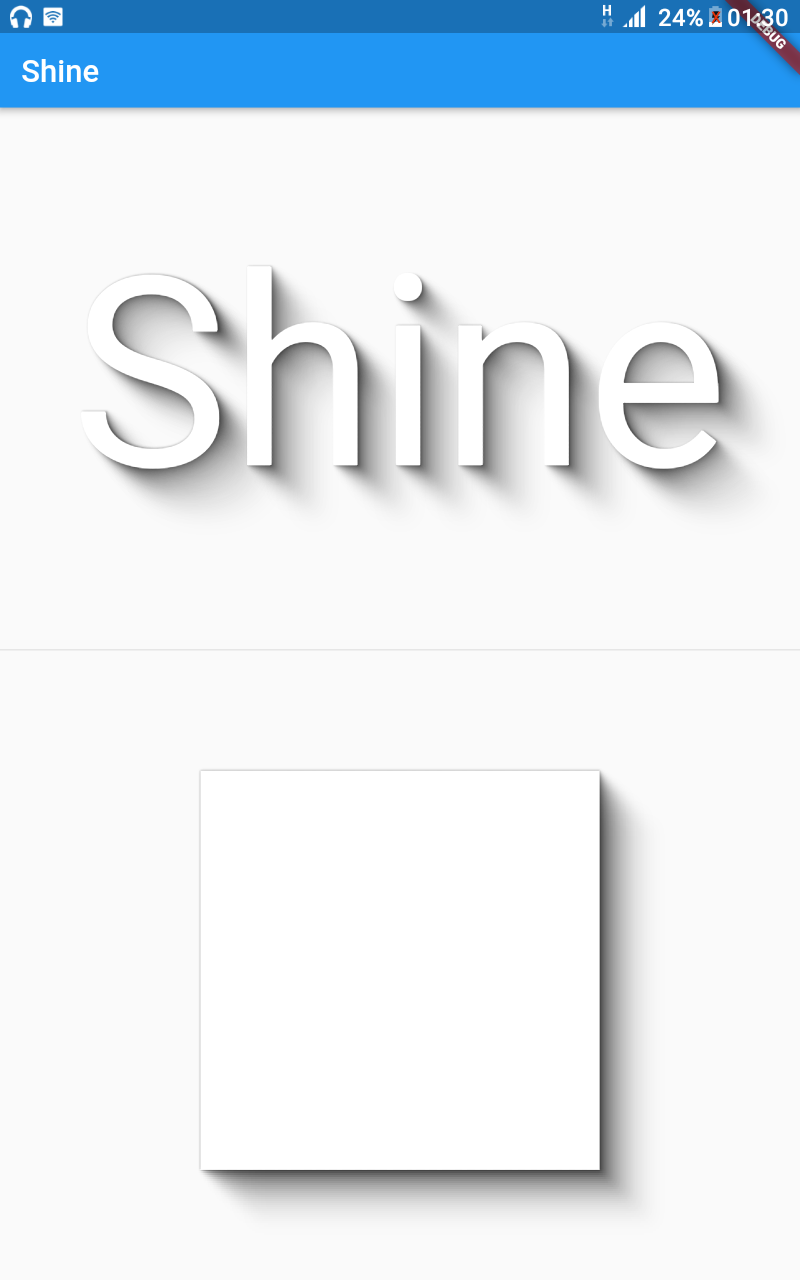
Flutter Shine 是一个用于美观阴影的库,支持动态光源位置、高度可定制的阴影,无任何库依赖,并且可根据内容生成文本或框阴影。

近 30 天下载
49
喜欢数
49
Pub 分数
35

安装插件

flutter pub add flutter_shine

插件介绍

基于插件公开信息、社区数据与项目使用情况整理的选型参考。

Flutter Shine 是一个轻量级、无依赖的库,可在 Flutter 应用中实现视觉上吸引人且动态的阴影效果。它支持随内容自适应的文本和框阴影,并可自定义光源位置以实现逼真的光照效果。设计简洁灵活,无需外部库即可为 UI 增加细微且动画化的阴影。适用于对深度和交互性有要求的现代精致界面。

适合场景

  • 在按钮上创建动态阴影
  • 增强文本的逼真光照效果
  • 设计交互式 UI 元素
  • 为卡片和容器增加深度
  • 构建动画视觉反馈
  • 通过最少的代码提升应用美感

主要特点

  • 动态光源定位
  • 可自定义的阴影强度和颜色
  • 无外部依赖
  • 支持文本和盒阴影
  • 内容感知阴影渲染
  • 轻量且高效

适合对象

  • 寻求视觉精致的UI设计师
  • 希望快速上手的开发者
  • 包含交互式或动画元素的应用程序
  • 专注于现代材料设计的项目
  • 注重性能和大小的团队

使用建议

  • 仅限阴影效果
  • 无内置动画控制
  • 需要手动配置以实现复杂行为
  • 不适合用于复杂的3D效果
  • 最好与简洁、清晰的 UI 布局配合使用

原始 README

以下为关联源码仓库的 README 原文快照,最新内容请访问源码仓库。

Image 1

Flutter Shine

Pub Build Status Awesome Flutter

Show some :heart: and star the repo to support the project

GitHub stars GitHub forks GitHub watchers GitHub followers
Twitter Follow

Flutter widget inspired by Shine

Installation

Add the Package

dependencies:
  flutter_shine: ^0.0.5

❔ Usage

Import this class
import 'package:flutter_shine/flutter_shine.dart';
Flutter Shine

See how easy it is to create a shadow on text and on a container.

Exemple
FlutterShine(
    builder: (BuildContext context, ShineShadow shineShadow) {
        return Column(
            crossAxisAlignment: CrossAxisAlignment.center,
            mainAxisAlignment: MainAxisAlignment.spaceEvenly,
            mainAxisSize: MainAxisSize.max,
            children: <Widget>[
                Text(
                    "Shine",
                    style: TextStyle(
                        fontSize: 100,
                        color: Colors.white,
                        shadows: shineShadow.shadows),
                ),
                Divider(),
                Container(
                    width: 300,
                    height: 300,
                    decoration: BoxDecoration(
                        color: Colors.white, boxShadow: shineShadow.boxShadows),
                )
            ],
        );
    },
),

Extremely customizable shadow with a dynamic light positions.

You can customize follows values :

  • number of Steps : The density of the shadow
  • opacity : The opacity of the shadow
  • opacity Power : The opacity power
  • offset : The offset of the shadow
  • offset Power : The offset power
  • blur : The blur of the shadow
  • blur Power : The blur power
  • shadow Color : The color of the shadow
Exemple
FlutterShine(
    [config: Config(shadowColor: Colors.red[300]),]
    [light: Light(intensity: 1, position: Point(x, y)),]
    builder: (BuildContext context, ShineShadow shineShadow) {
        return Column(
            crossAxisAlignment: CrossAxisAlignment.center,
            mainAxisAlignment: MainAxisAlignment.spaceEvenly,
            mainAxisSize: MainAxisSize.max,
            children: <Widget>[
                Text(
                    "Shine",
                    style: TextStyle(
                        fontSize: 100,
                        color: Colors.white,
                        shadows: shineShadow.shadows),
                ),
                Divider(),
                Container(
                    width: 300,
                    height: 300,
                    decoration: BoxDecoration(
                        color: Colors.white, boxShadow: shineShadow.boxShadows),
                )
            ],
        );
    },
),

Examples

Web and command-line examples can be found in the example folder.

Web Examples

In order to run the web examples, please follow these steps:

  1. Clone this repo and enter the directory
  2. Run pub get
  3. Run pub run build_runner serve example
  4. Navigate to http://localhost:8080/web/ in your browser
Command Line Examples

In order to run the command line example, please follow these steps:

  1. Clone this repo and enter the directory
  2. Run pub get
  3. Run dart example/lib/main.dart
Flutter Example
Install Flutter

In order to run the flutter example, you must have Flutter installed. For installation instructions, view the online documentation.

Run the app
  1. Open up an Android Emulator, the iOS Simulator, or connect an appropriate mobile device for debugging.
  2. Open up a terminal
  3. cd into the example/lib/ directory
  4. Run flutter doctor to ensure you have all Flutter dependencies working.
  5. Run flutter packages get
  6. Run flutter run

Stargazers over time

Stargazers over time

License

MIT License

Copyright (c) 2020 Jonathan Monga

Permission is hereby granted, free of charge, to any person obtaining a copy
of this software and associated documentation files (the "Software"), to deal
in the Software without restriction, including without limitation the rights
to use, copy, modify, merge, publish, distribute, sublicense, and/or sell
copies of the Software, and to permit persons to whom the Software is
furnished to do so, subject to the following conditions:

The above copyright notice and this permission notice shall be included in all
copies or substantial portions of the Software.

THE SOFTWARE IS PROVIDED "AS IS", WITHOUT WARRANTY OF ANY KIND, EXPRESS OR
IMPLIED, INCLUDING BUT NOT LIMITED TO THE WARRANTIES OF MERCHANTABILITY,
FITNESS FOR A PARTICULAR PURPOSE AND NONINFRINGEMENT. IN NO EVENT SHALL THE
AUTHORS OR COPYRIGHT HOLDERS BE LIABLE FOR ANY CLAIM, DAMAGES OR OTHER
LIABILITY, WHETHER IN AN ACTION OF CONTRACT, TORT OR OTHERWISE, ARISING FROM,
OUT OF OR IN CONNECTION WITH THE SOFTWARE OR THE USE OR OTHER DEALINGS IN THE
SOFTWARE.


所属分类

源码仓库

使用此插件的项目

暂无相关数据。