Flutter Shortcuts





Compatibility
✅ Android
❌ iOS (active issue: iOS support for quick actions)
Show some :heart: and :star: the repo
Why use Flutter Shortcuts?
Flutter Shortcuts Plugin is known for :
| Flutter Shortcuts |
| Fast, performant & compatible |
| Free & Open-source |
| Production ready |
| Make App Reactive |
Features
All the features listed below can be performed at the runtime.
✅ Create Shortcuts
✅ Clear Shortcuts
✅ Update Shortcuts
✅ Conversation Shortcuts
✅ Use both flutter and android asset as shortcut icon
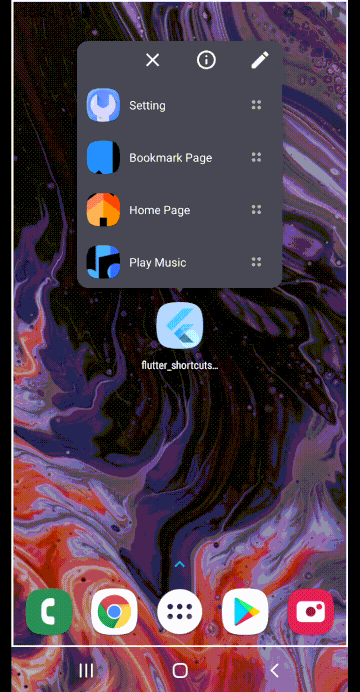
Demo
Quick Start
Step 1: Include plugin to your project
dependencies:
  flutter_shortcuts: <latest version>
Run pub get and get packages.
Step 2: Instantiate Flutter Shortcuts Plugin
final FlutterShortcuts flutterShortcuts = FlutterShortcuts();
Step 3: Initialize Flutter Shortcuts
flutterShortcuts.initialize(debug: true);
Example
Define Shortcut Action
flutterShortcuts.listenAction((String incomingAction) {
    setState(() {
    if (incomingAction != null) {
        action = incomingAction;
    }
  });
});
Get Max Shortcut Limit
Return the maximum number of static and dynamic shortcuts that each launcher icon can have at a time.
int? result = await flutterShortcuts.getMaxShortcutLimit();
Shortcut Icon Asset
Flutter Shortcuts allows you to create shortcut icon from both android drawable or mipmap and flutter Assets.
- If you want to use icon from Android resources,
drawable or mipmap.
use: ShortcutIconAsset.androidAsset
ShortcutItem(
  id: "2",
  action: 'Bookmark page action',
  shortLabel: 'Bookmark Page',
  icon: "ic_launcher",
  shortcutIconAsset: ShortcutIconAsset.androidAsset,
),
- If you want to create shortcut icon from flutter asset. (DEFAULT)
use: ShortcutIconAsset.flutterAsset
ShortcutItem(
  id: "2",
  action: 'Bookmark page action',
  shortLabel: 'Bookmark Page',
  icon: 'assets/icons/bookmark.png',
  shortcutIconAsset: ShortcutIconAsset.flutterAsset,
),
Set shortcut items
Publishes the list of shortcuts. All existing shortcuts will be replaced.
flutterShortcuts.setShortcutItems(
  shortcutItems: <ShortcutItem>[
    const ShortcutItem(
      id: "1",
      action: 'Home page action',
      shortLabel: 'Home Page',
      icon: 'assets/icons/home.png',
    ),
    const ShortcutItem(
      id: "2",
      action: 'Bookmark page action',
      shortLabel: 'Bookmark Page',
      icon: "ic_launcher",
      shortcutIconAsset: ShortcutIconAsset.androidAsset,
    ),
  ],
),
Clear shortcut item
Delete all dynamic shortcuts from the app.
flutterShortcuts.clearShortcutItems();
Push Shortcut Item
Push a new shortcut item. If there is already a dynamic or pinned shortcut with the same ID, the shortcut will be updated and pushed at the end of the shortcut list.
flutterShortcuts.pushShortcutItem(
  shortcut: ShortcutItem(
    id: "5",
    action: "Play Music Action",
    shortLabel: "Play Music",
    icon: 'assets/icons/music.png',
  ),
);
Push Shortcut Items
Pushes a list of shortcut item. If there is already a dynamic or pinned shortcut with the same ID, the shortcut will be updated and pushed at the end of the shortcut list.
flutterShortcuts.pushShortcutItems(
  shortcutList: <ShortcutItem>[
    const ShortcutItem(
      id: "1",
      action: 'Home page new action',
      shortLabel: 'Home Page',
      icon: 'assets/icons/home.png',
    ),
    const ShortcutItem(
      id: "2",
      action: 'Bookmark page new action',
      shortLabel: 'Bookmark Page',
      icon: 'assets/icons/bookmark.png',
    ),
    const ShortcutItem(
      id: "3",
      action: 'Settings Action',
      shortLabel: 'Setting',
      icon: 'assets/icons/settings.png',
    ),
  ],
);
Update Shortcut Item
Updates a single shortcut item based on id. If the ID of the shortcut is not same, no changes will be reflected.
flutterShortcuts.updateShortcutItem(
  shortcut: ShortcutItem(
    id: "1",
    action: 'Go to url action',
    shortLabel: 'Visit Page',
    icon: 'assets/icons/url.png',
  ),
);
Update Shortcut Items
Updates shortcut items. If the IDs of the shortcuts are not same, no changes will be reflected.
flutterShortcuts.updateShortcutItems(
 shortcutList: <ShortcutItem>[
   const ShortcutItem(
     id: "1",
     action: 'Resume playing Action',
     shortLabel: 'Resume playing',
     icon: 'assets/icons/play.png',
   ),
   const ShortcutItem(
     id: "2",
     action: 'Search Songs Action',
     shortLabel: 'Search Songs',
     icon: 'assets/icons/search.png',
   ),
 ],
);
Set Conversation Shortcut
Set conversationShortcut: true in ShortcutItem to make the shortcut as conversation shortcut.
The conversation shortcut can also be set as important and bot by setting isImportant: true & isBot: true.
await flutterShortcuts.pushShortcutItems(
 shortcutList: <ShortcutItem>[
   const ShortcutItem(
     id: "1",
     action: 'open_chat_1',
     shortLabel: 'Divyanshu Shekhar',
     icon: 'assets/icons/home.png',
     conversationShortcut: true,
     isImportant: true,
   ),
   const ShortcutItem(
     id: "2",
     action: 'oepn_chat_2',
     shortLabel: 'Subham Praharaj',
     icon: 'assets/icons/bookmark.png',
     conversationShortcut: true,
   ),
   const ShortcutItem(
     id: "3",
     action: 'oepn_chat_3',
     shortLabel: 'Auto Reply Bot',
     icon: 'assets/icons/url.png',
     conversationShortcut: true,
     isBot: true,
   ),
 ],
);
Change Shortcut Item Icon
Change the icon of the shortcut based on id. If the ID of the shortcut is not same, no changes will be reflected.
flutterShortcuts.changeShortcutItemIcon(
  id: "2",
  icon: "assets/icons/next.png",
);
Get shortcut icon properties
Get the icon properties of your shortcut icon.
Map<String, int> result = await flutterShortcuts.getIconProperties();
print( "maxHeight: ${result["maxHeight"]}, maxWidth: ${result["maxWidth"]}");
Project Created & Maintained By
Divyanshu Shekhar




Subham Praharaj

Contributions
Contributions are welcomed!
If you feel that a hook is missing, feel free to open a pull-request.
For a custom-hook to be merged, you will need to do the following:
Describe the use-case.
-
Open an issue explaining why we need this hook, how to use it, ...
This is important as a hook will not get merged if the hook doens't appeal to
a large number of people.
-
If your hook is rejected, don't worry! A rejection doesn't mean that it won't
be merged later in the future if more people shows an interest in it.
In the mean-time, feel free to publish your hook as a package on https://pub.dev.
-
A hook will not be merged unles fully tested, to avoid breaking it inadvertendly
in the future.
Stargazers

Forkers

Copyright & License
Code and documentation Copyright (c) 2021 Divyanshu Shekhar. Code released under the BSD 3-Clause License.