搜索插件、代码仓与 APP 分类

插件详情v0.0.3

flutter_sticky_widgets

实现行为类似于 CSS 中 position: sticky 的 Flutter 小部件。

AndroidiOSWebmacOSWindowsLinux
近 30 天下载
1600
喜欢数
91
Pub 分数
160

安装插件

flutter pub add flutter_sticky_widgets

插件介绍

基于插件公开信息、社区数据与项目使用情况整理的选型参考。

一个 Flutter 包,可使小部件的行为类似于 CSS 的 'position: sticky'——在滚动过程中保持可见,直到到达指定边界。非常适合用于标题、导航栏或任何应在内容滚动时保持在屏幕上的 UI 元素。该包可在所有主要平台上运行,包括 Android、iOS、Web、macOS、Windows 和 Linux,提供一致的粘性行为,无需编写原生平台特定代码。它可轻松集成到现有的 Flutter 布局中,设置简单。

适合场景

  • 列表中的滚动标题
  • 粘性导航栏
  • 持久化操作按钮
  • 固定滚动视图中的侧边面板
  • 动态布局元素,跟随用户滚动
  • 表单中的浮动工具栏

主要特点

  • 类似 CSS 的粘性定位
  • 跨平台兼容性
  • 最小配置
  • 自动边界检测
  • 支持嵌套滚动视图
  • 滚动时的平滑过渡

适合对象

  • 开发可滚动界面的开发者
  • 需要固定UI元素的设计师
  • 包含长列表或表单的应用程序
  • 需要响应式布局的 Web 和移动应用
  • 希望在跨平台环境中实现一致的粘性行为的团队

使用建议

  • 可能会影响大型列表中的性能
  • 需要仔细的布局嵌套
  • 不适合复杂的重叠场景
  • 超出基本粘性行为之外的自定义功能有限
  • 最好与单向滚动的上下文一起使用
  • 如果未妥善管理,可能与其他滚动控制器冲突

原始 README

以下为关联源码仓库的 README 原文快照,最新内容请访问源码仓库。

Build Status

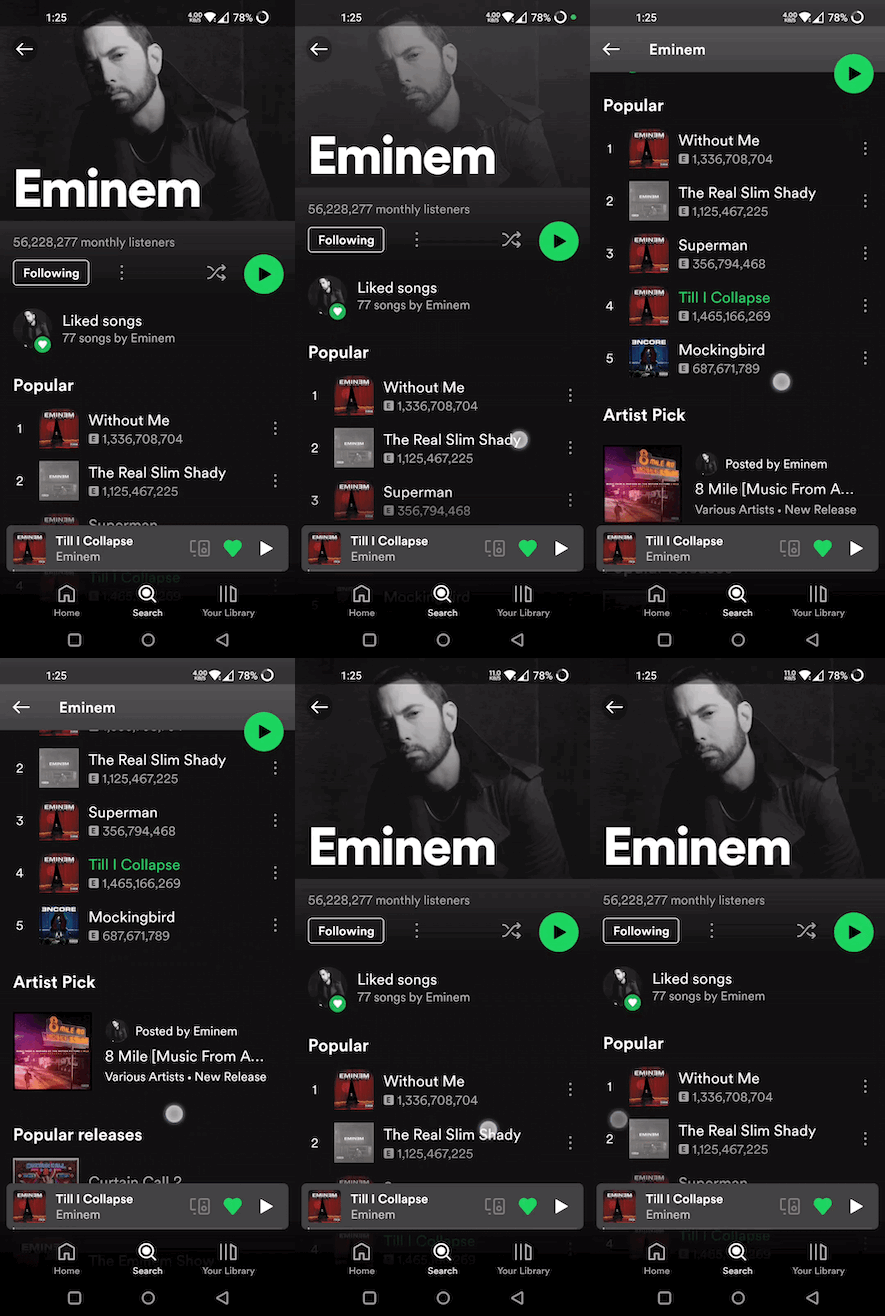
With flutter_sticky_widgets you can use a widget as if it is position: sticky; in CSS.

Sticky widgets is an UI pattern where we want widgets to scroll along with the UI upto a certain point, and then stick to the screen instead of scrolling off the screen.

(Green play button in first image, and shuffle play button in second image are examples for position: sticky)

Getting started

import 'package:flutter_sticky_widgets/flutter_sticky_widgets.dart';
StickyContainer(
    stickyChildren: [
        StickyWidget(
            initialPosition: StickyPosition(bottom: 20, right: 20),
            finalPosition: StickyPosition(
                bottom: MediaQuery.of(context).size.height - 80, right: 20),
            controller: _controller,
            child: Container(
            width: 40,
            height: 40,
            decoration: const BoxDecoration(
                shape: BoxShape.circle,
                color: Colors.green,
            ),
            child: const Center(child: Icon(Icons.pause)),
            ),
        ),
    ],
    child: ListView.builder(
    controller: _controller,
    itemCount: 50,
    itemBuilder: (context, index) {
        return ListTile(
            title: Text("Tile $index"),
        );
    }),
);
StickyWidget

Widget used to implement the sticky pattern.

  • initialPosition (StickyPosition): indicates the position of the widget before the scrolling has started. Position is represented by a custom class StickyPosition.

  • finalPosition (StickyPosition): indicates the position of the widget where it will remain sticky after sufficient amount of scrolling. Widget will return to its initial position if scrolled in reverse direction.

  • controller (ScrollController): used by StickyWidget to detect scrolling. Same ScrollController must be attached to your Scrollable (ListView, SingleChildScrollView, CustomScrollView, ...) for StickyWidgets to work. It is also used to determine if the scroll axis is vertical or horizontal.

  • callback (Function(double)?) (optional): An optional callback function, which gets called on every scroll. It receives scrolloffset as parameter which can be used to animate the StickyWidget.

StickyContainer

It must be the parent element of the Scrollable widget used. StickyContainer's size is used as reference size by StickWidgets to position themselves. So make sure StickyContainer's size is same as the size of the Scrollable widget.

  • child (Widget): ideally Scrollable widget should be supplied for this parameter, if not you have to make sure StickyContainer's size is same as Scrollable's size.

  • stickyChildren (List<StickyWidget>): you can supply one or more StickyWidgets.

  • displayOverFlowContent (bool) (optional): true if you want to display the StickyWidgets overflowing outside of the StickyContainer's bounds.

StickyPosition

A Custom class used to represent initial and final positions of StickyWidget. It takes 4 parameters (top, bottom, left, right). But you should supply only 2 of them (top / bottom, right / left)

Note: Make sure to pass same set of parameters for StickyPosition used in initialPosition and finalPosition

Eg:

Correct ✅
initialPosition: StickyPosition(top: .., left: ..)
finalPosition: StickyPosition(top: .., left: ..)

Wrong ❌
(should supply top instead of bottom for finalPosition also)

initialPosition: StickyPosition(top: .., left: ..)
finalPosition: StickyPosition(bottom: .., left: ..)

所属分类

源码仓库

使用此插件的项目

暂无相关数据。