A Flutter plugin that enables you to easily handle geofencing events in your Flutter app by utilizing native OS APIs on Android by creating a foreground service while being battery efficient since it uses the Geofence and WorkManager APIs. And on iOS by utilizing the CLLocationManager
It's important to note that the workmanager
and flutter_foreground_task plugins were a
great source of inspiration while creating this plugin.
Android
iOS
Features
Supports geofencing in foreground as well as background 💪
Geofence a circular area 🗺️
Geofence a polygon 🤯 You can add a geofence using a list of coordinates, the system will calculate the center of them and register it, having full polygon support is a WIP 🚧
Notification customization 🔔: ⚠️Android⚠️ Displaying a notification when running a foreground service is mandatory, you can customize what is being displayed on it (title, content or the icon), the plugin displays your app icon by default.
Notification responsiveness ⏱️: ⚠️Android⚠️ You can set the responsiveness of the android notifications as per the docs here
<!--required--><uses-permissionandroid:name="android.permission.FOREGROUND_SERVICE_LOCATION" /><!--at least one of the follwoing--><uses-permissionandroid:name="android.permission.ACCESS_FINE_LOCATION" /><uses-permissionandroid:name="android.permission.ACCESS_COARSE_LOCATION" />
Make sure the minSdkVersion in the app/build.gradle file is 29+
🔧 iOS Setup
Navigate to the Podfile and make sure to set the iOS version to 12+
platform :ios, '12.0'
Make sure to add the following permission to your Info.plist
<key>NSLocationAlwaysAndWhenInUseUsageDescription</key>
<string>This app need your location to provide best feature based on location</string><key>NSLocationAlwaysUsageDescription</key><string>This app need your location to provide best feature based on location</string><key>NSLocationWhenInUseUsageDescription</key><string>This app need your location to provide best feature based on location</string>
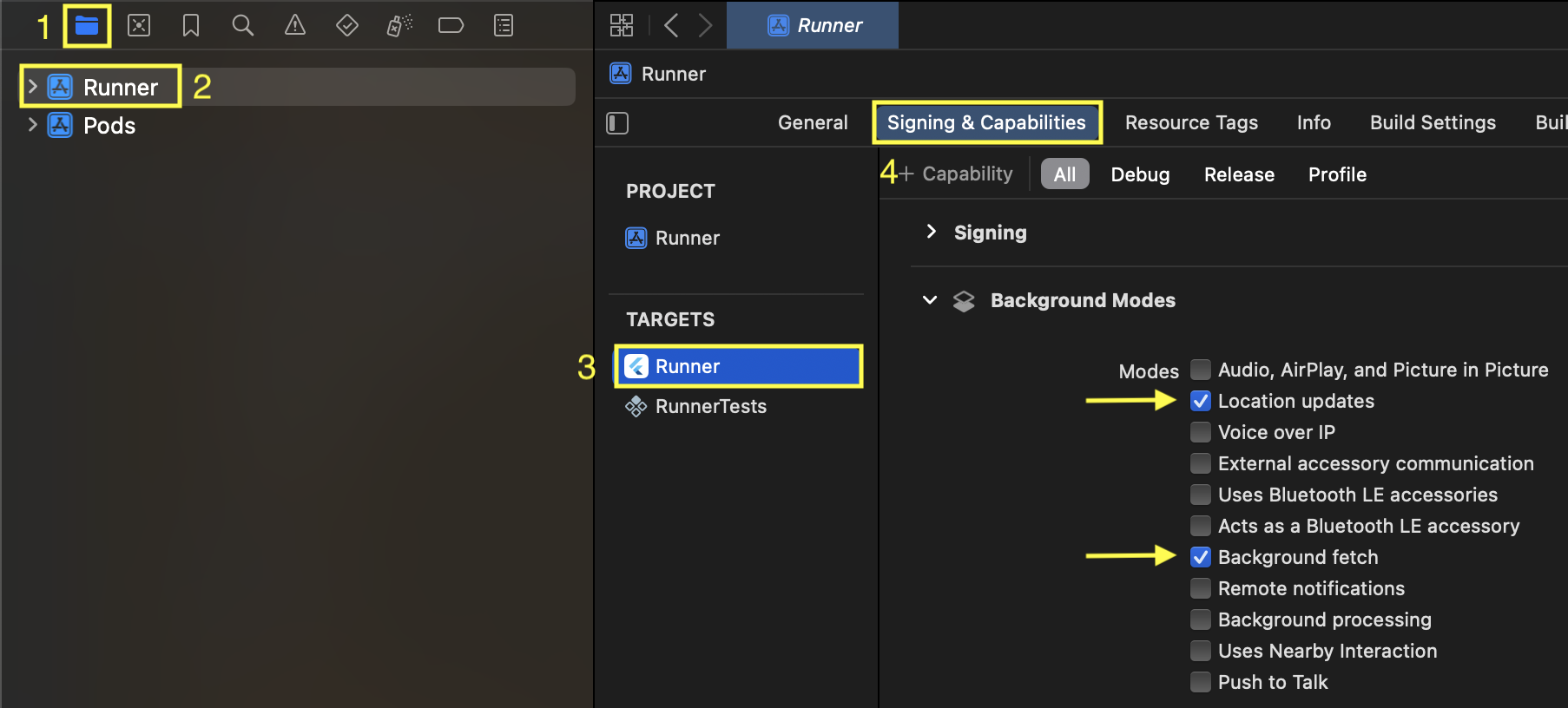
Turn on the Location updates and Background fetch capabilities from XCode
Example
Define the method that will handle the Geofence triggers
Then create an instance of the plugin to initiate it and assign GeoFences to it
finalList<LatLng> timesSquarePolygon = [
constLatLng(40.758078, -73.985640),
constLatLng(40.757983, -73.985417),
constLatLng(40.757881, -73.985493),
constLatLng(40.757956, -73.985688),
];
Future<void> initPlatformState() async {
// Remember to handle permissions before initiating the pluginbool hasServiceStarted = awaitGeofenceForegroundService().startGeofencingService(
contentTitle: 'Test app is running in the background',
contentText: 'Test app will be running to ensure seamless integration with ops team',
notificationChannelId: 'com.app.geofencing_notifications_channel',
serviceId: 525600,
callbackDispatcher: callbackDispatcher,
);
if (hasServiceStarted) {
awaitGeofenceForegroundService().addGeofenceZone(
zone: Zone(
id: 'zone#1_id',
radius: 10000, // measured in meters
coordinates: timesSquarePolygon,
triggers: [
GeofenceEventType.dwell,
GeofenceEventType.enter,
GeofenceEventType.exit
], // Currently, only available on Android
expirationDuration: constDuration(days: 1), // Currently, only available on Android
dwellLoiteringDelay: constDuration(hours: 1), // Currently, only available on Android
initialTrigger: GeofenceEventType.enter, // Currently, only available on Android
),
);
}
}
Something important to point out is the callbackDispatcher method will run in an entirely
different isolate than the actual app, so if you were to handle UI related code inside of it
you'll
need to use Ports, you can find more
information
here
You can pass a custom icon to the foreground service notification if you wish while initializing the
service, this icon will be placed inside the android/app/src/main/res folder, you can check the
example for more information, by default, it will take the app icon
Handling permissions is not a part of the package, so please refer
to permission_handler plugin to grant the required
permissions (it's used in the example too)
location
locationAlways
notification
Contributing
We welcome contributions. Please read CONTRIBUTING.md for pull request expectations (including small PRs and a maximum of 15 files per PR), testing, changelog updates, and review practices.