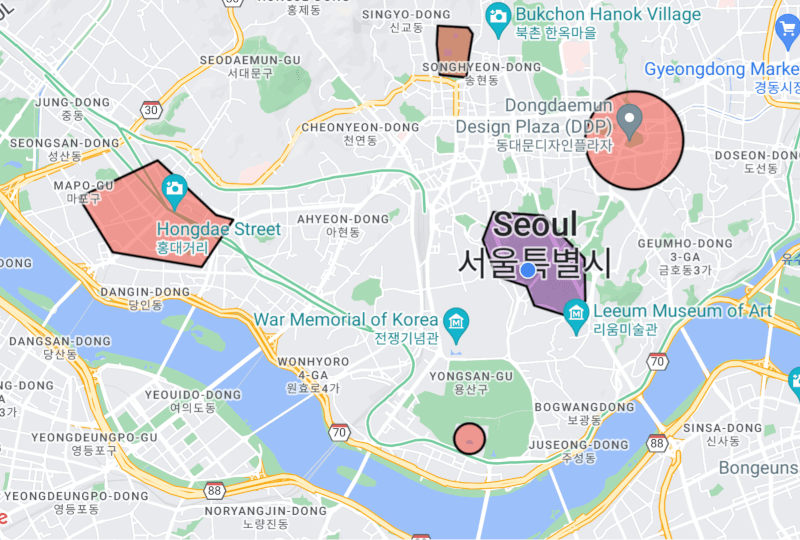
geofencing_api 包使开发者能够在 Android、iOS 和 Web 平台上实现基于圆形和多边形的地理围栏。它提供了一个统一的接口,用于监控地理边界,并在用户进入或离开定义区域时触发事件。适用于位置感知的应用程序,支持实时地理位置跟踪和区域监控,设置简单。该插件可无缝集成到 Flutter 应用中,并利用原生地理围栏功能以实现最佳性能和电池效率。
适合场景
基于位置的通知
资产追踪
接近警报
地理围栏签到
实时位置监控
主要特点
圆形和多边形地理围栏
跨平台支持(Android、iOS、Web)
原生性能集成
事件驱动的区域监控
区域管理的简单 API
适合对象
带有位置服务的移动应用
现场作业跟踪
智慧城市应用
零售近距离营销
物流和配送系统
使用建议
需要位置权限
启用监控后,电池使用量可能会增加
Web 支持仅限于现代浏览器
多边形精度取决于设备的准确性
某些平台上的后台执行限制
原始 README
以下为关联源码仓库的 README 原文快照,最新内容请访问源码仓库。
This plugin is used to implement circular and polygon geofencing service.
[!CAUTION]
It does not use the geofencing api implemented in the platform.
Therefore, battery efficiency cannot be guaranteed.
Instead, this plugin can provide more accurate and real-time geofencing by navigating your location while your app is alive.
Features
Can create a circular type geofence.
Can create a polygon type geofence.
Can listen to geofence status changes in real-time.
<key>NSLocationAlwaysAndWhenInUseUsageDescription</key>
<string>Used to collect location data in the background.</string><key>NSLocationAlwaysUsageDescription</key><string>Used to collect location data in the background.</string><key>UIBackgroundModes</key><array><string>fetch</string><string>location</string></array>
Request location permission. To start the geofencing service, the permission result must be always or whileInUse.
Future<bool> requestLocationPermission({bool background = false}) async {
if (!awaitGeofencing.instance.isLocationServicesEnabled) {
// Location services is disabled.returnfalse;
}
LocationPermission permission =
awaitGeofencing.instance.getLocationPermission();
if (permission == LocationPermission.denied) {
// Android: ACCESS_COARSE_LOCATION or ACCESS_FINE_LOCATION// iOS 12-: NSLocationWhenInUseUsageDescription or NSLocationAlwaysAndWhenInUseUsageDescription// iOS 13+: NSLocationWhenInUseUsageDescription
permission = awaitGeofencing.instance.requestLocationPermission();
}
if (permission == LocationPermission.denied ||
permission == LocationPermission.deniedForever) {
// Location permission has been ${permission.name}.returnfalse;
}
// Web: Only allow whileInUse permission.if (kIsWeb || kIsWasm) {
returntrue;
}
// Android: You must request location permission one more time to access background location.// iOS 12-: You can request always permission through the above request.// iOS 13+: You can only request whileInUse permission through the above request.// When the app enters the background, a prompt will appear asking for always permission.if (Platform.isAndroid &&
background &&
permission == LocationPermission.whileInUse) {
// You need a clear explanation of why your app's feature needs access to background location.// https://developer.android.com/develop/sensors-and-location/location/permissions#request-background-location// Android: ACCESS_BACKGROUND_LOCATION
permission = awaitGeofencing.instance.requestLocationPermission();
if (permission != LocationPermission.always) {
// Location permission must always be granted to collect location in the background.returnfalse;
}
}
returntrue;
}
Set up the geofencing service.
interval: The millisecond interval at which to update the geofence status. This value may be delayed by device platform limitations. The default is 5000.
accuracy: The accuracy of the geofencing service in meters. The default is 100.
statusChangeDelay: The status change delay in milliseconds. GeofenceStatus.enter and GeofenceStatus.exit events may be called frequently when the location is near the boundary of the geofence. If the option value is too large, real-time geofencing is not possible, so use it carefully. The default is 10000.
allowsMockLocation: Whether to allow mock location. The default is false.
printsDebugLog: Whether to print debug logs in plugin. The default is true.