icon_decoration
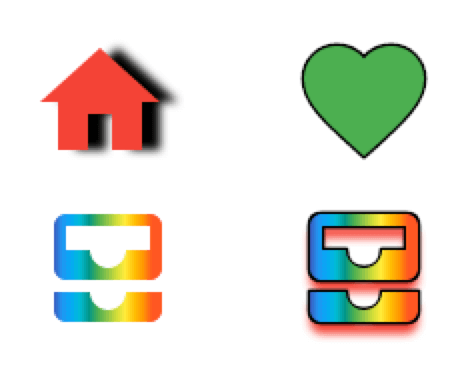
Add decoration capabilities to the Icon widget with borders and gradients. This new DecoratedIcon widget overlap itself with the base Icon widget to provide a more complete decoration system through a IconDecoration property.
Table of contents
Add to your project
Add dependency to your pubspec.yaml
icon_decoration: any
Import the package
import 'package:icon_decoration/icon_decoration.dart' ;
How to use
Add borders to icons
DecoratedIcon (
icon: Icon (Icons .favorite, color: Colors .green),
decoration: IconDecoration (border: IconBorder ()),
)
Add gradients to icons
Gradients are supported on Flutter Web only with the canvaskit renderer
DecoratedIcon (
icon: Icon (Icons .all_inbox),
decoration: IconDecoration (
gradient: rainbowGradient,
),
)
Mix them all together
DecoratedIcon (
icon: Icon (
Icons .all_inbox,
shadows: [
Shadow (
color: Colors .red,
blurRadius: 3 ,
offset: Offset (0 , 2 ),
),
],
),
decoration: IconDecoration (
gradient: _rainbowGradient,
border: IconBorder (),
),
)
Migration Guide
v2.0.0
Removed IconDecoration.shadows, use Icon.shadows instead.
Before
DecoratedIcon (
icon: Icon (Icons .all_inbox),
decoration: IconDecoration (
shadows: [
Shadow (
color: Colors .red,
blurRadius: 3 ,
offset: Offset (0 , 2 ),
),
],
),
)
After
Icon (
Icons .all_inbox,
shadows: [
Shadow (
color: Colors .red,
blurRadius: 3 ,
offset: Offset (0 , 2 ),
),
],
),