搜索插件、代码仓与 APP 分类

插件详情v1.4.0

intent

一个简单易用的 Flutter 插件,用于处理 Android Intents - 您的 Android Intents 一站式解决方案。

近 30 天下载
223
喜欢数
122
Pub 分数
40

安装插件

flutter pub add intent

插件介绍

基于插件公开信息、社区数据与项目使用情况整理的选型参考。

intent 包是一个简单的 Flutter 插件,旨在简化 Android Intent 处理。它能够实现 Flutter 应用与原生 Android 组件之间的无缝通信,使开发者能够以最少的代码启动活动、发送广播以及管理 intents。非常适合用于共享数据、打开外部应用或触发系统操作(如发送电子邮件或消息)。该插件将 Android 复杂的 Intent API 抽象为易于使用的 Dart 方法,即使是初学者也能轻松上手。配合清晰的文档和持续维护,它作为 Flutter 与 Android 原生功能之间的可靠桥梁。

适合场景

  • 在应用之间共享内容
  • 启动外部应用程序
  • 发送广播意图
  • 打开系统设置
  • 处理深度链接
  • 触发设备操作

主要特点

  • Android Intents 的简单 Dart 接口
  • 支持隐式和显式意图
  • 与Flutter工作流程的轻松集成
  • 最小化样板代码
  • 活跃的 GitHub 仓库
  • 清晰的文档

适合对象

  • 面向 Android 的 Flutter 开发人员
  • 需要 Android 特定操作的应用
  • 共享和深度链接功能
  • 初学者学习 Android 集成

使用建议

  • 仅限 Android 的功能
  • 仅限 Android 平台
  • 高级使用需要Android SDK知识
  • 无 iOS 支持
  • 某些意图可能需要额外权限

原始 README

以下为关联源码仓库的 README 原文快照,最新内容请访问源码仓库。

Warning I've stopped maintaining this project !

intent

A simple flutter plugin to deal with Android Intents - your one stop solution for Android Intents, written with :heart:.

Show some :heart: by putting :star:

intent tries to help you in launching another android activity using Android Intents. This Dart API replicates Android Intent API, so for detailed information on how to use it efficiently, when to send what kind of data, you may be interested in taking a look here, which explains things more elaborately.

intent is readily available for use.

what does it do ?

  • intent is your one stop solution for handling different Android Intents from Flutter app.
  • It provides an easy to use Dart API, which can be used to launch different kind of Android Activities
  • You can view / create documents
  • Pick document(s) from Document Tree
  • Open default Assist Activity
  • Perform a Web Search
  • Request definition of a certain string to default Assist Activity
  • Open image for editing / viewing
  • Share text / multimedia to another activity
  • Send Email to specific user, while also setting CC & BCC
  • Share multiple documents at a time
  • Sync system content
  • Translate text
  • Set Wallpaper
  • Open any URL
  • Open Dialer for calling a specific number
  • Can pick a contact from your default phone activity
  • Can capture a photo using default Camera Activity
latest addition

Newest Addition: You can pass extra data's type information, while invoking Intent.putExtra(String extra, dynamic data, {String type}) as optional named param type. You don't even need to hardcode type names as Strings, rather a class named TypedExtra has been given to developers, which has all currently supported type names as static variables. Consider using them. And last but not least, this is not a breaking change !!!

import 'package:intent/intent.dart' as android_intent;
import 'package:intent/extra.dart' as android_extra;
import 'package:intent/typedExtra.dart' as android_typedExtra;
import 'package:intent/action.dart' as android_action;

// more codes ...

android_intent.Intent()
        ..setAction(android_action.Action.ACTION_SHOW_APP_INFO)
        ..putExtra(android_extra.Extra.EXTRA_PACKAGE_NAME, "com.whatsapp", type: android_typedExtra.TypedExtra.stringExtra)
        ..startActivity().catchError((e) => print(e));

how to use it ?

Well make sure, you include intent in your pubspec.yaml.

Define a Term :
Intent()
        ..setAction(Action.ACTION_DEFINE)
        ..putExtra(Extra.EXTRA_TEXT, "json")
        ..startActivity().catchError((e) => print(e));
Show Desired Application Info :

Make sure you address app using its unique package id.

Intent()
        ..setAction(Action.ACTION_SHOW_APP_INFO)
        ..putExtra(Extra.EXTRA_PACKAGE_NAME, "com.whatsapp")
        ..startActivity().catchError((e) => print(e));
Show Application Preference Activity :
Intent()
        ..setAction(Action.ACTION_APPLICATION_PREFERENCES)
        ..startActivity().catchError((e) => print(e));
Launch Application Error Reporting Activity :
Intent()
        ..setAction(Action.ACTION_APP_ERROR)
        ..startActivity().catchError((e) => print(e));
Launch Default Assist Activity :
Intent()
        ..setAction(Action.ACTION_ASSIST)
        ..startActivity().catchError((e) => print(e));
Report Bug :
Intent()
        ..setAction(Action.ACTION_BUG_REPORT)
        ..startActivity().catchError((e) => print(e));
View a URI :

Which activity to be launched, depends upon type of URI passed.

In case of passing tel URI, opens dialer up.

Intent()
        ..setAction(Action.ACTION_VIEW)
        ..setData(Uri(scheme: "tel", path: "123"))
        ..startActivity().catchError((e) => print(e));

If you pass a mailto URI, it'll open email app.

Intent()
        ..setAction(Action.ACTION_VIEW)
        ..setData(Uri(scheme: "mailto", path: "someone@example.com"))
        ..startActivity().catchError((e) => print(e));

In case of http/ https URI, opens browser up.

Intent()
        ..setAction(Action.ACTION_VIEW)
        ..setData(Uri(scheme: "https", host:"google.com"))
        ..startActivity().catchError((e) => print(e));
Dial a Number using Default Dial Activity :

Setting data using tel URI, will open dialer, number as input.

Intent()
        ..setAction(Action.ACTION_DIAL)
        ..setData(Uri(scheme: 'tel', path: '121'))
        ..startActivity().catchError((e) => print(e));

But if you're interested in opening dialer without any numbers dialer, make sure you don't set data field.

Intent()
        ..setAction(Action.ACTION_DIAL)
        ..startActivity().catchError((e) => print(e));
Calling a Number :

You can simply call a number, but make sure you've necessary permissions to do so.

Intent()
        ..setAction(Action.ACTION_CALL)
        ..setData(Uri(scheme: 'tel', path: '121'))
        ..startActivity().catchError((e) => print(e));

It'll always be a wise decision to use ACTION_DIAL, because that won't require any kind of permissions.

Create Precomposed Email :
Intent()
        ..setPackage("com.google.android.gm")
        ..setAction(Action.ACTION_SEND);
        ..setType("message/rfc822");
        ..putExtra(Extra.EXTRA_EMAIL, ["john.doe@exampleemail.com"]);
        ..putExtra(Extra.EXTRA_CC, ["jane.doe@exampleemail.com"]);
        ..putExtra(Extra.EXTRA_SUBJECT, "Foo bar");
        ..putExtra(Extra.EXTRA_TEXT, "Lorem ipsum");
        ..startActivity().catchError((e) => print(e));
Create a Document :

Content type of document is set text/plain, category is CATEGORY_OPENABLE and file name is passed as an extra i.e. EXTRA_TITLE.

Intent()
        ..setAction(Action.ACTION_CREATE_DOCUMENT)
        ..setType("text/plain")
        ..addCategory(Category.CATEGORY_OPENABLE)
        ..putExtra(Extra.EXTRA_TITLE, "test.txt")
        ..startActivity().catchError((e) => print(e));

You can also set path of file using data field. But make sure data field is a valid path URI.

Edit Document :

You can edit image/ text or any other kind of data using appropriate activity.

Intent()
        ..setAction(Action.ACTION_EDIT)
        ..setData(Uri(scheme: 'content',
                path:
                'path-to-image'))
        ..setType('image/*')
        ..startActivity().catchError((e) => print(e));
Add a Contact to your Contact Database :
Intent()
        ..setAction('com.android.contacts.action.SHOW_OR_CREATE_CONTACT')
        ..setData(Uri(scheme: 'tel', path: '1234567890'))
        ..startActivity().catchError((e) => print(e));
Search for a Term :

Opens up a list of eligible candidates, which can provides search activity.

Intent()
        ..setAction(Action.ACTION_SEARCH)
        ..putExtra(Extra.EXTRA_TEXT, 'json')
        ..startActivity().catchError((e) => print(e));
Share Text/ Media :

Make sure you've set appropriate path URI for sharing documents/ media using EXTRA_STREAM and also set type properly.

Following one will share a plain text. For sharing html formatted text, set type to text/html.

Intent()
        ..setAction(Action.ACTION_SEND)
        ..setType('text/plain')
        ..putExtra(Extra.EXTRA_TEXT, 'json')
        ..startActivity().catchError((e) => print(e));

But if you're interested in creating a chooser i.e. all eligible candidates shown up system, which can handle this intent, make sure you set createChooser named parameter to true, which is by default false.

Send Email to certain ID while setting Content and CC/ BCC :
Intent()
        ..setAction(Action.ACTION_SENDTO)
        ..setData(Uri(scheme: 'mailto', path: 'anjanroy@yandex.com'))
        ..putExtra(Extra.EXTRA_CC, ['someone@example.com'])
        ..putExtra(Extra.EXTRA_TEXT, 'Hello World')
        ..startActivity().catchError((e) => print(e));
Translate a Text using default Assist Activity :
Intent()
        ..setAction(Action.ACTION_TRANSLATE)
        ..putExtra(Extra.EXTRA_TEXT, "I Love Computers")
        ..startActivity().catchError((e) => print(e));
Pick a Contact up from Phone :
  • Opens default Phone Activity and let user pick a contact up, selected contact will be returned as Future<List<String>> from startActivityForResult().
        Intent()
                ..setAction(Action.ACTION_PICK)
                ..setData(Uri.parse('content://contacts'))
                ..setType("vnd.android.cursor.dir/phone_v2")
                ..startActivityForResult().then((data) => print(data),
                onError: (e) => print(e));
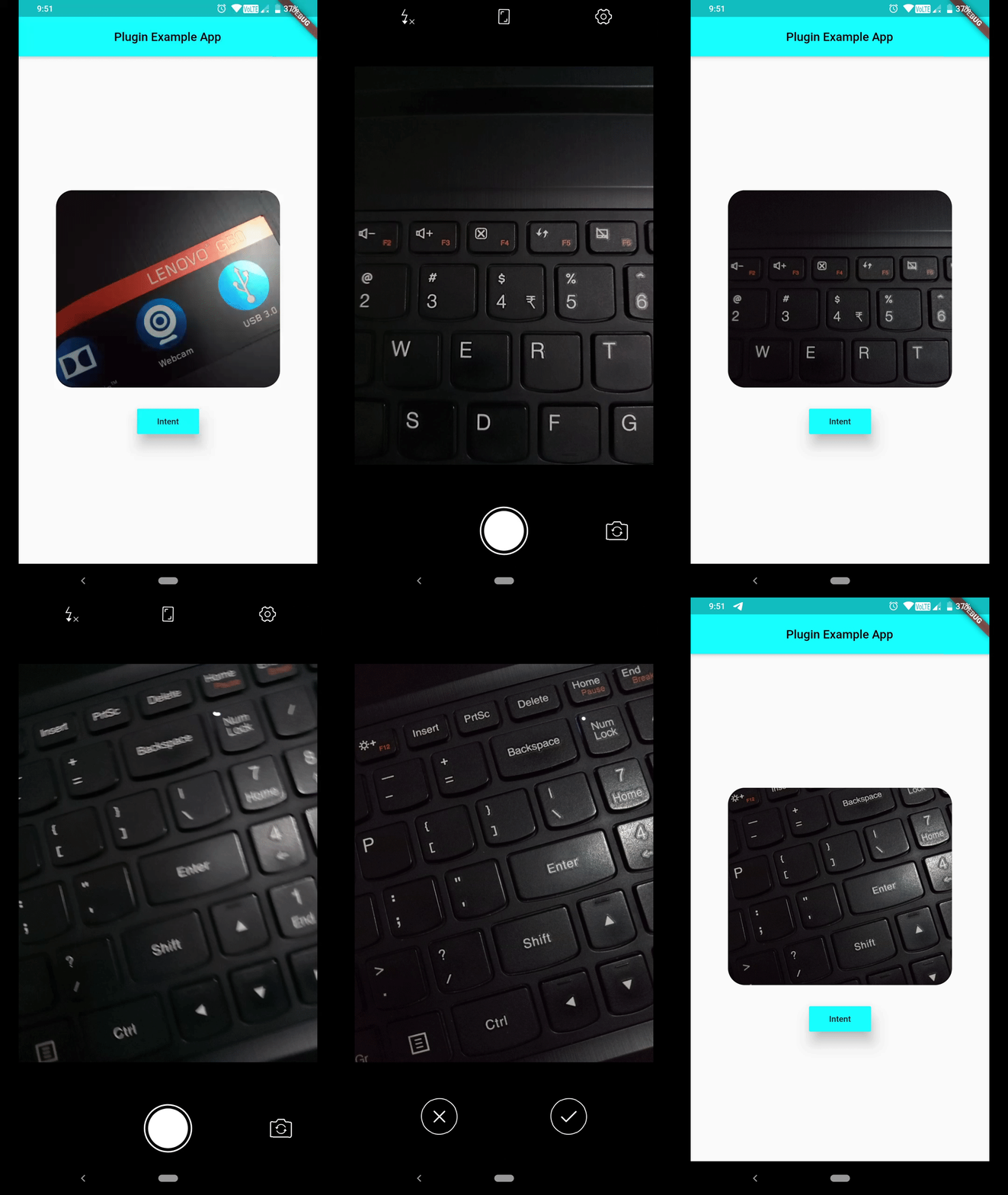
Capture Image using default Camera activity :

Path to captured image can be grabbed from Intent().startActivityForResult().then(() { ... } ), which will be provided in form of List<String>, open file using that path, File(data[0]). Now you can work on that image file.

        Intent()
                ..setAction(Action.ACTION_IMAGE_CAPTURE)
                ..startActivityForResult().then((data) => print(data[0]), // gets you path to image captured
                onError: (e) => print(e));

image_capture_using_intent

If you're not interested in showing default activity launch animation, set following flag.

Intent()..addFlag(Flag.FLAG_ACTIVITY_NO_ANIMATION);

If you don't want this activity to be displayed in recents, set following flag.

Intent()..addFlag(Flag.FLAG_ACTIVITY_EXCLUDE_FROM_RECENTS);

If you request for certain Activity and no eligible candidate was found, you'll receive one error message, which you can listen for using Future.catchError((e) {},) method.

PlatformException(Error, android.content.ActivityNotFoundException: No Activity found to handle Intent { act=android.intent.action.SYSTEM_TUTORIAL }, null)

Currently a limited number of Actions are provided in Action class, but you can always use a string constant as an Action, which will help you in dealing with many more Activities.

Hoping this helps :wink:

所属分类

源码仓库

使用此插件的项目

暂无相关数据。