搜索插件、代码仓与 APP 分类

插件详情v1.0.2

internet_connectivity_checker

帮助您根据设备的互联网连接状态轻松动态管理小部件的 Flutter 包。

AndroidiOSmacOSWindowsLinux
近 30 天下载
458
喜欢数
38
Pub 分数
160

安装插件

flutter pub add internet_connectivity_checker

插件介绍

基于插件公开信息、社区数据与项目使用情况整理的选型参考。

一个 Flutter 包,可根据设备当前的互联网连接状态实现动态小部件管理。它提供跨多个平台的实时网络可用性监控,使开发者能够根据网络状况有条件地显示内容、显示加载指示器或在离线时触发备用 UI。该包可无缝集成到需要在不同网络条件下具备响应式行为的应用中。通过简单的 API 和跨平台支持,确保无论连接状态如何,都能提供一致的用户体验。

适合场景

  • 显示离线横幅
  • 有条件地渲染网络依赖的组件
  • 离线时显示重试按钮
  • 连接丢失时的加载占位符
  • 具有网络感知能力的 API 请求处理
  • 根据实时连接状态变化更新UI

主要特点

  • 实时连接监控
  • 跨平台兼容性
  • 用于小部件控制的简单 API
  • 自动状态更新
  • 支持所有主要的桌面和移动平台
  • 轻量且易于集成

适合对象

  • 需要离线模式支持的应用
  • 网络敏感应用程序
  • 需要动态反馈的用户界面
  • 开发响应式网络感知功能的开发者
  • 针对 Android、iOS、macOS、Windows 和 Linux 的项目

使用建议

  • 在某些平台上需要适当的权限
  • 可能需要额外的错误处理来应对特殊情况
  • 不适用于高频轮询场景
  • 仅限连接状态(不包括带宽)
  • 依赖系统级别的网络检测API

原始 README

以下为关联源码仓库的 README 原文快照,最新内容请访问源码仓库。

internet_connectivity_checker

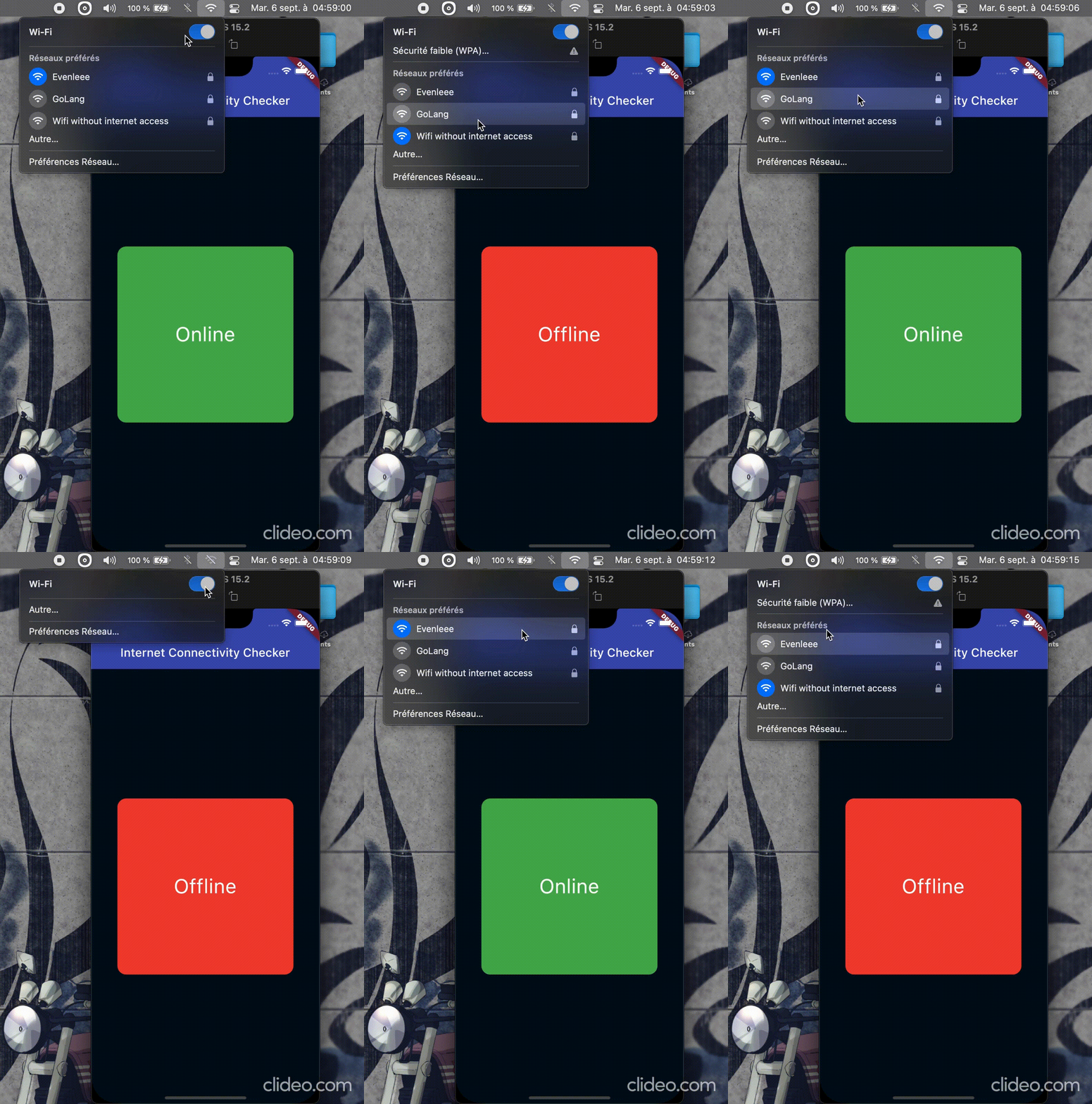
The connectivity package and other similar packages only provides information if there is a network connection, but not if the network is connected to the Internet. That's why the internet_connectivity_checker package helps you easily manage widgets dynamically based on the device's internet access.


Demo


🧑‍💻 Getting started

flutter pub add internet_connectivity_checker

🛠️ Usage

Simply import package:internet_connectivity_checker/internet_connectivity_checker.dart' and use the ConnectivityBuilder widget. It takes a builder and an optional parameter, interval(Duration object) which is the time interval to wait between each internet connectivity verification; default is 5 seconds.


Exemple
class Hello extends StatelessWidget {
  const Hello({super.key});

  @override
  Widget build(BuildContext context) {
    return ConnectivityBuilder(
      builder: (status) {
        bool connected = status == ConnectivityStatus.online;
        return Text(connected ? "Online" : "Offline");
      },
    );
  }
}

A more complete example.

ConnectivityBuilder(
  builder: (ConnectivityStatus status) {
    if (status == ConnectivityStatus.online) {
      return Container(
        decoration: BoxDecoration(
          color: Colors.green,
          borderRadius: BorderRadius.circular(15),
        ),
        child: Center(child: Text("Online", style: kTextStyle)),
      );
    } else if (status == ConnectivityStatus.offline) {
      return Container(
        decoration: BoxDecoration(
          color: Colors.red,
          borderRadius: BorderRadius.circular(15),
        ),
        child: Center(child: Text("Offline", style: kTextStyle)),
      );
    } else { // status == ConnectivityStatus.checking
      return const Center(
        child: SizedBox(
          width: 25,
          height: 25,
          child: CircularProgressIndicator(strokeWidth: 2),
        ),
      );
    }
  },
),

You can also use the ConnectivityChecker().stream stream, provided be the package, to handle the logic yourself.

class Foo extends StatelessWidget {
  const Foo({super.key});

  @override
  Widget build(BuildContext context) {
    return StreamBuilder(
      stream: ConnectivityChecker(interval: const Duration(seconds: 10)).stream,
      builder: (context, snapshot) {
        if (snapshot.hasData && (snapshot.data as bool) == true) {
          return const Text("Online");
        } else if (snapshot.connectionState == ConnectionState.waiting) {
          return const Center(child: CircularProgressIndicator());
        } else {
          return const Text("Offline");
        }
      },
    );
  }
}

ℹ️ Additional Information

Contribute to this project by making a PR ⬆️ or creating a new issue 🐞 on GitHub.
Do not hesitate to let a 🌟 on the repo if you find it useful.

👷 Maintainers

Created & maintained with 💖 by moustapha.dev.

📄 License

MIT License

Copyright (c) Moustapha Ndoye (@csof3cen), 2023.

Permission is hereby granted, free of charge, to any person obtaining a copy
of this software and associated documentation files (the "Software"), to deal
in the Software without restriction, including without limitation the rights
to use, copy, modify, merge, publish, distribute, sublicense, and/or sell
copies of the Software, and to permit persons to whom the Software is
furnished to do so, subject to the following conditions:

The above copyright notice and this permission notice shall be included in all
copies or substantial portions of the Software.

THE SOFTWARE IS PROVIDED "AS IS", WITHOUT WARRANTY OF ANY KIND, EXPRESS OR
IMPLIED, INCLUDING BUT NOT LIMITED TO THE WARRANTIES OF MERCHANTABILITY,
FITNESS FOR A PARTICULAR PURPOSE AND NONINFRINGEMENT. IN NO EVENT SHALL THE
AUTHORS OR COPYRIGHT HOLDERS BE LIABLE FOR ANY CLAIM, DAMAGES OR OTHER
LIABILITY, WHETHER IN AN ACTION OF CONTRACT, TORT OR OTHERWISE, ARISING FROM,
OUT OF OR IN CONNECTION WITH THE SOFTWARE OR THE USE OR OTHER DEALINGS IN THE
SOFTWARE.

所属分类

源码仓库

使用此插件的项目

暂无相关数据。