搜索插件、代码仓与 APP 分类

loadmore 封面
插件详情v2.1.0

loadmore

ListView 滚动到底部时,可以加载更多数据。帮助开发者实现分页加载数据。

AndroidiOSWebmacOSWindowsLinux
近 30 天下载
1万
喜欢数
226
Pub 分数
150

安装插件

flutter pub add loadmore

插件介绍

基于插件公开信息、社区数据与项目使用情况整理的选型参考。

loadmore 包通过检测 ListView 到达底部时触发分页数据加载,简化了在 Flutter 应用中实现无限滚动。它帮助开发者高效管理内容的延迟加载,减少内存使用并提升大数据集渲染时的性能。该包专为与 ListView 及其他可滚动控件无缝集成而设计,支持 Android、iOS、Web、macOS、Windows 和 Linux 多个平台。该包轻量且易于使用,只需最少设置即可实现用户滚动时平滑按需获取数据。

适合场景

  • 无限滚动信息流
  • 懒加载列表
  • 分页数据检索
  • 动态内容加载
  • 电子商务产品网格

主要特点

  • 自动滚动检测
  • 与 ListView 的轻松集成
  • 支持多个平台
  • 最少的样板代码
  • 可配置的加载指示器

适合对象

  • 开发可滚动内容的开发者
  • 大型数据集的应用程序
  • 分页密集型 UI
  • 跨平台移动和Web应用
  • 高效的数据加载实现

使用建议

  • 需要手动处理数据状态
  • 不适用于固定长度的列表
  • 可能需要自定义错误处理
  • 依赖外部数据源
  • 对复杂滚动行为的自定义有限

原始 README

以下为关联源码仓库的 README 原文快照,最新内容请访问源码仓库。

loadmore

pub package GitHub

A loadMore library

Support ListView and SliverList

中文构思思路和使用说明可以看简书

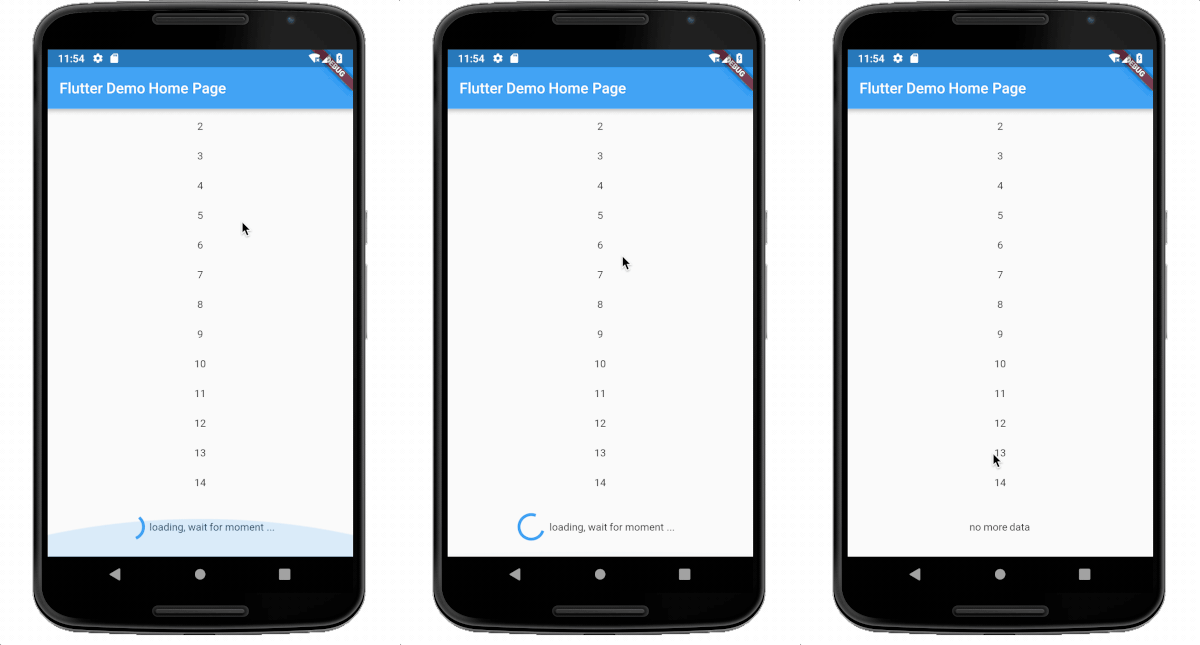
screenshot

img

whole example

show https://github.com/CaiJingLong/flutter_listview_loadmore

install

in pubspec.yaml

dependencies:
  loadmore: ^2.0.1

import in dartfile:

import 'package:loadmore/loadmore.dart';

use in build:

  @override
  Widget build(BuildContext context) {
    return new Scaffold(
      appBar: new AppBar(
        title: new Text(widget.title),
      ),
      body: Container(
        child: LoadMore(
          isFinish: count >= 60,
          onLoadMore: _loadMore,
          child: ListView.builder(
            itemBuilder: (BuildContext context, int index) {
              return Container(
                child: Text(list[index].toString()),
                height: 40.0,
                alignment: Alignment.center,
              );
            },
            itemCount: count,
          ),
        ),
      ),
    );
  }

  Future<bool> _loadMore() async {
    print("onLoadMore");
    await Future.delayed(Duration(seconds: 0, milliseconds: 100));
    load();
    return true;
  }

properties use:

child: Widget ,required , support ListView ListView.builder ListView.separated, other is not support.
onLoadMore:required A Function , `typedef Future<bool> FutureCallBack();` , reture true is success and status delay,return false or null ,then the status will change to fail.
isFinish: bool, optional, if true, then the status will change to finish ,default is false
delegate: LoadMoreDelegate,optional, see the LoadMoreDelegate class,default is DefaultLoadMoreDelegate
textBuilder: optional, the result will show in loading view ,if you use default delegate. default is DefaultLoadMoreText.chinese,
whenEmptyLoad: bool ,optional, default is true, when [whenEmptyLoad] is true, and when listView children length is 0,or the itemCount is 0,not build loadMoreWidget.
abstract class LoadMoreDelegate {
  const LoadMoreDelegate();

  double widgetHeight(LoadMoreStatus status) => _defaultLoadMoreHeight; // the loadMore height. default is 80.0

  Duration loadMoreDelay() => Duration(milliseconds: _loadMoreDelay);// When widget is created, the refresh delay time is triggered.

  Widget buildChild(LoadMoreStatus status); // build your widget in the loadmore widget.
}

other

homePage: https://github.com/CaiJingLong/flutter_listview_loadmore emailto me : cjl_spy@163.com

LICENSE

APACHE 2.0

所属分类

源码仓库

使用此插件的项目

暂无相关数据。