搜索插件、代码仓与 APP 分类

material_dialogs 封面
插件详情v1.1.5

material_dialogs

一个 Flutter 包旨在帮助您在应用中创建动画、简洁、时尚的 Material 对话框。

AndroidiOSWebmacOSWindowsLinux
近 30 天下载
4080
喜欢数
360
Pub 分数
155

安装插件

flutter pub add material_dialogs

插件介绍

基于插件公开信息、社区数据与项目使用情况整理的选型参考。

Material Dialogs 是一个 Flutter 包,旨在简化动画、时尚且可自定义的 Material Design 对话框的创建。它提供了一个易于使用的 API,用于构建符合所有平台 Material 指南的现代对话框界面。该包支持多种对话框类型,包括警告、确认和自定义对话框,具有流畅的动画和响应式布局。非常适合在面向 Android、iOS、Web、macOS、Windows 和 Linux 的应用中通过视觉吸引力强的弹窗增强用户交互。

适合场景

  • 显示警报和确认
  • 创建自定义模态对话框
  • 通过动画增强用户反馈
  • 实施引导或教程提示
  • 添加交互式底部表单
  • 通过 Material Design 提升 UI 一致性

主要特点

  • 动画过渡
  • 可自定义的主题
  • 跨平台支持
  • 简单 API
  • 内置对话框类型
  • 响应式设计

适合对象

  • 寻求快速对话实现的开发者
  • 需要一致的 Material Design 的应用
  • 面向多平台的项目
  • 面向用户界面的应用程序
  • 注重开发者体验的团队
  • 原型设计与快速开发

使用建议

  • 仅限材料设计美学
  • 可能需要为非 Material 主题添加额外的样式
  • 依赖 Flutter 的 Material 库
  • 不适合复杂的自定义模态框
  • 最好与 Flutter 的默认主题系统一起使用
  • 需要理解 Flutter 的 widget 树

原始 README

以下为关联源码仓库的 README 原文快照,最新内容请访问源码仓库。

Flutter Material Dialogs

pub

Flutter Material Dialogs 📱

A Flutter library aims to help you create 💪🏻animated, 😃 simple, 😎 stylish Material Dialogs in your app.

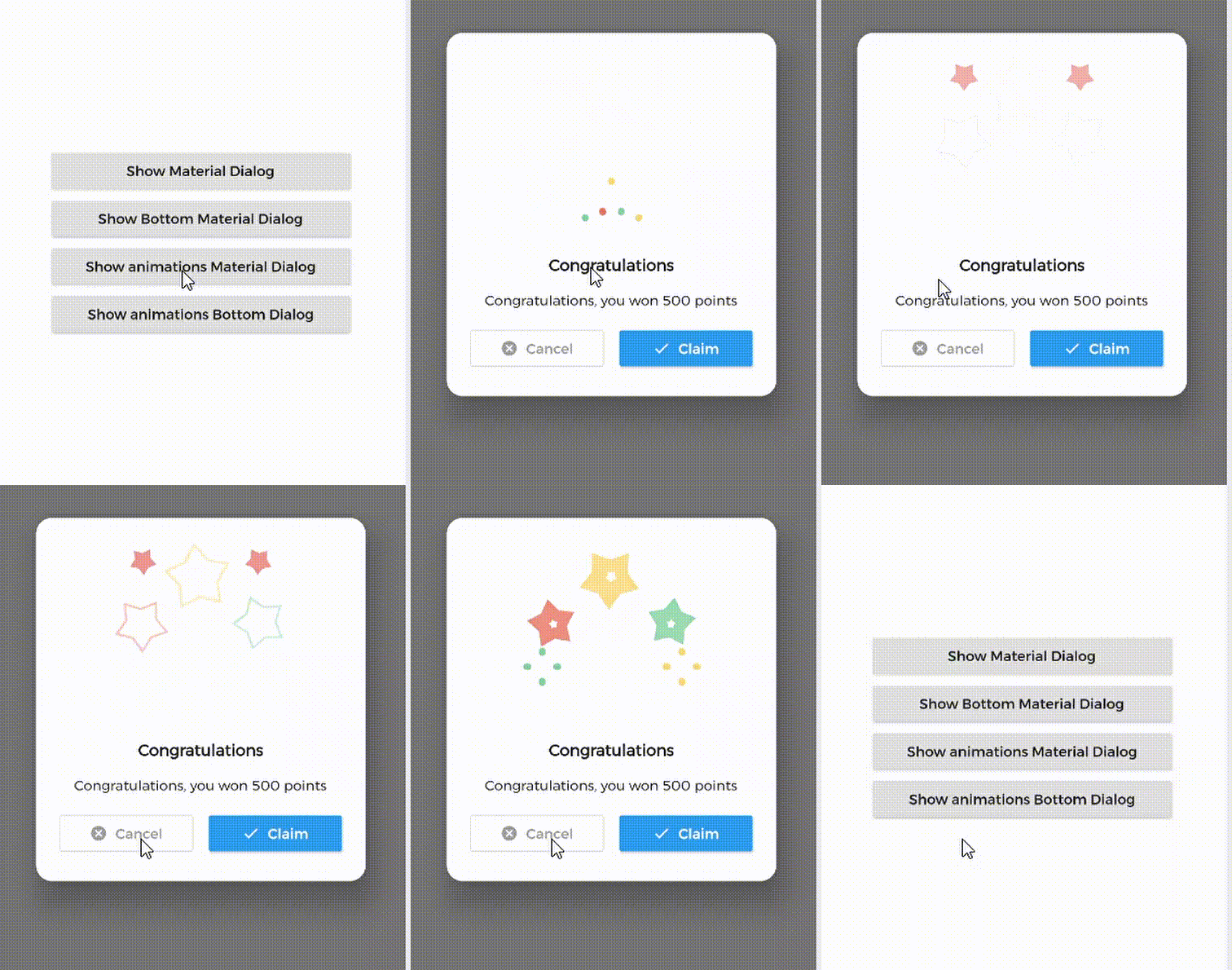
1. Material Dialog 2. Animations Material Dialog 3. Bottom Material Dialog 4. Animations Bottom Dialog

Table of Contents:

Introduction

MaterialDialog This Plugin will be useful to create simple, animated, and beautiful dialogs in your next Flutter app. This library implements Airbnb's Lottie library to render After Effects animation in app.

Types of Dialog

MaterialDialog library provides two types of dialog i.e.

1. Material Dialog 2. Bottom Sheet Material Dialog
A normal material dialog which can have one or two buttons. A Bottom Sheet material dialog which can have one or two buttons, is showed from bottom of device.

Implementation

Implementation of Material Dialog library is so easy. You can check /example directory for demo. Let's have look talk in details about it.

install
i. pubspec

In pubspec.yaml

dependencies:
  material_dialogs: _latest_version

Now in your Dart code, you can use:

import 'package:material_dialogs/material_dialogs.dart';

Details see pub.dev.

Create Dialog

As there are two types of dialogs in library. Material Dialogs are instantiated as follows.

i. Material Dialog

Dialogs class will be used to create your dialog, below is an example to show your dialog in the app.

Dialogs.materialDialog(
          msg: 'Are you sure ? you can\'t undo this',
          title: "Delete",
          color: Colors.white,
          context: context,
          actions: [
            IconsOutlineButton(
              onPressed: () {},
              text: 'Cancel',
              iconData: Icons.cancel_outlined,
              textStyle: TextStyle(color: Colors.grey),
              iconColor: Colors.grey,
            ),
            IconsButton(
              onPressed: () {},
              text: 'Delete',
              iconData: Icons.delete,
              color: Colors.red,
              textStyle: TextStyle(color: Colors.white),
              iconColor: Colors.white,
            ),
          ])

IconsOutlineButton and IconsButton are both buttons widgets provided by the plugin to make things easier for you read more, you can use any other buttons if you want.

ii. Bottom Sheet Material Dialog

Dialogs class will be used to create your dialog, use bottomMaterialDialog. Below is an example to show your dialog in the app.

Dialogs.bottomMaterialDialog(
          msg: 'Are you sure? you can\'t undo this action',
          title: 'Delete',
          context: context,
          actions: [
            IconsOutlineButton(
              onPressed: () {},
              text: 'Cancel',
              iconData: Icons.cancel_outlined,
              textStyle: TextStyle(color: Colors.grey),
              iconColor: Colors.grey,
            ),
            IconsButton(
              onPressed: () {},
              text: 'Delete',
              iconData: Icons.delete,
              color: Colors.red,
              textStyle: TextStyle(color: Colors.white),
              iconColor: Colors.white,
            ),
          ]),

Show Animations

Animations in this library are implemented using Lottie animation library. You can get free animations files here.

*.json file downloaded from LottieFiles should be placed in flutter project.

For example, here cong_example.json animation file is used in the assets folder to show congratulations animation in the example app.

In code, set lottieBuilder arg in Widget to set Animation to the dialog.

Dialogs.materialDialog(
          color: Colors.white,
          msg: 'Congratulations, you won 500 points',
          title: 'Congratulations',
          lottieBuilder: Lottie.asset(
          'assets/cong_example.json',
          fit: BoxFit.contain,
          ),
          context: context,
          actions: [
            IconsButton(
              onPressed: () {},
              text: 'Claim',
              iconData: Icons.done,
              color: Colors.blue,
              textStyle: TextStyle(color: Colors.white),
              iconColor: Colors.white,
            ),
          ]),

Icons buttons

The plugin provide you some out of the box customized buttons to help you creating your dialog.

IconsOutlineButton

This widget helps you create an outline button easily

    IconsOutlineButton(
      onPressed: () {},
      text: 'Cancel',
      iconData: Icons.cancel_outlined,
      textStyle: TextStyle(color: Colors.grey),
      iconColor: Colors.grey,
    ),
IconsButton

This widget helps you create a material button with icons in few lines of code

    IconsButton(
      onPressed: () {},
      text: 'Delete',
      iconData: Icons.delete,
      color: Colors.red,
      textStyle: TextStyle(color: Colors.white),
      iconColor: Colors.white,
    ),
CustomView

You can add your own Widget inside the dialog by using the customView attribute and CustomViewPosition to place it wherever you want.

Possible values
BEFORE_ANIMATION
BEFORE_TITLE (Default)
BEFORE_MESSAGE
BEFORE_ACTION
AFTER_ACTION
Dialogs.materialDialog(
          color: Colors.white,
          msg: 'Congratulations, you won 500 points',
          title: 'Congratulations',
          lottieBuilder: Lottie.asset(
          'assets/cong_example.json',
          fit: BoxFit.contain,
          ),
          customView: MySuperWidget(),
          customViewPosition: CustomViewPosition.BEFORE_ACTION,
          context: context,
          actions: [
            IconsButton(
              onPressed: () {},
              text: 'Claim',
              iconData: Icons.done,
              color: Colors.blue,
              textStyle: TextStyle(color: Colors.white),
              iconColor: Colors.white,
            ),
          ]),

Limitations

it's better to make your animation to have the same background color as your dialog's background color, please use lottie editor to remove the background layer of your animation or make it same as your dialog background color before using it in the plugin.

Contribute

Let's develop with collaborations. We would love to have contributions by raising issues and opening PRs. Filing an issue before PR is must.

Credits

This library is built using following open-source libraries.

License

Project is published under the Apache 2.0 license. Feel free to clone and modify repo as you want, but don't forget to add reference to authors :)

所属分类

依赖

依赖清单 1 项

源码仓库

使用此插件的项目

暂无相关数据。