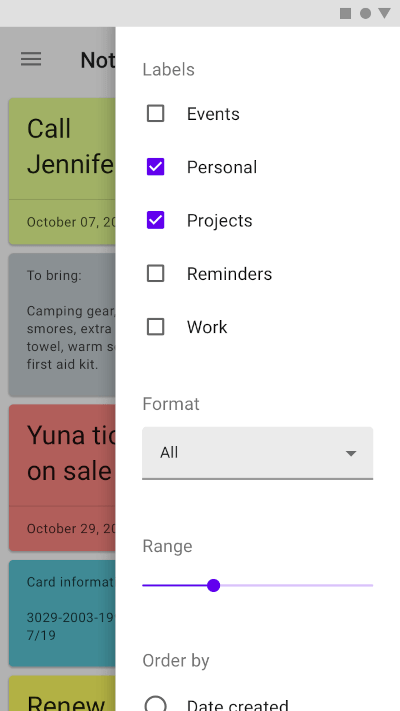
一个 Flutter 包,可将 Material Design 侧边栏集成到跨平台的应用程序中。它提供了一个可自定义且响应式的侧边栏小部件,兼容 Android、iOS、Web、macOS、Windows 和 Linux。侧边栏可用于以模态方式呈现补充内容或操作,从而在不离开当前屏幕的情况下增强用户交互体验。该组件基于 Material 设计原则构建,确保与原生平台行为的一致性。
适合场景
在模态覆盖层中显示详细信息
显示操作菜单或选项
暂时显示表单或输入字段
通过滑入面板增强导航
在不进行全屏切换的情况下提供上下文控件
主要特点
符合 Material Design 的侧边抽屉
跨平台支持(Android、iOS、Web、macOS、Windows、Linux)
可自定义的外观和行为
通过 pub add 命令轻松集成
支持持久化和可消除模式
适合对象
使用一致的 UI 构建跨平台应用的开发人员
使用 Material Design 指南的团队
需要临时内容叠加的App
需要轻量级模态框的项目
以用户体验为中心的界面,带有滑动面板
使用建议
可能需要为非 Material 主题添加额外的样式
大型内容列表上的性能影响
与完全自定义小部件相比,自定义选项有限
不适合复杂的导航结构
需要仔细处理触摸设备上的手势
原始 README
以下为关联源码仓库的 README 原文快照,最新内容请访问源码仓库。
Side Sheet
A package to use Material side sheet into your Flutter project.
Learn more about side sheet at Material.io
Platform Support
Android
iOS
MacOS
Web
Linux
Windows
✔️
✔️
✔️
✔️
✔️
✔️
Getting Started
This package comes with two types of side sheets, Standard side sheet and Modal side sheet.
Modal Side Sheet
Modal side sheets present content while blocking interaction with the rest of the screen.
This side sheet generally used in mobile devices as per recommended by Material Design by Google.
See also : Modal Side Sheet
You can use it by calling showModalSideSheet() function into your Flutter project.
Standard side sheets co-exist with the screen’s primary UI region, which allows viewing and interaction with both surfaces. They are used only on tablet and desktop.
See also: Standard Side Sheet
This side sheet can be used with BodyWithSideSheet widget.
Just place this widget into your Scaffold's body property.