搜索插件、代码仓与 APP 分类

multi_image_layout 封面
插件详情v2.0.0

multi_image_layout

适用于在自适应布局中显示多个网络和资源图片的灵活画廊包。

AndroidiOS
近 30 天下载
122
喜欢数
61
Pub 分数
150

安装插件

flutter pub add multi_image_layout

插件介绍

基于插件公开信息、社区数据与项目使用情况整理的选型参考。

一个灵活的画廊包,用于在自适应布局中显示多个网络和资源图像。它支持根据图像数量动态调整网格排列,确保在各种设备上都能实现最佳视觉呈现。非常适合社交媒体应用或图片分享平台,能够高效处理远程和本地图像,实现流畅渲染和响应式设计。该包轻量级,可无缝集成到Flutter项目中。

适合场景

  • 社交媒体动态显示
  • 应用中的图像画廊
  • 用户资料照片网格
  • 多图分享功能
  • 响应式图像布局管理

主要特点

  • 自适应网格布局
  • 支持网络和资产图片
  • 平滑的图像加载
  • 响应式设计
  • 可自定义的间距和对齐方式

适合对象

  • 开发图像密集型应用的开发者
  • 社交媒体应用
  • 照片分享平台
  • 需要动态图像网格的应用程序
  • Flutter 初学者探索图像显示

使用建议

  • 需要对损坏的图像URL进行适当的错误处理
  • 可能需要额外的缓存以提高大量图像时的性能
  • 超出布局结构之外的自定义功能有限
  • 未针对没有分页的大型图像集进行优化

原始 README

以下为关联源码仓库的 README 原文快照,最新内容请访问源码仓库。

multi_image_layout

Flexible Flutter layouts for mixed media grids and fullscreen viewing.

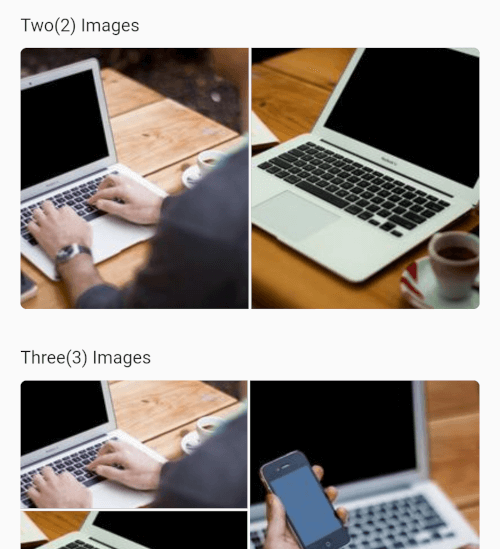
multi_image_layout lets you render single or multiple media items in adaptive layouts, then open them in a fullscreen viewer with captions, save support, and media-specific controls.

Screenshot 2026-03-22 at 23 42 57

Screenshot_20250430-162040

Features

  • Adaptive layouts for 1, 2, 3, 4, and 4+ items
  • Mixed image and video support in the same grid
  • Fullscreen media viewer with swipe navigation
  • Zoomable images
  • Zoomable fullscreen videos
  • Video autoplay with autoPlay: true by default
  • Video play/pause, mute, progress bar, elapsed time, and total duration
  • Shimmer loading placeholders for network images
  • Save support for images and videos
  • Video cache warm-up for faster repeat playback
  • Optional captions with expand/collapse support

Getting Started

Add the package to your project:

dependencies:
  multi_image_layout: ^1.0.0

Import it:

import 'package:multi_image_layout/multi_image_layout.dart';
iOS

If you use the save action, add these keys to ios/Runner/Info.plist:

<key>NSPhotoLibraryAddUsageDescription</key>
<string>This app saves images and videos to your photo library.</string>
<key>NSPhotoLibraryUsageDescription</key>
<string>This app accesses your photo library to save and manage media.</string>

Without these keys, iOS may terminate the app when save is triggered.

If you plan to load remote media, prefer https URLs. If you need http sources, configure App Transport Security for your app.

Android

If you load remote images or videos, make sure your app has internet access:

<uses-permission android:name="android.permission.INTERNET" />

If you use the save action, request the appropriate storage or media permissions for your target Android version. For older Android versions, that may include:

<uses-permission android:name="android.permission.WRITE_EXTERNAL_STORAGE" />

And, where needed:

<application android:requestLegacyExternalStorage="true" ...>

Permission handling is app-specific, so you should request it from your app layer before calling the save action. A package like permission_handler can be used for that flow.

Usage

Images only
MultiImageViewer(
  images: const [
    ImageModel(
      imageUrl:
          "https://4.img-dpreview.com/files/p/TS250x250~sample_galleries/3800753625/4684313123.jpg",
      caption: "Caption 1",
    ),
    ImageModel(
      imageUrl:
          "https://3.img-dpreview.com/files/p/TS250x250~sample_galleries/3800753625/8719688791.jpg",
      caption: "Caption 2",
    ),
  ],
);
Mixed Image and Video
MultiImageViewer(
  autoPlay: true,
  images: const [
    ImageModel(
      imageUrl:
          "https://4.img-dpreview.com/files/p/TS250x250~sample_galleries/3800753625/4684313123.jpg",
      caption: "Image caption",
    ),
    ImageModel.video(
      videoUrl:
          "https://flutter.github.io/assets-for-api-docs/assets/videos/butterfly.mp4",
      caption: "Video caption",
    ),
    ImageModel(
      imageUrl:
          "https://3.img-dpreview.com/files/p/TS250x250~sample_galleries/3800753625/8719688791.jpg",
      caption: "Another image caption",
    ),
  ],
  height: 220,
);
Disable Video Autoplay
MultiImageViewer(
  autoPlay: false,
  images: const [
    ImageModel.video(
      videoUrl:
          "https://flutter.github.io/assets-for-api-docs/assets/videos/butterfly.mp4",
      caption: "Tap to open and play",
    ),
  ],
);

API Notes

ImageModel

Use ImageModel(...) for images:

const ImageModel(
  imageUrl: 'https://example.com/image.jpg',
  caption: 'An image',
)

Use ImageModel.video(...) for videos:

const ImageModel.video(
  videoUrl: 'https://example.com/video.mp4',
  caption: 'A video',
)
MultiImageViewer

Common parameters:

  • images: media items to render
  • height: layout height
  • width: optional layout width
  • gap: spacing between tiles
  • radius: edge corner radius
  • enableSave: show or hide the save action in fullscreen
  • autoPlay: autoplay videos in the grid and fullscreen viewer
  • networkImageHeaders: headers used for remote image and video requests
  • textStyle: style for the +N overlay

Fullscreen Video Behavior

When a video is opened fullscreen, the viewer includes:

  • play/pause
  • mute/unmute
  • elapsed time
  • total duration
  • draggable seek bar
  • zoom support

Network videos are also warmed into cache to improve repeat playback speed.

Notes

  • The first playback of a remote video can still take time because the player must initialize and buffer the remote media.
  • Cached playback is most noticeable on repeat opens of the same video.
  • Save behavior depends on platform permissions being granted by the host app.

Contributing

Contributions, issues, and feature requests are welcome.

Feel free to check the issues page.

License

This project is MIT licensed.

所属分类

依赖

源码仓库

使用此插件的项目

暂无相关数据。