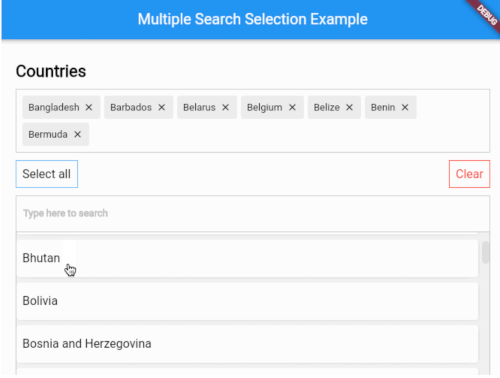
一个高度可定制的多选控件,包含模糊搜索功能,使用户能够从大型数据集中高效地选择多个项目。它支持实时过滤和智能匹配,非常适合需要选择多个选项的表单、标签或筛选场景。该控件专为跨平台的流畅性能而设计,并提供广泛的样式和行为自定义选项。基于 Flutter 构建,可无缝集成到面向 Android、iOS、Web、macOS、Windows 和 Linux 的应用中。
适合场景
具有多个选项的表单输入
标签选择界面
具有动态搜索的过滤系统
用户偏好选择
带搜索功能的动态下拉菜单
管理员面板中的多选
主要特点
模糊搜索以实现灵活匹配
可自定义的用户界面和样式
对大型数据集的支持
跨平台兼容性
实时搜索筛选
多选并提供清晰反馈
适合对象
开发复杂表单组件的开发者
需要高效多项目选择的应用程序
需要在下拉菜单中进行智能搜索的项目
优先考虑跨平台一致性的团队
想要一个轻量级但功能强大的选择小部件的用户
使用建议
可能需要针对非常大的数据集进行调整
自定义选项可能会增加初始设置的复杂性
性能取决于项目渲染优化
有限的内置验证功能
不适用于单选使用场景
原始 README
以下为关联源码仓库的 README 原文快照,最新内容请访问源码仓库。
Show some love by dropping a ⭐ at GitHub
A highly customizable multiple selection widget with fuzzy search functionality
// Use this controller to adjust the behaviour of the widget// 1. getAllItems// 2. getPickedItems// 3. searchItems// 4. clearSearchField// 5. clearAllPickedItems// 6. selectAllItems// 7. minCharsToShowItems// 8. allowDuplicateSelection// 9. isSelectableMultipleSearchController controller = MultipleSearchController();
MultipleSearchSelection<Country>(
// The TextField that is used to search items.//// You can use this to customize the search field.// The `onChanged` of the `searchField` is used internally to search items,// so you can use the `onSearchChanged` callback to get the search query.
searchField: TextField(
decoration: InputDecoration(
hintText: 'Search countries',
border: OutlineInputBorder(
borderRadius: BorderRadius.circular(6),
),
),
),
onSearchChanged: (text) {
print('Text is $text');
},
items: countries, // List<Country>
fieldToCheck: (c) {
return c.name; // String
},
itemBuilder: (country,index,isPicked) {
returnPadding(
padding: constEdgeInsets.all(6.0),
child: Container(
decoration: BoxDecoration(
borderRadius: BorderRadius.circular(6),
color: Colors.white,
),
child: Padding(
padding: constEdgeInsets.symmetric(
vertical: 20.0,
horizontal: 12,
),
child: Text(country.name),
),
),
);
},
pickedItemBuilder: (country) {
returnContainer(
decoration: BoxDecoration(
color: Colors.white,
border: Border.all(color: Colors.grey[400]!),
),
child: Padding(
padding: constEdgeInsets.all(8),
child: Text(country.name),
),
);
},
onTapShowedItem: () {},
onPickedChange: (items) {},
onItemAdded: (item) {},
onItemRemoved: (item) {},
sortShowedItems: true,
sortPickedItems: true,
fuzzySearch: FuzzySearch.jaro,
itemsVisibility: ShowedItemsVisibility.alwaysOn,
title: Text(
'Countries',
style: kStyleDefault.copyWith(
fontSize: 22,
fontWeight: FontWeight.bold,
),
),
showSelectAllButton: true,
maximumShowItemsHeight: 200,
)
MultipleSearchSelection<T>.creatable
MultipleSearchSelection<T>.creatable constructor can now create new item when search result does not return any results. It takes a new required parameter, createOptions e.g :
// [T] here is [Country]
createOptions: CreateOptions<Country>(
// You need to create and return the item you want to add since [T] is not always [String].
create: (text) {
returnCountry(name: text, iso: text);
},
// A callback when the item is succesfully created.
onCreated: (c) => print('Country ${c.name} created'),
// Create item Widget that appears instead of no results.
createBuilder: (text) => Align(
alignment: Alignment.centerLeft,
child: Padding(
padding: constEdgeInsets.all(8.0),
child: Text('Create "$text"'),
),
),
// Whether you want to pick the newly created item or just add it to your list. Defaults to false.
pickCreated: true,
),
Showed items visibility
itemsVisibility behaviour for the default & creatable constructors
ShowedItemsVisibility.alwaysOn
ShowedItemsVisibility.onType
ShowedItemsVisibility.toggle
Issues / Features
Found a bug or want a new feature? Open an issue in the Github repository of the project.