搜索插件、代码仓与 APP 分类

ncscolor 封面
插件详情v1.0.0

ncscolor

一个全面的 Dart 包,用于将 NCS(自然色彩系统)颜色转换为 RGB、HSL 和 HEX 格式,并提供额外的 RGB 转换工具。

AndroidiOSWebmacOSWindowsLinux
近 30 天下载
22
喜欢数
4
Pub 分数
150

安装插件

flutter pub add ncscolor

插件介绍

基于插件公开信息、社区数据与项目使用情况整理的选型参考。

ncscolor 是一个 Dart 包,可实现 NCS(自然色彩系统)颜色与 RGB、HSL 和 HEX 等常见格式之间的无缝转换。它提供了精确的颜色转换功能,对于需要精准色彩表示的设计和开发工作流至关重要。该包还包含用于 RGB 操作的附加工具,增强了其在 UI/UX 应用中的实用性。专为跨平台使用而设计,支持 Android、iOS、Web、macOS、Windows 和 Linux。

适合场景

  • 设计系统实施
  • 数字界面中的颜色匹配
  • 创意工具开发
  • 无障碍颜色选择
  • UI 原型设计

主要特点

  • NCS 转 RGB/HSL/HEX
  • RGB 工具函数
  • 高精度颜色计算
  • 跨平台兼容性
  • 简单 API 集成

适合对象

  • 使用NCS色彩标准的设计师
  • 开发颜色选择器的开发者
  • 需要精确色彩转换的应用程序
  • 使用设计系统的前端团队
  • 创意软件集成NCS

使用建议

  • 需要理解NCS色彩模型
  • 仅限颜色格式转换
  • 无内置颜色选择器 UI
  • 最好与设计工具配合使用
  • 未针对实时颜色编辑进行优化

原始 README

以下为关联源码仓库的 README 原文快照,最新内容请访问源码仓库。

NCSColor 🎨

pub package License: MIT

A comprehensive Dart package for converting NCS (Natural Color System) colors to RGB, HSL, and HEX formats, with additional RGB conversion utilities. Perfect for Flutter apps and Dart projects that need to work with NCS color specifications.

🌐 Live Demo

🚀 Try the Interactive Web Demo

Experience NCSColor in action with our live Flutter web demo! Test color conversions, explore the NCS color system, and see real-time previews of your color transformations.

✨ Features

  • 🎯 NCS to RGB conversion - Convert NCS color codes to RGB values
  • 🌈 NCS to HSL conversion - Get HSL representation of NCS colors
  • 🎨 NCS to HEX conversion - Generate hex color codes from NCS
  • 🔄 RGB to HSL conversion - Convert RGB values to HSL format
  • 🔄 RGB to HEX conversion - Convert RGB values to hex format
  • ✅ Input validation - Proper NCS format validation with clear error messages
  • 📱 Flutter ready - Works seamlessly with Flutter Color widgets
  • 🚀 Modern Dart - Built with latest Dart features and null safety

🚀 Installation

Add this to your package's pubspec.yaml file:

dependencies:
  ncscolor: ^1.0.0

Then run:

flutter pub get

📖 Usage

Import the package
import 'package:ncscolor/ncscolor.dart';
NCS Color Conversions
// Create an NCS color instance
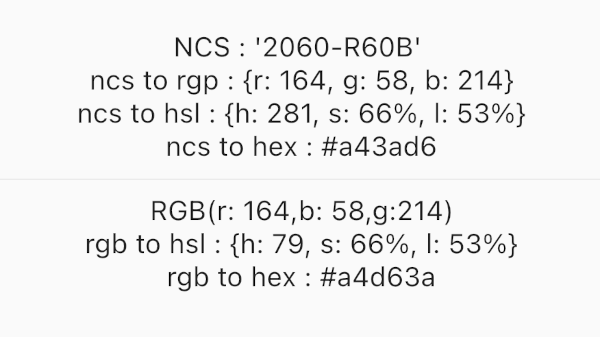
final ncsColor = NCSColor(ncsCode: '2060-R60B');

// Convert to RGB
final rgb = ncsColor.toRgb();
print(rgb); // {r: 164, g: 58, b: 214}

// Convert to HSL
final hsl = ncsColor.toHsl();
print(hsl); // {h: 281, s: 66%, l: 53%}

// Convert to HEX
final hex = ncsColor.toHex();
print(hex); // #a43ad6
RGB Conversions
// RGB to HSL
final hsl = ColorConvert.rgbToHsl(r: 164, g: 58, b: 214);
print(hsl); // {h: 281, s: 66%, l: 53%}

// RGB to HEX
final hex = ColorConvert.rgbToHex(r: 164, g: 58, b: 214);
print(hex); // #a43ad6
Using with Flutter Colors
final ncsColor = NCSColor(ncsCode: '2060-R60B');
final rgb = ncsColor.toRgb();

// Create a Flutter Color
final flutterColor = Color.fromRGBO(
  rgb['r']!,
  rgb['g']!,
  rgb['b']!,
  1.0,
);

// Use in your widgets
Container(
  color: flutterColor,
  child: Text('Hello NCS!'),
)

🎨 NCS Color Format

The Natural Color System (NCS) uses a specific format for color codes:

  • Format: ####-[RGBY][##[RGBY]]
  • Examples:
    • 2060-R60B (Red-Blue with 20% blackness, 60% chromaticness, 60% blue)
    • 1050-Y90R (Yellow-Red with 10% blackness, 50% chromaticness, 90% red)
    • 0505-B (Blue with 5% blackness, 5% chromaticness)
Format breakdown:
  • First two digits: Blackness (00-99)
  • Next two digits: Chromaticness (00-99)
  • Letter: Hue (R=Red, G=Green, B=Blue, Y=Yellow)
  • Optional: Hue percentage and secondary hue

📱 Example App

Check out the /example folder for a complete Flutter app demonstrating all features:

  • Interactive NCS color input
  • Real-time color preview
  • All conversion formats displayed
  • Error handling and validation

NCS Color Demo

🔧 API Reference

NCSColor Class
Constructor
NCSColor({required String ncsCode})
Methods
  • Map<String, int> toRgb() - Returns RGB values
  • Map<String, String> toHsl() - Returns HSL values
  • String toHex() - Returns hex color code
  • String toString() - String representation
  • bool operator ==(Object other) - Equality comparison
  • int get hashCode - Hash code
ColorConvert Class
Static Methods
  • Map<String, String> rgbToHsl({required int r, required int g, required int b})
  • String rgbToHex({required int r, required int g, required int b})

⚠️ Error Handling

The package provides clear error messages for invalid NCS codes:

try {
  final ncsColor = NCSColor(ncsCode: 'invalid-code');
  final rgb = ncsColor.toRgb();
} catch (e) {
  print(e); // ArgumentError: Invalid NCS color format...
}

🧪 Testing

Run the test suite:

flutter test

🤝 Contributing

Contributions are welcome! Please feel free to submit a Pull Request. For major changes, please open an issue first to discuss what you would like to change.

  1. Fork the repository
  2. Create your feature branch (git checkout -b feature/amazing-feature)
  3. Commit your changes (git commit -m 'Add some amazing feature')
  4. Push to the branch (git push origin feature/amazing-feature)
  5. Open a Pull Request

📚 Resources

📄 License

This project is licensed under the MIT License - see the LICENSE file for details.

🙏 Acknowledgments

  • Based on the Natural Color System specification
  • Inspired by W3Schools color converter algorithms
  • Built with ❤️ for the Flutter community

Made with Flutter 💙

所属分类

源码仓库

使用此插件的项目

暂无相关数据。