搜索插件、代码仓与 APP 分类

插件详情v0.1.7

nice_button

一个适用于 Android 和 IOS 的 Flutter 包,可轻松为您的应用设计美观的按钮。尽情享受吧!

近 30 天下载
81
喜欢数
63
Pub 分数
40

安装插件

flutter pub add nice_button

插件介绍

基于插件公开信息、社区数据与项目使用情况整理的选型参考。

Nice_Button 是一个 Flutter 包,旨在简化在 Android 和 iOS 上创建视觉上吸引人的按钮。它提供了一个易于使用的界面,用于设计美观且可自定义的按钮,而无需进行大量编码。该包内置了动画和样式选项,使开发者能够快速高效地增强应用程序的用户界面。该包支持流畅的过渡效果和现代按钮设计,非常适合追求精致外观的应用程序。对于需要快速原型设计或保持一致按钮美学的项目尤其有用。

适合场景

  • 在移动应用中创建动画按钮
  • 通过时尚的按钮设计提升UI
  • 交互式界面的快速原型设计
  • 通过视觉反馈提升用户参与度
  • 在各个平台上添加一致的按钮样式

主要特点

  • 预构建的精美按钮模板
  • 平滑的动画效果
  • 跨平台兼容性(Android 和 iOS)
  • 通过属性实现轻松自定义
  • 所需设置最少

适合对象

  • 初学者 Flutter 开发者
  • 面向用户界面的应用项目
  • 需要一致按钮样式的应用
  • 需要快速UI开发的原型
  • 注重视觉吸引力的项目

使用建议

  • 仅限按钮特定功能
  • 不支持高级手势交互
  • 依赖外部设计选择
  • 可能需要额外的样式设置以应对复杂用例
  • 不适用于非按钮类UI组件

原始 README

以下为关联源码仓库的 README 原文快照,最新内容请访问源码仓库。

nice_button

pub package Donate

A Flutter package for Android and IOS to design nice buttons with no hassle in your app. Enjoy !

Installation

Add the following to pubspec.yaml

dependencies:
  ...
  nice_button: ^0.1.7

Usage Example

import nice_button.dart

import 'package:nice_button/nice_button.dart';
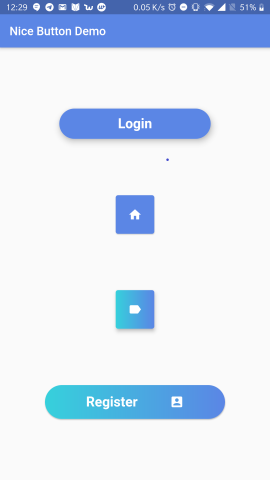
For normal buttons
NiceButton(
    width: 255,
    elevation: 8.0,
    radius: 52.0,
    text: "Login",
    background: yourColor,
    onPressed: () {
        print("hello");
        },
    ),
For mini buttons

Icon is required in this case

NiceButton(
    mini: true,
    icon: Icons.home,
    background: yourColor,
    onPressed: () {
        print("hello");
    },
    )
For gradient buttons
var firstColor = Color(0xff5b86e5), secondColor = Color(0xff36d1dc);

NiceButton(
    radius: 40,
    padding: const EdgeInsets.all(15),
    text: "Register",
    icon: Icons.account_box,
    gradientColors: [secondColor, firstColor],
    onPressed: () {},
    )

Package demo

Refer to example folder and the source code for more information.

所属分类

源码仓库

使用此插件的项目

暂无相关数据。