搜索插件、代码仓与 APP 分类

patterns_canvas 封面
插件详情v0.6.0

patterns_canvas

在画布元素或小部件上绘制条纹或点状图案。

AndroidiOSWebmacOSWindowsLinux
近 30 天下载
2.3万
喜欢数
116
Pub 分数
160

安装插件

flutter pub add patterns_canvas

插件介绍

基于插件公开信息、社区数据与项目使用情况整理的选型参考。

一个 Flutter 包,可实现对画布元素或小部件的可自定义图案(如条纹、圆点和网格)的创建。它非常适合在注重设计和美学的应用中添加装饰性背景、纹理或视觉效果。该包支持 Android、iOS、Web、macOS、Windows 和 Linux 等多个平台,适用于跨平台开发。通过简单的 API,开发者可以轻松地将图案渲染集成到其 UI 组件中。

适合场景

  • 创建纹理背景
  • 设计自定义 UI 元素
  • 添加装饰性叠加层
  • 生成重复图案
  • 通过着色器增强应用视觉效果
  • 构建艺术界面

主要特点

  • 支持条纹、点状和网格图案
  • 跨平台兼容性
  • 与 Canvas 和 Widgets 的轻松集成
  • 可自定义的图案大小和颜色
  • 高性能渲染
  • 可扩展的模式定义

适合对象

  • 寻求视觉多样性的UI设计师
  • 开发艺术或创意应用的开发者
  • 需要动态背景效果的应用
  • 专注于绘画和涂鸦的项目
  • 致力于多平台设计的团队

使用建议

  • 可能会影响复杂模式的性能
  • 需要了解 Canvas 渲染
  • 仅限基于模式的图形
  • 不适合高精度矢量图形
  • 最好与优化的渲染策略配合使用

原始 README

以下为关联源码仓库的 README 原文快照,最新内容请访问源码仓库。

Patterns

Flutter library to draw patterns like stripes or dots on Canvas elements or widgets.

patterns_canvas Pub Version

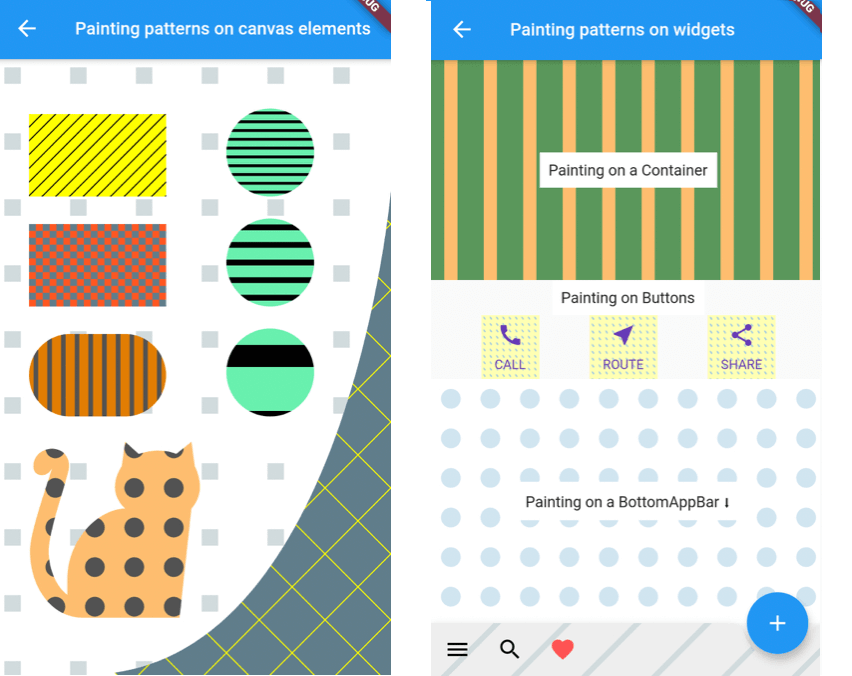
A utility library that lets you paint Canvas shapes or widgets with patterns like dots, stripes, squares, etc.:


Simple Example

Inside your CustomPainter class's paint method, create a Pattern class with background (bgColor) and foreground (fgColor) colors and use one of its paintOn methods:

class MyPainter extends CustomPainter {
  @override
  void paint(Canvas canvas, Size size) {
  
    // Prepare a rectangle shape to draw the pattern on.
    final rect = Rect.fromLTWH(80, 50, 200, 100);
    
    // Create a Pattern object of diagonal stripes with the colors we want.
    final Pattern pattern = DiagonalStripesThick(bgColor: Colors.lightGreenAccent, fgColor: Colors.black);
    
    // Paint the pattern on the rectangle. 
    pattern.paintOnRect(canvas, size, rect);
    
  }
}

Results in this pattern drawn:

Pattern constructors and types:

You can construct a Pattern with three different ways:

  1. Directly with a Pattern type constructor:
final Pattern p1 = DiagonalStripesLight(bgColor: Colors.yellowAccent, fgColor: Colors.black);
  1. With the Pattern.fromValues factory constructor:
final Pattern p2 = Pattern.fromValues(patternType: PatternType.diagonalLight, bgColor: Colors.yellowAccent, fgColor: Colors.black);
  1. From a String representation in the form of patternType_backgroundHex_foregroundHex:
final Pattern p3 = Pattern.fromString("diagonalLight_ffff00_000000");

Usage

Painting patterns on a Canvas shape:
  • Create your Canvas element inside the paint function of your CustomPaint.
  • Create a Pattern object with the desired type and colors.
  • Use the corresponding paint method to draw the pattern on the object.
// In the build method of your screen:
...
body: Center(
    child: CustomPaint(
      size: const Size(double.infinity, double.infinity),
      painter: MyPainter(),
    ),
  ),
...

// In your CustomPainter:
class MyPainter extends CustomPainter {
  @override
  void paint(Canvas canvas, Size size) {
  
    final rect = Rect.fromLTWH(80, 50, 200, 100);
    DiagonalStripesLight(bgColor: Colors.lightGreenAccent, fgColor: Colors.black).paintOnRect(canvas, size, rect);
    
    final path = Path();
    path.moveTo(120, 200);
    path.lineTo(300, 280);
    path.quadraticBezierTo(20, 400, 40, 300);
    path.close();
    Crosshatch(bgColor: Colors.yellow, fgColor: Colors.black).paintOnPath(canvas, size, path);
    
  }
}

You can use the below methods to draw on Canvas shapes:

pattern.paintOnPath(canvas, size, path);
pattern.paintOnRect(canvas, size, rect);
pattern.paintOnRRect(canvas, size, rRect);
pattern.paintOnCircle(canvas, size, center, radius);

Check the Scale behavior setting section for more info on how the Pattern can be drawn.

Painting patterns on the whole Canvas:

As above, but you can use the paintOnCanvas method to draw the pattern on the whole Canvas:

TexturePattern(bgColor: Colors.white, fgColor: Colors.blueGrey).paintOnCanvas(canvas, size);

The result of the above paints:

Painting patterns on a Widget:

To draw patterns on a Widget, you need to:

  • Wrap the Widget with a CustomPaint:
CustomPaint(
  painter: ContainerPatternPainter(),
  child: Container(
    width: 600,
    height: 200,
    child: Center(
      child: Text("Painting on a Container"),
    ),
  ),
),
  • Inside your CustomPainter, create a Pattern and use its paintOnWidget method to paint with it:
class ContainerPatternPainter extends CustomPainter {
  @override
  void paint(Canvas canvas, Size size) {
    VerticalStripesThick(bgColor: Color(0xff0509050), fgColor: Color(0xfffdbf6f)).paintOnWidget(canvas, size);
  }

  @override
  bool shouldRepaint(CustomPainter oldDelegate) => true;
}

Rectangular widgets, like Containers, Rows, Columns, IconButtons, etc. can be painted directly with the above method. For widgets that have a custom shape, like a BottomAppbar, you need to provide a different clipBehavior property, e.g. Clip.antiAlias, to make sure the pattern is clipped to the special shape. Check the second screen in the example app for more.

Patterns and settings

Available patterns

All Patterns require a background and foreground color on instantiation. The currently available patterns are:

Description Class PatternType enum
Horizontal Stripes Light HorizontalStripesLight(Color bgColor, Color fgColor) PatternType.horizontalLight
Horizontal Stripes Thick HorizontalStripesThick(Color bgColor, Color fgColor) PatternType.horizontalThick
Vertical Stripes Light VerticalStripesLight(Color bgColor, Color fgColor) PatternType.verticalLight
Vertical Stripes Thick VerticalStripesThick(Color bgColor, Color fgColor) PatternType.verticalThick
Diagonal Stripes Light DiagonalStripesLight(Color bgColor, Color fgColor) PatternType.diagonalLight
Diagonal Stripes Thick DiagonalStripesThick(Color bgColor, Color fgColor) PatternType.diagonalThick
Checkers Checkers(Color bgColor, Color fgColor) PatternType.checkers
Crosshatch Crosshatch(Color bgColor, Color fgColor) PatternType.crosshatch
Dots Dots(Color bgColor, Color fgColor) PatternType.dots
Raindrops Raindrops(Color bgColor, Color fgColor) PatternType.raindrops
Subtle Patch SubtlePatch(Color bgColor, Color fgColor) PatternType.subtlepatch
Texture TexturePattern(Color bgColor, Color fgColor) PatternType.texture
Setting the number of pattern features to draw

You can pass a featuresCount argument when creating a Pattern, to set how many features, e.g. how many stripes, you want to be drawn.

DiagonalStripesThick(bgColor: bgColor, fgColor: fgColor, featuresCount: 40).paintOnRect(canvas, size, rect1);
Dots(bgColor: bgColor, fgColor: fgColor, featuresCount: 5).paintOnRect(canvas, size, rect2);
Scale behavior setting

All patterns are by default scaled to their container (patternScaleBehavior = PatternScaleBehavior.container). This means that, regardless of its size, a Rectangle will contain 15 diagonal stripes or 10 dots.

DiagonalStripesThick(bgColor: bgColor, fgColor: fgColor).paintOnRect(canvas, size, rect1);
Dots(bgColor: bgColor, fgColor: fgColor).paintOnRect(canvas, size, rect2);

You can change this behavior by providing a different argument to the paintOn method:

Pass patternScaleBehavior: PatternScaleBehavior.canvas to scale the pattern to the whole Canvas area. Now the Canvas will contain 15 diagonal stripes or 10 dots, so, a Rectangle will contain as many dots or stripes as it can fit:

DiagonalStripesThick(bgColor: bgColor, fgColor: fgColor).paintOnRect(canvas, size, rect1, patternScaleBehavior: PatternScaleBehavior.canvas);
Dots(bgColor: bgColor, fgColor: fgColor).paintOnRect(canvas, size, rect2, patternScaleBehavior: PatternScaleBehavior.canvas);

Pass patternScaleBehavior: PatternScaleBehavior.customRect and a customRect (e.g. a Rectangle with half the Canvas height) to further customize the Pattern size:

final Rect halfCanvas = Rect.fromLTWH(0, size.height / 2, size.width, size.height / 2); // a Rectangle with half the Canvas height.
DiagonalStripesThick(bgColor: bgColor, fgColor: fgColor).paintOnRect(canvas, size, rect1, patternScaleBehavior: PatternScaleBehavior.customRect, customRect: halfCanvas );
Dots(bgColor: bgColor, fgColor: fgColor).paintOnRect(canvas, size, rect2, patternScaleBehavior: PatternScaleBehavior.customRect, customRect: halfCanvas );

所属分类

源码仓库

使用此插件的项目

所在榜单