搜索插件、代码仓与 APP 分类

payment_card 封面
插件详情v0.0.1

payment_card

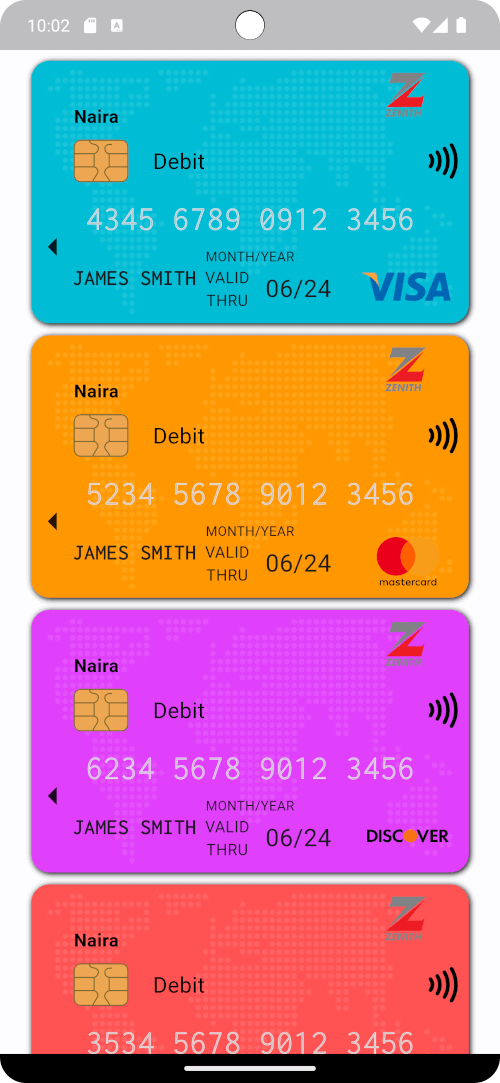
一个用于在 Flutter 中创建精美支付(例如信用卡或借记卡)的自定义小部件。

AndroidiOSWebmacOSWindowsLinux
近 30 天下载
11
喜欢数
11
Pub 分数
130

安装插件

flutter pub add payment_card

插件介绍

基于插件公开信息、社区数据与项目使用情况整理的选型参考。

一个专为创建视觉上吸引人的支付卡(如信用卡或借记卡)而设计的 Flutter 小部件,支持自定义样式和布局。它支持 Android、iOS、Web、macOS、Windows 和 Linux 多个平台,非常适合需要卡片 UI 组件的跨平台应用。该包提供了一个简洁、可重复使用的界面,用于显示卡号、有效期和持卡人姓名等信息,从而在支付相关工作流程中提升用户体验。

适合场景

  • 支付表单界面
  • 数字钱包显示
  • 电子商务结账屏幕
  • 卡片预览组件
  • 用户资料卡管理

主要特点

  • 可自定义的卡片设计
  • 跨平台兼容性
  • 响应式布局支持
  • 轻松集成表单
  • 支持卡号格式化

适合对象

  • 开发电子商务应用的开发者
  • 需要一致卡片 UI 的设计师
  • 具有支付处理功能的应用程序
  • 面向前端的 Flutter 项目

使用建议

  • 不处理实际的支付处理
  • 需要手动输入验证
  • 有限的内置安全措施
  • 不适用于生产环境的支付网关

原始 README

以下为关联源码仓库的 README 原文快照,最新内容请访问源码仓库。

PaymentCard

pub package pub points popularity likes Star on Github Awesome Flutter License: BSD

Overview

The PaymentCard widget is a flexible Flutter widget designed to display payment card information with customizable properties. It enables developers to showcase payment card details such as the card number, card type, cardholder name, and background image in a visually appealing manner.

Table of Contents

Installation

To use PaymentCard in your Flutter project, add the following dependency to your pubspec.yaml file:

dependencies:
  payment_card: ^0.0.1

Then, run:

flutter pub get

Usage

Import the package:

import 'package:payment_card/payment_card.dart';

Add the PaymentCard widget to your UI, providing the necessary parameters:

PaymentCard(
  cardIssuerIcon: Icons.credit_card,
  backgroundColor: Colors.blue,
  currency: 'USD',
  cardNumber: '1234567890123456',
  validity: '12/24',
  holder: 'John Doe',
  cardType: CardNetwork.visa,
  cardTypeTextStyle: TextStyle(fontSize: 16, fontWeight: FontWeight.bold),
  cardNumberStyles: CardNumberStyles.lightStyle1,
  margin: EdgeInsets.all(16),
)

Features

  • Customization: Customize various aspects of the payment card, including the card issuer icon, background color, background image, currency, card number, validity, cardholder name, card type, and more.
  • Flexible Design: The PaymentCard widget allows for flexible design configurations, enabling developers to tailor the appearance of the payment card to suit their app's visual style and branding.
  • Easy Integration: Integrating the PaymentCard widget into Flutter projects is straightforward, making it accessible to developers of all skill levels.
  • Highly Configurable: With support for customizing card number styles, card type text styles, and margins, developers can fine-tune the presentation of payment card details to meet specific requirements.

Examples

Here's a basic example demonstrating the usage of the PaymentCard widget:

import 'package:flutter/material.dart';
import 'package:payment_card/payment_card.dart';

void main() {
  runApp(const MyApp());
}

class MyApp extends StatelessWidget {
  const MyApp({super.key});

  @override
  Widget build(BuildContext context) {
    return MaterialApp(
      debugShowCheckedModeBanner: false,
      home: Scaffold(
        backgroundColor: Colors.black12,
        body: SingleChildScrollView(
          child: Padding(
            padding: const EdgeInsets.all(16.0),
            child: Column(
              crossAxisAlignment: CrossAxisAlignment.stretch,
              children: [
                buildPaymentCardExample1(),
                const SizedBox(height: 16),
                buildPaymentCardExample2(),
                const SizedBox(height: 16),
                buildPaymentCardExample3(),
                const SizedBox(height: 16),
                buildPaymentCardExample4(),
              ],
            ),
          ),
        ),
      ),
    );
  }

  Widget buildPaymentCardExample1() {
    return const PaymentCard(
      cardIssuerIcon: CardIcon(icon: Icons.credit_card),
      backgroundColor: Colors.blue,
      backgroundGradient: LinearGradient(
        colors: [Colors.purple, Colors.indigo],
        begin: Alignment.topLeft,
        end: Alignment.bottomRight,
      ),
      currency: Text('EUR'),
      cardNumber: '1234567890123456',
      validity: '10/24',
      holder: 'Jane Doe',
      isStrict: false,
      cardNetwork: CardNetwork.visa,
      cardTypeTextStyle: TextStyle(fontSize: 16, fontWeight: FontWeight.bold),
      cardNumberStyles: CardNumberStyles.darkStyle4,
      backgroundImage: null,
    );
  }

  Widget buildPaymentCardExample2() {
    return const PaymentCard(
      cardIssuerIcon: CardIcon(icon: Icons.credit_card),
      currency: Text('GBP'),
      cardNumber: '1234567890123456',
      isStrict: false,
      validity: '08/23',
      holder: 'John Smith',
      cardNetwork: CardNetwork.mastercard,
      cardTypeTextStyle: TextStyle(fontSize: 16, fontWeight: FontWeight.bold, color: Colors.white),
      cardNumberStyles: CardNumberStyles.lightStyle2,
      backgroundImage: null,
      backgroundColor: Colors.grey,
    );
  }

  Widget buildPaymentCardExample3() {
    return const PaymentCard(
      cardIssuerIcon: CardIcon(icon: Icons.credit_card),
      backgroundColor: Colors.green,
      backgroundImage: null,
      currency: Text('USD'),
      cardNumber: '1234567890123456',
      validity: '06/22',
      holder: 'Alice Johnson',
      isStrict: false,
      cardNetwork: CardNetwork.americanExpress,
      cardTypeTextStyle: TextStyle(fontSize: 16, fontWeight: FontWeight.bold),
      cardNumberStyles: CardNumberStyles.lightStyle3,
    );
  }

  Widget buildPaymentCardExample4() {
    return const PaymentCard(
      cardIssuerIcon: CardIcon(icon: Icons.credit_card),
      backgroundColor: Colors.orange,
      currency: Text('USD'),
      cardNumber: '1234567890123456',
      validity: '09/25',
      holder: 'Robert Brown',
      isStrict: false,
      cardNetwork: CardNetwork.discover,
      cardTypeTextStyle: TextStyle(fontSize: 16, fontWeight: FontWeight.bold),
      cardNumberStyles: CardNumberStyles.darkStyle5,
      backgroundImage: null,
    );
  }
}

Screenshots

Screenshot 1 Screenshot 2 Screenshot 3
Screenshot 4 Screenshot 5 Screenshot 6

Contributing

Contributions are welcome! Feel free to open issues or submit pull requests.

  • Issues: If you encounter any bugs, have feature requests, or want to suggest improvements, please open an issue on our GitHub repository. Provide as much detail as possible to help us understand the problem or idea better.

  • Pull Requests: If you'd like to contribute code changes, feel free to submit a pull request. Before doing so, make sure to fork the repository and create a new branch for your changes. Follow the existing coding style and guidelines, and write clear and concise commit messages. Your pull request will undergo review, and we'll work together to ensure the changes align with the project's goals.

  • Feature Requests: If you have ideas for new features or enhancements, please open an issue to discuss them. We value community feedback and want to ensure that new features align with the project's direction and objectives.

  • Spread the Word: Help us grow the FontResoft community by sharing the project with others. Whether through social media, blog posts, or word of mouth, spreading the word about FontResoft helps attract more users and contributors.

License

This project is licensed under the BSD 3-Clause License - see the LICENSE file for details.

所属分类

依赖

依赖清单 1 项

源码仓库

使用此插件的项目

暂无相关数据。