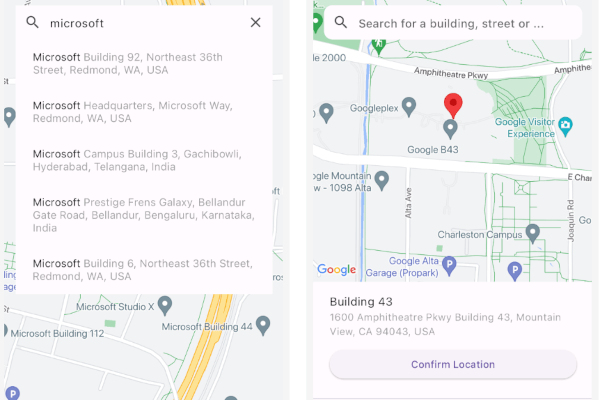
一个 Flutter 包,可实现 Google 地图的无缝集成以选择地点,完全用 Dart 实现。它提供了一个直观的界面,用于从 Google 地图中选择位置,支持 Android 和 iOS 平台。该包通过在 Flutter 应用中直接利用 Google 地图 API,简化了选择地址或坐标的过程。适用于需要位置输入的应用程序,如配送服务、旅行应用或活动规划工具。
适合场景
配送应用中的位置选择
旅行预订的地址输入
活动策划的地理定位
用户资料地址设置
基于地图的表单输入
主要特点
完全用 Dart 编写
与 Google 地图 API 集成
支持 Android 和 iOS
用于地点选择的简单 API
可自定义的 UI 组件
适合对象
开发位置感知的 Flutter 应用程序的开发者
需要 Google 地图集成的应用程序
需要地址选择器功能的项目
具有地理位置功能的移动应用
跨平台位置输入解决方案
使用建议
需要 Google Maps API 密钥
依赖互联网连接
可能需要额外的权限才能访问位置
大量地图渲染可能带来的性能影响
有限的自定义选项,需高级配置
原始 README
以下为关联源码仓库的 README 原文快照,最新内容请访问源码仓库。
Place Picker Google
A comprehensive, cross-platform google maps place picker library for Flutter.
The package provides common operations for Place picking,
Places autocomplete, My Location, and Nearby places from google maps given you have enabled
Places API, Maps SDK for Android, Maps SDK for iOS and Geocoding API for your API key.
The following permissions are not required to use Google Maps Android API v2, but are recommended.
android.permission.ACCESS_COARSE_LOCATION Allows the API to use WiFi or mobile cell data (or both) to determine the
device's location. The API returns the location with an accuracy approximately equivalent to a city block.
android.permission.ACCESS_FINE_LOCATION Allows the API to determine as precise a location as possible from the
available location providers, including the Global Positioning System (GPS) as well as WiFi and mobile cell data.
On iOS you'll need to add the following entries to your Info.plist file (located under ios/Runner) in order to access the device's location.
Simply open your Info.plist file and add the following:
<key>NSLocationWhenInUseUsageDescription</key><string>This app needs access to location when open.</string><key>NSLocationAlwaysUsageDescription</key><string>This app needs access to location when in the background.</string><key>NSLocationAlwaysAndWhenInUseUsageDescription</key><string>This app needs access to location when open and in the background.</string>
Web
You'll need to modify the web/index.html file of your Flutter Web application to include the Google Maps JS SDK.
Get an API Key for Google Maps JavaScript API.
Get started here.
Modify the <head> tag of your web/index.html to load the Google Maps JavaScript API, like so:
<head><!-- // Other stuff --><!-- TODO: Add your Google Maps API key --><scriptsrc="https://maps.googleapis.com/maps/api/js?key=YOUR_API_KEY"></script></head>
Check the google_maps_flutter_web README
for the latest information on how to prepare your App to use Google Maps on the
web.
Note
Browser-based apps can't use dart:io library for the Platform API.
Only servers, command-line scripts, and Flutter mobile apps can import and use dart:io.
A native solution to switch between the platforms would be to use the flutter/foundation library.
import'package:flutter/foundation.dart';
if (kIsWeb) {
/// Web specific code
}
elseif (defaultTargetPlatform == TargetPlatform.iOS || defaultTargetPlatform == TargetPlatform.android) {
/// Android/iOS specific code
}
Google places API prevents CORS. So we can't make a request from client-side.
And As the PlacesAutocomplete widget makes http request to the Google places API like this:
This client-side request will be prevented.
The Google API was not made to be call from browser.
You need to use a proxy server that add the CORS to your request. e.g cors-anywhere.
Deploy the proxy server in Heroku or Vercel. You'll get a URL after deployment.
After that you need to add the URL before your API endpoint while making the calls. i.e "proxy_server_url/google_api_endpoint".
The proxy server will add the necessary headers.
For example with the proxy server it would look like
You can use PlacePicker by pushing to a new page using Navigator, OR put as a child of any widget.
When the user picks a place on the map, it will return result to onPlacePicked with LocationResult type.
Alternatively, you can build your own way with selectedPlaceWidgetBuilder and fetch result from it (See the instruction below).
If you do want to fetch places from a custom location or refresh them when the user moves the map, you must enable /nearbysearch queries in Place Picker.
To do that, enable enableNearbyPlaces flag in the package.
Customizing selected place UI
By default, when a user selects a place by using auto complete search or dragging/tapping the map,
we display the information at the bottom of the map.
However, if you don't like this UI/UX, simply override the builder using selectedPlaceWidgetBuilder.
Note that using this customization WILL NOT INVOKE onPlacePicked callback
Free Geocoding (Reduce Google API Billing)
This package supports free geocoding using the geocoding package, which leverages the device’s native geocoding capabilities on iOS and Android.
Set useFreeGeocoding in PlacePicker as true to access geocoding API's.
Benefits
Avoids Google Geocoding API calls → Reduce billing costs
On-device geocoding for common address lookups
Works offline for some platforms (cached or approximated results)
Note:
Native geocoding may provide less detailed results than Google Geocoding API.
For precise or international addresses, use Google’s API as a fallback.
Not available on the web.
Packages Used
Below are the information about the packages used.