搜索插件、代码仓与 APP 分类

proste_bezier_curve 封面
插件详情v2.0.2

proste_bezier_curve

更少的代码,更低的难度,绘制标准贝塞尔曲线。该包可用于裁剪控件或自行绘制路径。

AndroidiOSWebmacOSWindowsLinux
近 30 天下载
478
喜欢数
67
Pub 分数
150

安装插件

flutter pub add proste_bezier_curve

插件介绍

基于插件公开信息、社区数据与项目使用情况整理的选型参考。

Proste Bezier Curve 是一个轻量级的 Flutter 包,可简化标准贝塞尔曲线的创建和使用。它减少了样板代码和复杂性,使开发者能够轻松绘制自定义路径或使用平滑曲线形状裁剪控件。适用于需要优雅、流畅轮廓的 UI 元素,支持所有主要平台,包括 Android、iOS、Web、macOS、Windows 和 Linux。该包特别适合以最少的努力设计现代界面。

适合场景

  • 创建弯曲的UI边框
  • 剪裁具有自定义形状的小部件
  • 设计动画路径过渡
  • 构建交互式绘图组件
  • 通过平滑曲线增强视觉吸引力

主要特点

  • 用于贝塞尔曲线创建的简单 API
  • 支持使用贝塞尔路径进行控件裁剪
  • 跨平台兼容性
  • 所需最少代码
  • 灵活的路径自定义

适合对象

  • 寻求优雅曲线的UI设计师
  • 开发人员构建自定义形状
  • 需要流畅动画路径的应用
  • Flutter 初学者探索路径绘制
  • 专注于干净、现代美学的项目

使用建议

  • 仅限标准贝塞尔曲线(非B样条)
  • 无内置动画支持
  • 需要手动处理路径更新
  • 不适合复杂的基于样条曲线的设计
  • 最适合静态或简单的动态路径

原始 README

以下为关联源码仓库的 README 原文快照,最新内容请访问源码仓库。

English | 中文

Introduction

The control points of Bezier curve are obtained through data calculation, and then the points are drawn into curves through the drawing function of flutter.

The difference between using package and drawing your own path

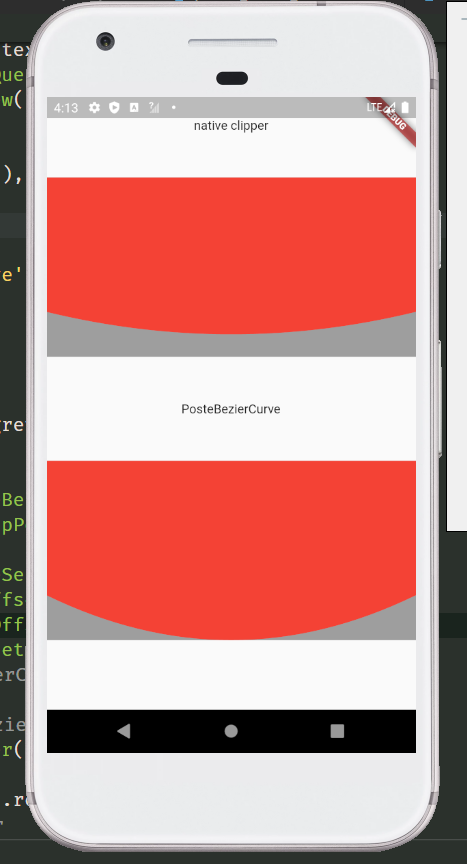
The common method of tracing points according to the position of elements will leave a gap. Only after the control points are calculated can the element information be completely filled. For example, in the following picture, the coordinates of the points used are the same, but the styles cut out are different. The function I want to provide is to restore the design style as much as possible. And after using the package, you only need to confirm the coordinates of each point, without other complex calculations, and the code is more concise.

  • draw your own
Stack(
  children: [
    Container(
      height: 200,
      color: Colors.grey,
    ),
    ClipPath(
      clipper: NativeClipper(),
      child: Container(
        height: 200,
        color: Colors.red,
      ),
    ),
  ],
)

class NativeClipper extends CustomClipper<Path> {
  @override
  Path getClip(Size size) {
    Path path = Path();

    path.lineTo(0, 0);
    path.lineTo(0, size.height - 50);
    path.quadraticBezierTo(size.width / 2, size.height, size.width, size.height - 50);
    path.lineTo(size.width, 0);
    path.lineTo(0, 0);
    return path;
  }

  @override
  bool shouldReclip(covariant CustomClipper<Path> oldClipper) => true;
}
  • use package

Stack(
  children: [
    Container(
      height: 200,
      color: Colors.grey,
    ),
    ClipPath(
      clipper: ProsteBezierCurve(
        position: ClipPosition.bottom,
        list: [
          BezierCurveSection(
            start: Offset(0, 150),
            top: Offset(screenWidth / 2, 200),
            end: Offset(screenWidth, 150),
          ),
        ],
      ),
      child: Container(
        height: 200,
        color: Colors.red,
      ),
    ),
  ],
),

Usage

Second order Bezier curve

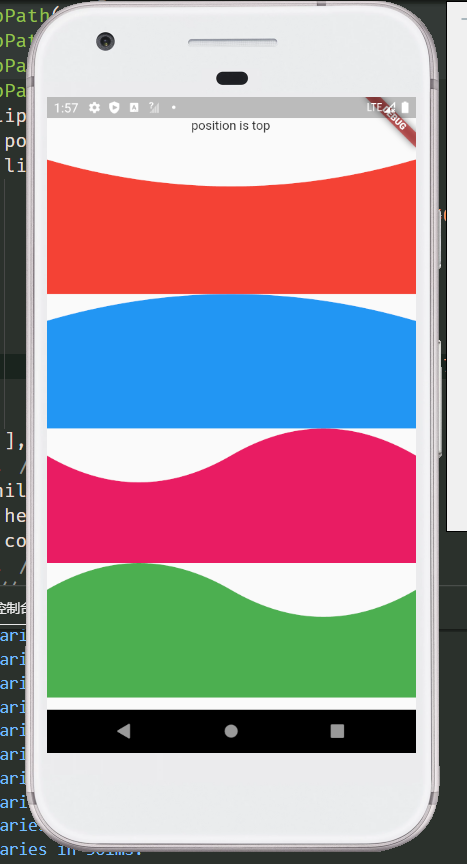
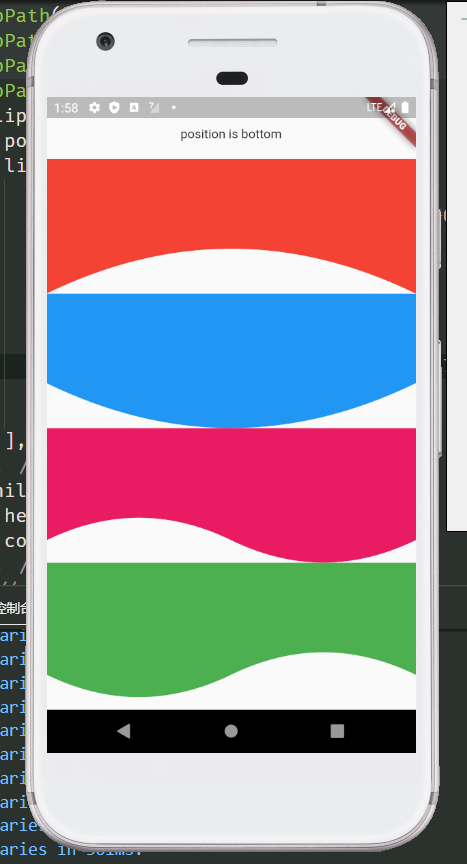
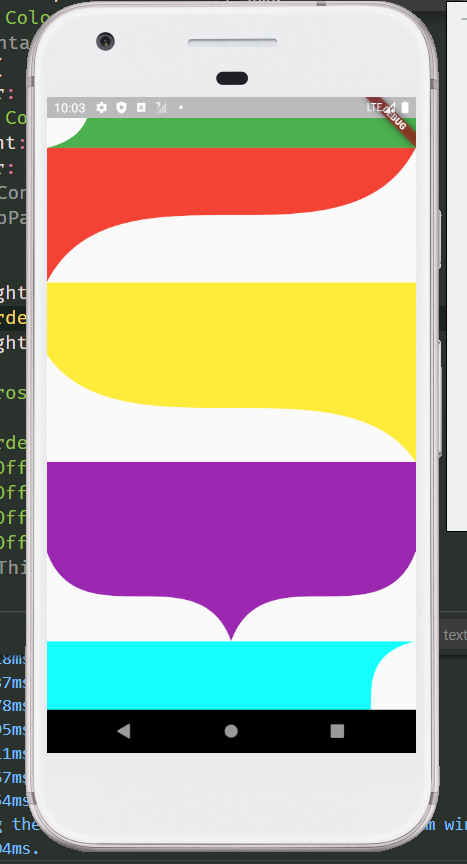
more preview

Examples
  ClipPath(
    clipper: ProsteBezierCurve(
      position: ClipPosition.top,
      list: [
        BezierCurveSection(
          start: Offset(screenWidth, 0),
          top: Offset(screenWidth / 2, 30),
          end: Offset(0, 0),
        ),
      ],
    ),
    child: Container(
      color: Colors.red,
      height: 150,
    ),
  )

  
  /// Wavy line
  ClipPath(
    clipper: ProsteBezierCurve(
      position: ClipPosition.bottom,
      list: [
        BezierCurveSection(
          start: Offset(0, 125),
          top: Offset(screenWidth / 4, 150),
          end: Offset(screenWidth / 2, 125),
        ),
        BezierCurveSection(
          start: Offset(screenWidth / 2, 125),
          top: Offset(screenWidth / 4 * 3, 100),
          end: Offset(screenWidth, 150),
        ),
      ],
    ),
    child: Container(
      height: 150,
      color: Colors.red,
    ),
  )
class
  • ProsteBezierCurve Used to draw and return the clipping path
parameter type default describe
list List<BezierCurveSection> Used to draw Bezier curve, you can pass in more than one
reclip bool true Allow redrawing elements
position ClipPosition ClipPosition.left Used to determine the drawing position of the curve
  ClipPath(
    clipper: ProsteBezierCurve(
      position: ClipPosition.top,
      reclip: false,
      list: [
        ...
      ],
    ),
    child: ...,
  ),
  • BezierCurveSection Clips for drawing curves
parameter type default describe
start Offset start point of Bezier curve
top Offset top point of Bezier curve
end Offset end point of Bezier curve
proportion double 1/2 the proportion of the top position of the Bezier curve,It doesn't need to be modified

  ClipPath(
    clipper: ProsteBezierCurve(
      position: ClipPosition.top,
      reclip: false,
      list: [
        BezierCurveSection(
          proportion: 1 / 3,
          start: Offset(..,..),
          top: Offset(..,..),
          end: Offset(..,..),
        ),
      ],
    ),
    child: ...,
  )

  • BezierCurveDots Coordinates of Bezier curve control points
parameter type default describe
x1 double The X-coordinate of the first point
y1 double The Y-coordinate of the first point
x2 double The X-coordinate of the second point
y2 double The Y-coordinate of the second point
Static function of ProsteBezierCurve
  • BezierCurveDots calcCurveDots(BezierCurveSection param) Obtain the coordinates of the control points after calculation, and draw the path after obtaining the control points, such as drawing curves with multiple edges or combining the curves with other drawing rules

ClipPath(
  clipper: CustomSelfClipper1(),
  child: Container(
    height: 150,
    color: Colors.red,
  ),
)

class CustomSelfClipper1 extends CustomClipper<Path> {
  @override
  Path getClip(Size size) {
    Path path = Path();
    BezierCurveSection section1 = BezierCurveSection(
      start: Offset(0, 30),
      top: Offset(10, 45),
      end: Offset(0, 60),
    );
    BezierCurveSection section2 = BezierCurveSection(
      start: Offset(size.width, size.height - 90),
      top: Offset(size.width - 10, size.height - 105),
      end: Offset(size.width, size.height - 120),
    );
    BezierCurveDots dot1 = ProsteBezierCurve.calcCurveDots(section1);
    BezierCurveDots dot2 = ProsteBezierCurve.calcCurveDots(section2);

    List<double> dot1List = dot1.getList(); // Return to list<double>
    Map<String, double> dot2Map = dot1.getMap(); // Return to Map<String, double>

    print(dot1List); // [20.0, 45.0, 0.0, 60.0]
    print(dot2Map); // {x1: 20.0, y1: 45.0, x2: 0.0, y2: 60.0}

    path.lineTo(0, 0);
    path.lineTo(0, 30);
    path.quadraticBezierTo(dot1.x1, dot1.y1, dot1.x2, dot1.y2);
    path.lineTo(0, size.height);
    path.lineTo(size.width, size.height);
    path.lineTo(size.width, size.height - 90);
    path.quadraticBezierTo(dot2.x1, dot2.y1, dot2.x2, dot2.y2);
    path.lineTo(size.width, 0);
    path.lineTo(0, 0);
    return path;
  }

  @override
  bool shouldReclip(covariant CustomClipper<Path> oldClipper) => true;
}

/// This method can splice the third-order Bezier curve, but is not recommended. You can use the ProsteThirdOrderBezierCurve

class CustomSelfClipper2 extends CustomClipper<Path> {
  @override
  Path getClip(Size size) {
    Path path = Path();
    BezierCurveSection section1 = BezierCurveSection(
      start: Offset(0, size.height),
      top: Offset(30, size.height - 50),
      end: Offset(80, size.height - 70),
    );
    BezierCurveSection section2 = BezierCurveSection(
      start: Offset(size.width - 100, size.height - 70),
      top: Offset(size.width - 30, size.height - 95),
      end: Offset(size.width, size.height - 160),
    );
    BezierCurveDots dot1 = ProsteBezierCurve.calcCurveDots(section1);
    BezierCurveDots dot2 = ProsteBezierCurve.calcCurveDots(section2);

    path.lineTo(0, 0);
    path.lineTo(0, size.height);
    path.quadraticBezierTo(dot1.x1, dot1.y1, dot1.x2, dot1.y2);
    path.lineTo(size.width - 100, size.height - 70);
    path.quadraticBezierTo(dot2.x1, dot2.y1, dot2.x2, dot2.y2);
    path.lineTo(size.width, 0);
    path.lineTo(0, 0);
    return path;
  }

  @override
  bool shouldReclip(covariant CustomClipper<Path> oldClipper) => true;
}

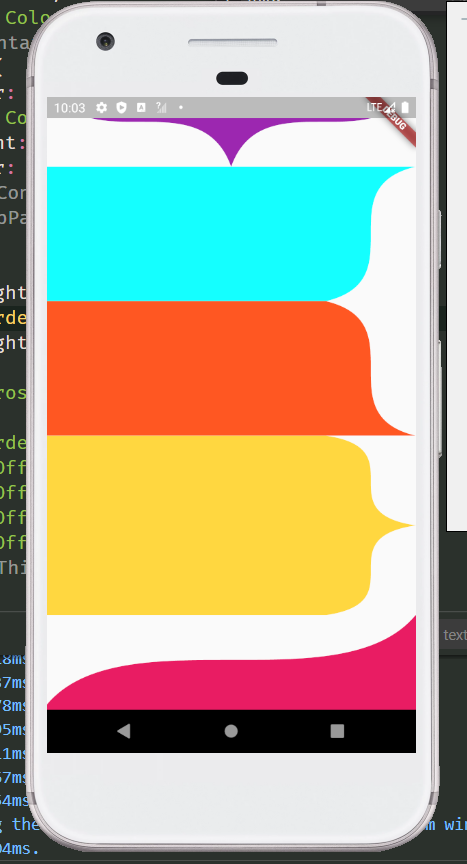
Third order Bezier curve

more preview

Examples

  ClipPath(
    clipper: ProsteThirdOrderBezierCurve(
      position: ClipPosition.bottom,
      list: [
        ThirdOrderBezierCurveSection(
          p1: Offset(0, 100),
          p2: Offset(0, 200),
          p3: Offset(screenWidth, 100),
          p4: Offset(screenWidth, 200),
        ),
      ],
    ),
    child: Container(
      height: 200,
      color: Colors.red,
    ),
  )

class
  • ProsteThirdOrderBezierCurve Clipping path for drawing and returning third order Bezier curves
parameter type default describe
list List<ThirdOrderBezierCurveSection> Used to draw Bezier curve, you can pass in more than one
reclip bool true Allow redrawing elements
position ClipPosition ClipPosition.left Used to determine the drawing position of the curve
ClipPath(
  clipper: ProsteThirdOrderBezierCurve(
    position: ClipPosition.bottom,
    list: [
      ...
    ],
  ),
  child: ...,
)
  • ThirdOrderBezierCurveSection Fragment for drawing third order Bezier curve
parameter type default describe
p1 Offset The coordinates of the first point
p2 Offset The coordinates of the second point
p3 Offset The coordinates of the third point
p4 Offset The coordinates of the fourth point
smooth double .5 The greater the value of smoothness 0 ~ 1, the straighter the value is, the smaller the value is, and the larger the arc is. When the drawing distance is short and saw tooth appears, try to increase this value
ClipPath(
  clipper: ProsteThirdOrderBezierCurve(
    position: ClipPosition.bottom,
    list: [
      ThirdOrderBezierCurveSection(
        smooth: .7,
        p1: Offset(0, 100),
        p2: Offset(0, 200),
        p3: Offset(screenWidth, 100),
        p4: Offset(screenWidth, 200),
      ),
    ],
  ),
  child: Container(
    height: 200,
    color: Colors.red,
  ),
)

/// Spire shape
ClipPath(
  clipper: ProsteThirdOrderBezierCurve(
    position: ClipPosition.top,
    list: [
      ThirdOrderBezierCurveSection(
        p1: Offset(screenWidth, 0),
        p2: Offset(screenWidth, 100),
        p4: Offset(screenWidth / 2, 100),
        p3: Offset(screenWidth / 2, 0),
      ),
      ThirdOrderBezierCurveSection(
        p1: Offset(screenWidth / 2, 100),
        p2: Offset(screenWidth / 2, 0),
        p3: Offset(0, 100),
        p4: Offset(0, 0),
      ),
    ],
  ),
  child: Container(
    height: 200,
    color: Colors.teal,
  ),
)

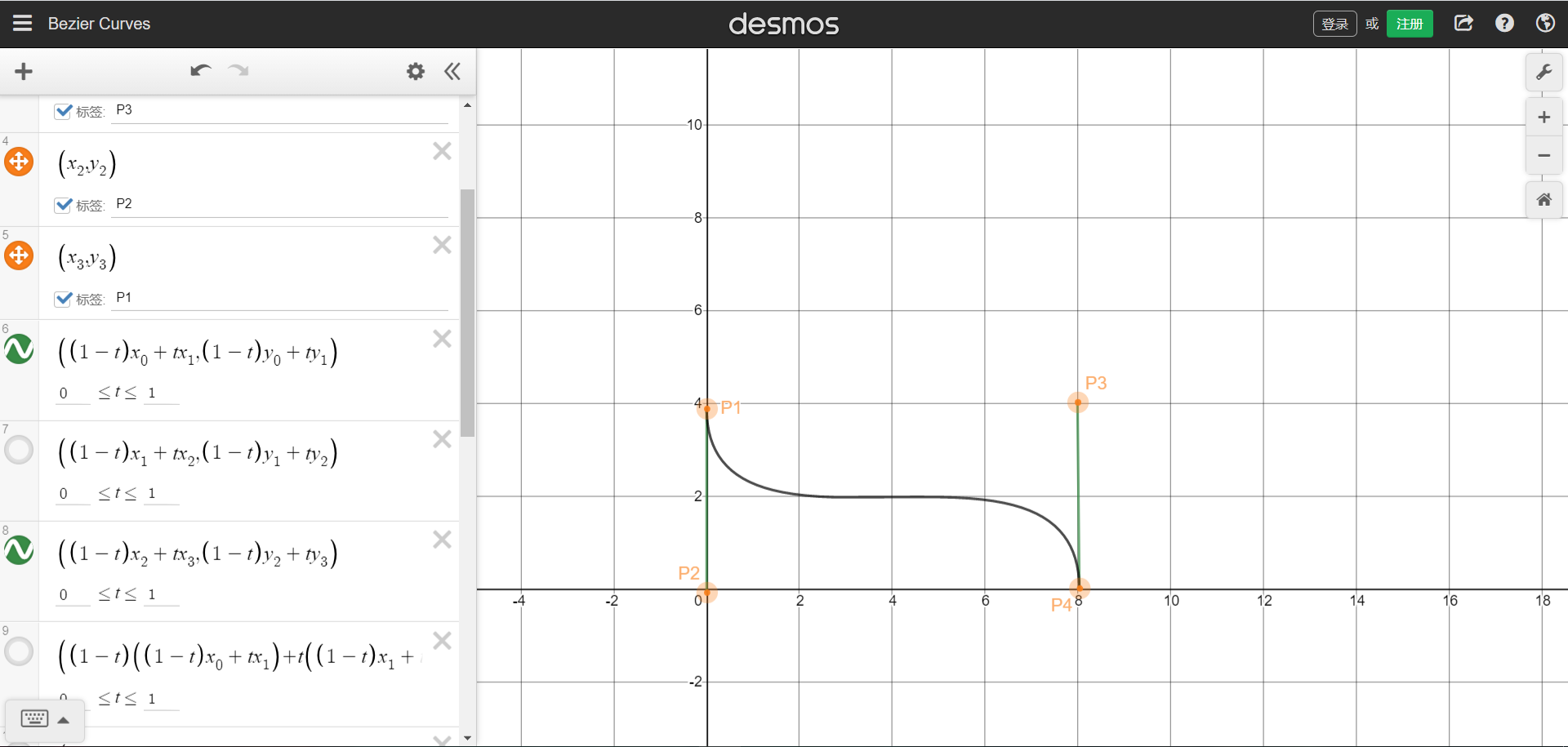
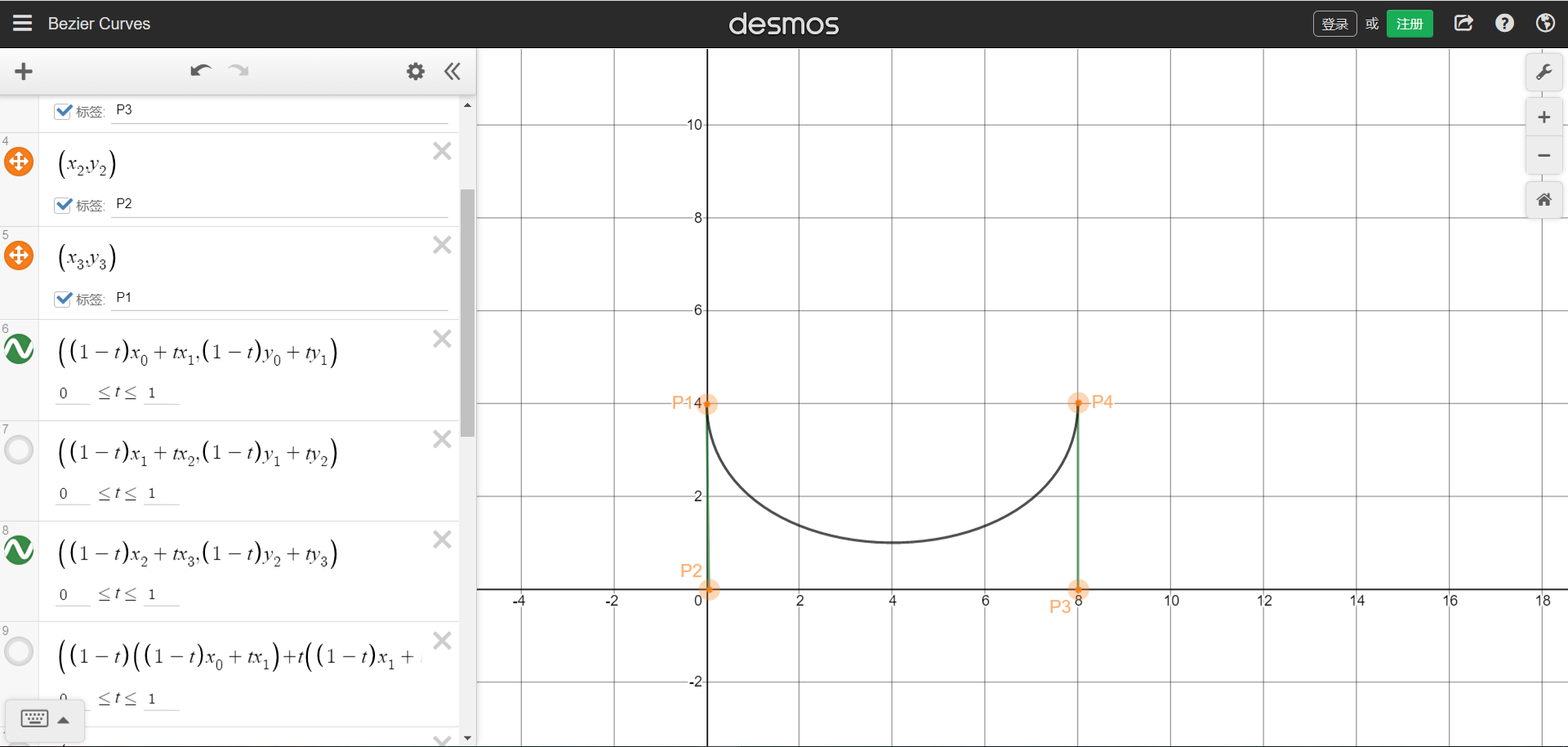
The position coordinates of the four points can refer to the figure below. The starting and ending points are P1 and P4 respectively.Picture sample URL。You can understand that four points form a rectangle, and the four coordinates are the positions of the four points. The curve will be drawn in the rectangle.

We can also draw a single arc graph through the third-order Bessel function, need P1 and P4 are on the same side,But that brings up the problem that was stated at the beginning,The arc does not cling to the bottom.

  • ThirdOrderBezierCurveDots Coordinates of third order Bezier curve control points
parameter type default describe
x1 double The X-coordinate of the first point
y1 double The Y-coordinate of the first point
x2 double The X-coordinate of the second point
y2 double The Y-coordinate of the second point
x3 double The X-coordinate of the third point
y3 double The Y-coordinate of the third point
Static function of ProsteThirdOrderBezierCurve
  • ThirdOrderBezierCurveDots calcCurveDots(ThirdOrderBezierCurveSection param) Obtain the coordinates of the control points after calculation, and draw the path after obtaining the control points, such as drawing curves with multiple edges or combining the curves with other drawing rules

ClipPath(
  clipper: CustomSelfClipper1(),
  child: Container(
    height: 200,
    color: Colors.teal,
  ),
)

class CustomSelfClipper1 extends CustomClipper<Path> {
  @override
  Path getClip(Size size) {
    Path path = Path();
    ThirdOrderBezierCurveSection param = ThirdOrderBezierCurveSection(
      smooth: 0.3,
      p1: Offset(0, size.height),
      p2: Offset(0, 0),
      p3: Offset(size.width, size.height),
      p4: Offset(size.width, 0),
    );
    ThirdOrderBezierCurveDots dots = ProsteThirdOrderBezierCurve.calcCurveDots(param);

    List<double> dotsList = dots.getList(); // Return to list<double>
    Map<String, double> dotsMap = dots.getMap(); // Return to Map<String, double>

    print(dotsList); // [71.56809408040556, 0.0, 339.8604773481659, 200.0, 411.42857142857144, 0.0]
    print(dotsMap); // {x1: 71.56809408040556, y1: 0.0, x2: 339.8604773481659, y2: 200.0, x3: 411.42857142857144, y3: 0.0}

    path.lineTo(0, 0);
    path.lineTo(0, size.height);
    path.cubicTo(dots.x1, dots.y1, dots.x2, dots.y2, dots.x3, dots.y3);
    path.lineTo(0, 0);

    return path;
  }

  @override
  bool shouldReclip(covariant CustomClipper<Path> oldClipper) => true;
}

If you have any issue, please submit them to issues, I will deal with them as soon as I see them. Thank you!

所属分类

源码仓库

使用此插件的项目

暂无相关数据。