搜索插件、代码仓与 APP 分类

round_spot 封面
插件详情v0.5.0

round_spot

可定制、易于使用的热图界面分析库

AndroidiOSWebmacOSWindowsLinux
近 30 天下载
33
喜欢数
90
Pub 分数
130

安装插件

flutter pub add round_spot

插件介绍

基于插件公开信息、社区数据与项目使用情况整理的选型参考。

Round Spot 是一个可定制且用户友好的热图界面分析库,旨在跨各种平台可视化数据模式。它使开发人员能够轻松地将交互式热图集成到其应用程序中,支持 Android、iOS、Web、macOS、Windows 和 Linux。适用于分析和消费者洞察,通过直观的可视化帮助识别用户行为热点。该库轻量级且易于实现,对初学者和经验丰富的开发人员都易于使用。

适合场景

  • 用户行为跟踪
  • 交互式数据可视化
  • A/B测试分析
  • 客户旅程地图
  • 基于热图的用户体验研究
  • 实时分析仪表板

主要特点

  • 跨平台兼容性
  • 高度可定制的热图样式
  • 与 Flutter 的简单集成
  • 实时数据更新
  • 响应式设计支持
  • 内置交互事件

适合对象

  • UX研究人员
  • 产品分析师
  • Flutter 开发者
  • 数据可视化项目
  • 测试和反馈工具
  • 分析仪表板构建器

使用建议

  • 需要理解热图原理
  • 可能需要额外的样式来处理复杂的用户界面
  • 大数据集的性能影响
  • 有限的内置数据处理
  • 依赖外部数据源
  • 未针对非交互式使用场景进行优化

原始 README

以下为关联源码仓库的 README 原文快照,最新内容请访问源码仓库。

icon
Round Spot

Customizable heat map interface analysis library

Pub likes build style: effective dart License: MIT

Banner

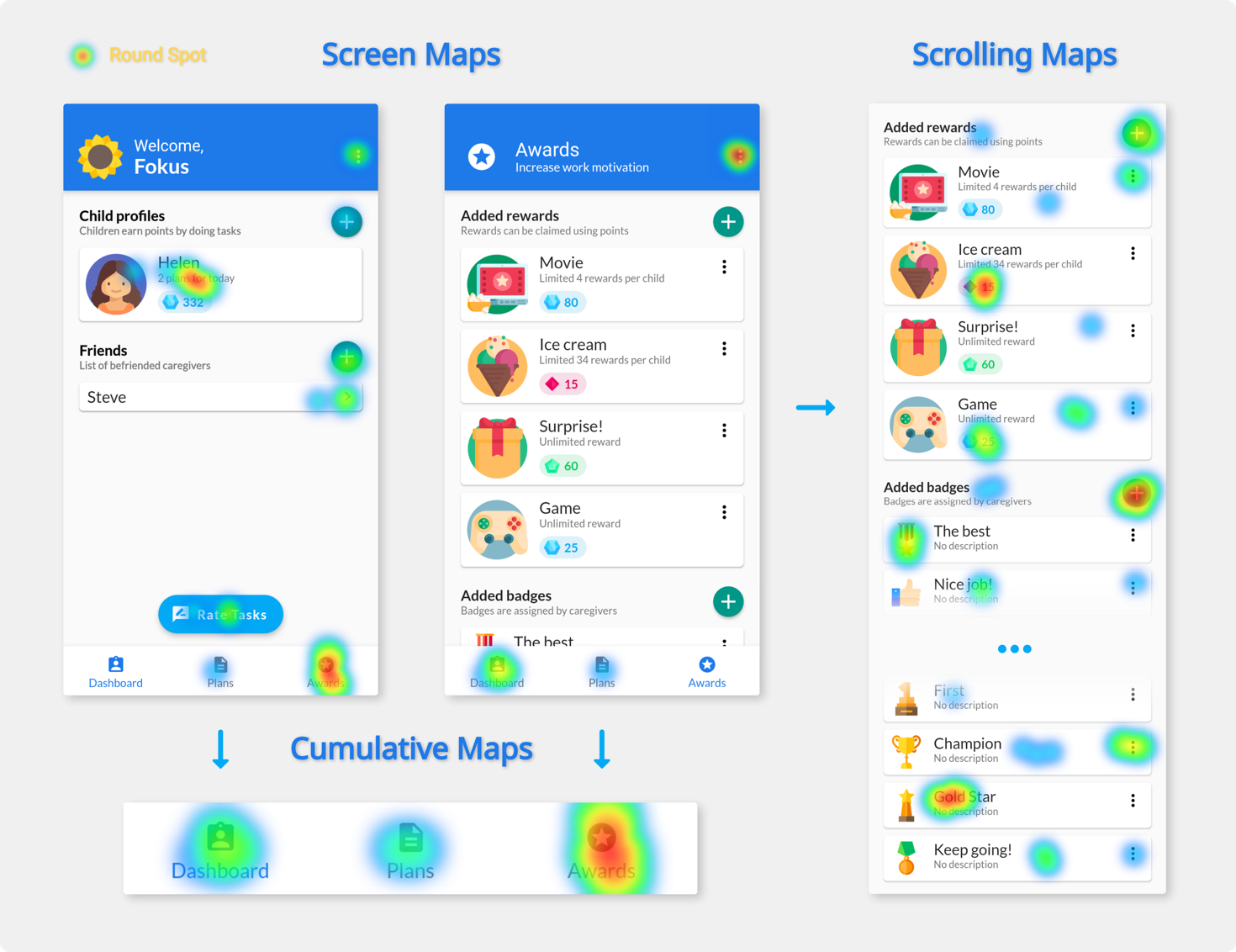
Round Spot simplifies the UI accessibility and behaviour analysis for Flutter applications by handling the data gathering and processing. It produces beautiful heat map visualizations that aim to make the UI improvement and troubleshooting easy and intuitive.

⚠️ Note: This tool still in its development and currently only offers local on device heat map generation. This limits the number of interactions that can be included in a single image and therefore can be considered as a preview.

Usage

Import the package in your main file:

import 'package:round_spot/round_spot.dart';
Setup

Wrap your MaterialApp widget to initialize the library:

void main() {
  runApp(initialize(
    child: Application()
  ));
}

Add an observer for monitoring the navigator:

MaterialApp(
  navigatorObservers: [ Observer() ]
)
Configuration

Provide the callbacks for saving the processed output:

initialize(
  localRenderCallback: (data, info) => sendHeatMapImage(data)
)

Configure the tool to better fit your needs:

initialize(
  config: Config(
    minSessionEventCount: 5,
    uiElementSize: 15,
    heatMapPixelRatio: 2.0,
  )
)
UI Instrumentation
Route naming

Route names are used to differentiate between pages. Make sure you are consistently specifying them both when using named routes and pushing PageRoutes (inside RouteSetting)

Scrollable widgets

To correctly monitor interactions with any scrollable space a Detector has to be placed as a direct parent of that widget:

Detector(
  areaID: id,
  child: ListView(
    children: /* children */,
  ),
)

Contributors

Created by Stanisław Góra

License

This tool is licenced under MIT License

所属分类

依赖

依赖清单 8 项

源码仓库

使用此插件的项目

暂无相关数据。