scroll_navigation
My other APIs
Features
- Fancy animations.
- Customizable colors.
- Works with the back button.
- Scrolling pages by gestures.
- Indicator that follows the scroll.
- Easy and powerful implementation! :)
- Page movement when tapping an icon.
Scroll Navigation Details
| NavigationPosition.bottom |
NavigationPosition.top |
 |
 |
Code
@override
Widget build(BuildContext context) {
  return ScrollNavigation(
    bodyStyle: NavigationBodyStyle(
      background: Colors.white,
      borderRadius: BorderRadius.vertical(bottom: Radius.circular(20)),
    ),
    barStyle: NavigationBarStyle(
      background: Colors.white,
      elevation: 0.0,
    ),
    pages: [
      Container(color: Colors.blue[100]),
      Container(color: Colors.green[100]),
      Container(color: Colors.purple[100]),
      Container(color: Colors.amber[100]),
      Container(color: Colors.deepOrange[100])
    ],
    items: const [
      ScrollNavigationItem(icon: Icon(Icons.camera)),
      ScrollNavigationItem(icon: Icon(Icons.chat)),
      ScrollNavigationItem(icon: Icon(Icons.favorite)),
      ScrollNavigationItem(icon: Icon(Icons.notifications)),
      ScrollNavigationItem(icon: Icon(Icons.home))
    ],
  );
}
| NavigationPosition.left |
NavigationPosition.right |
 |
 |
Code
@override
Widget build(BuildContext context) {
  return ScrollNavigation(
    bodyStyle: NavigationBodyStyle(
      background: Colors.white,
      borderRadius: BorderRadius.horizontal(left: Radius.circular(20)),
      scrollDirection: Axis.vertical,
    ),
    barStyle: NavigationBarStyle(
      position: NavigationPosition.left,
      elevation: 0.0,
      background: Colors.white,
    ),
    pages: [
      Container(color: Colors.blue[100]),
      Container(color: Colors.green[100]),
      Container(color: Colors.purple[100]),
      Container(color: Colors.amber[100]),
      Container(color: Colors.deepOrange[100])
    ],
    items: const [
      ScrollNavigationItem(icon: Icon(Icons.camera)),
      ScrollNavigationItem(icon: Icon(Icons.chat)),
      ScrollNavigationItem(icon: Icon(Icons.favorite)),
      ScrollNavigationItem(icon: Icon(Icons.notifications)),
      ScrollNavigationItem(icon: Icon(Icons.home))
    ],
  );
}
Go to a Page Code
final navigationKey = GlobalKey<ScrollNavigationState>();

@override
Widget build(BuildContext context) {
  return ScrollNavigation(
    key: navigationKey,
    pages: [...],
    items: [...],
    barStyle: NavigationBarStyle(position: NavigationPosition.top),
  );
}

void goToPage(int index) => navigationKey.currentState.goToPage(index);
Identifier Details
| physics = true |
physics = False |
 |
 |
| position = IdentifierPosition.topAndRight |
showIdentifier = False |
 |
 |
Code
return ScrollNavigation(
    pages: [...],
    items: [...],
    physics: true,
    showIdentifier: true,
    identiferStyle: NavigationIdentiferStyle(
      position: NavigationPosition.top,
    ),
);
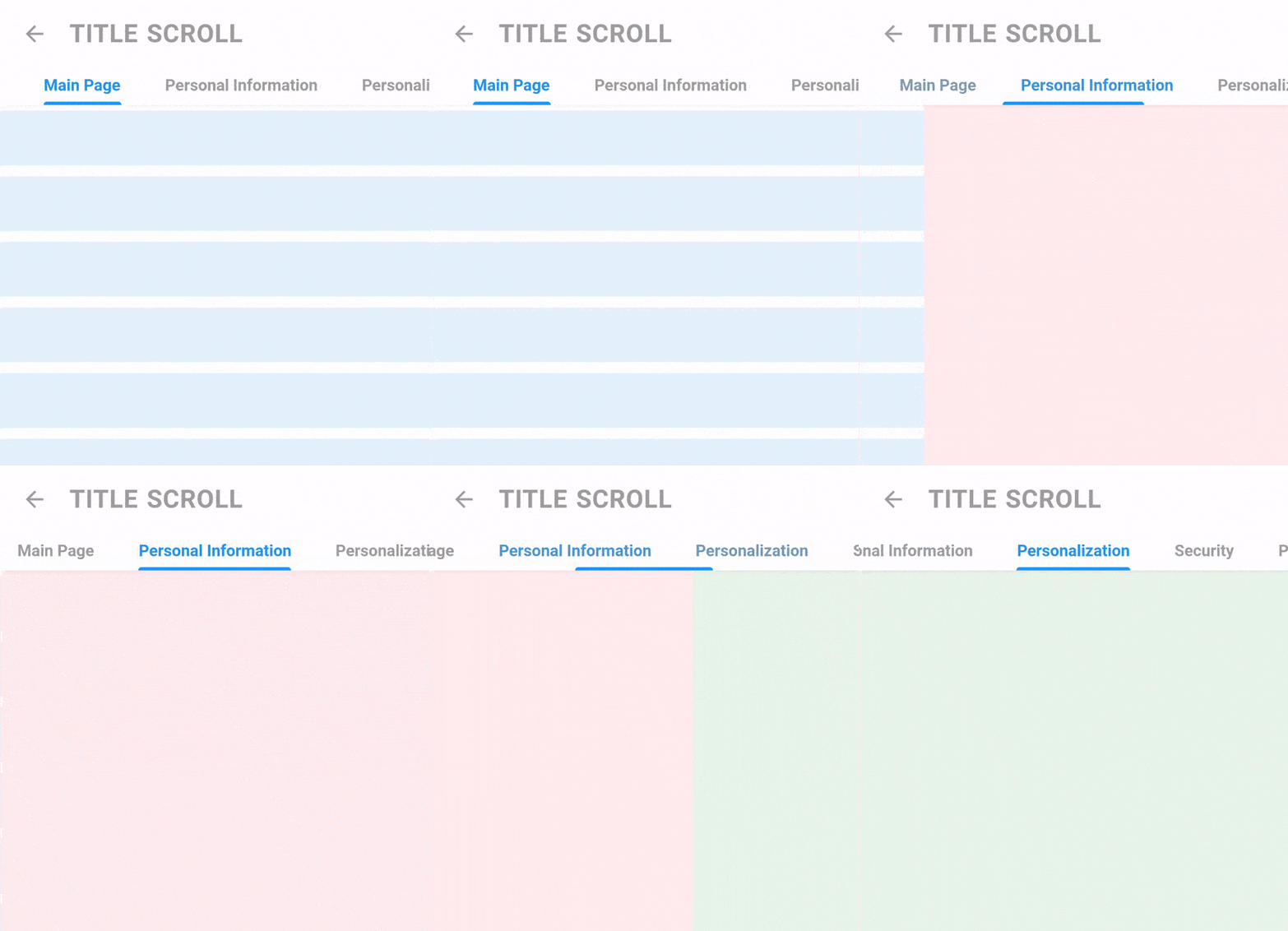
Title Scroll Navigation Details

Code
return TitleScrollNavigation(
    barStyle: TitleNavigationBarStyle(
      style: TextStyle(fontWeight: FontWeight.bold),
      padding: EdgeInsets.symmetric(horizontal: 40.0),
      spaceBetween: 40,
    ),
    titles: [
      "Main Page",
      "Personal Information",
      "Personalization",
      "Security",
      "Payment Methods",
    ],
    pages: [
      Container(color: Colors.blue[50]),
      Container(color: Colors.red[50]),
      Container(color: Colors.green[50]),
      Container(color: Colors.purple[50]),
      Container(color: Colors.yellow[50]),
    ],
);
Screen Details (Hide AppBar on scroll)

Code
ScrollController controller = ScrollController();
return Screen(
appBar: AppBarTitle(title: "Title Scroll", showBack: true),
controllerToHideAppBar: controller,
body: ListView.builder(
itemCount: 15,
padding: EdgeInsets.zero,
controller: controller,
itemBuilder: (_, __) {
return Padding(
padding: EdgeInsets.symmetric(vertical: 5),
child: Container(
height: 50,
color: Colors.blue[50],
),
);
},
),
);