搜索插件、代码仓与 APP 分类

selectable_list 封面
插件详情v0.1.1

selectable_list

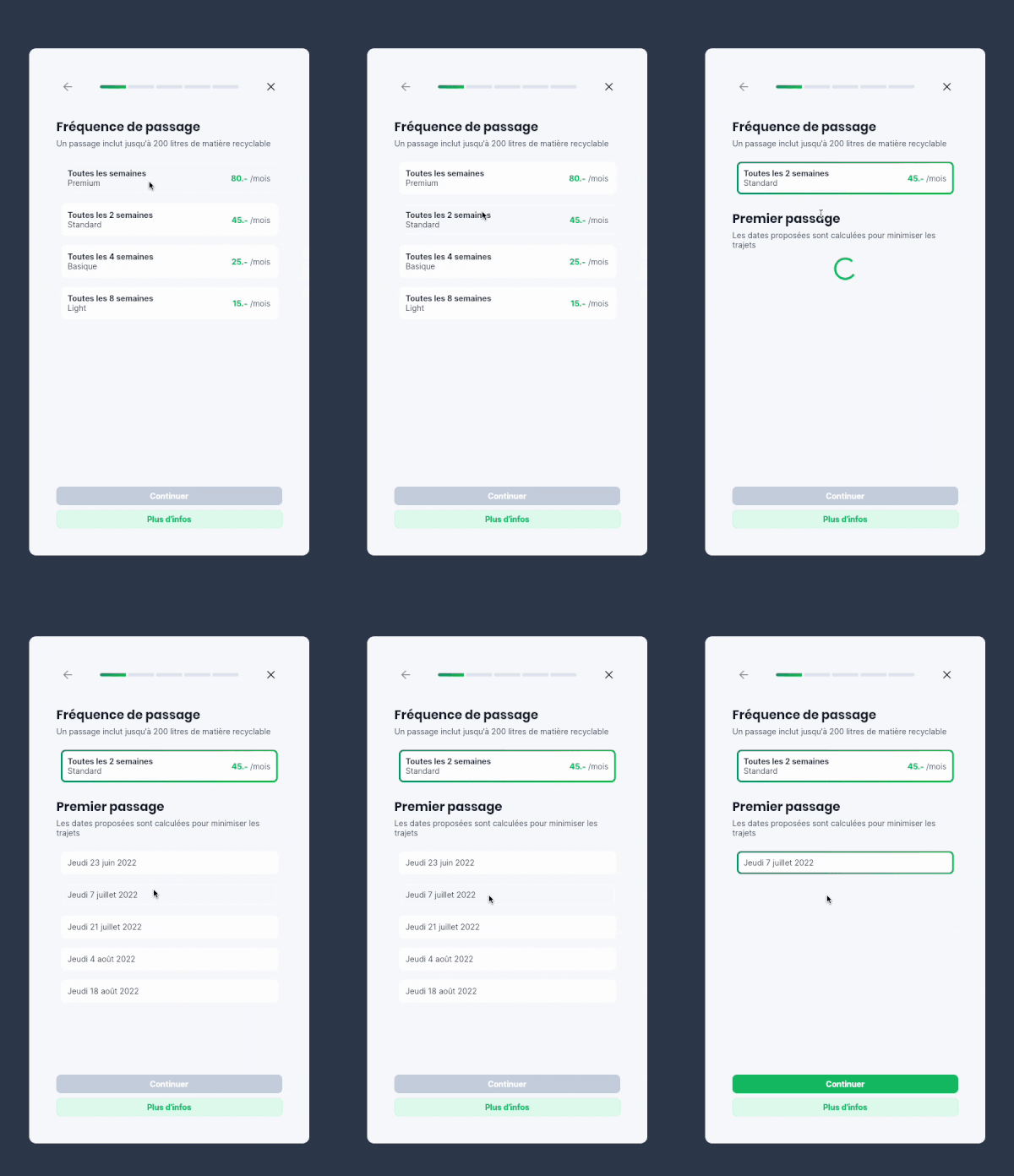
一个显示可选择项列表的小部件。当选择其中一项时,列表中的其他元素会动画移除,仅留下所选值。

AndroidiOSWebmacOSWindowsLinux
近 30 天下载
16
喜欢数
55
Pub 分数
150

安装插件

flutter pub add selectable_list

插件介绍

基于插件公开信息、社区数据与项目使用情况整理的选型参考。

selectable_list 包提供了一个 Flutter 小部件,用于显示一个项目列表,每个项目都可以被选择。选择后,列表中的其他项目会动画淡出,仅留下所选项目可见。这创造了一种简洁、专注的用户体验,非常适合单选场景。动画流畅且可自定义,增强了交互过程中的视觉反馈。它支持 Android、iOS、Web、macOS、Windows 和 Linux 等多个平台,适用于跨平台应用。

适合场景

  • 单选界面
  • 具有有限选项的表单输入
  • 交互式列表导航
  • 引导页
  • 动态内容过滤
  • 极简用户界面设计

主要特点

  • 选择时动画收起项目
  • 单选模式
  • 跨平台兼容性
  • 可自定义的动画
  • 与 Flutter 的简单集成
  • 响应式布局支持

适合对象

  • 开发直观的选取器小部件的开发者
  • 寻求极简交互模式的设计师
  • 需要专注用户输入的应用
  • 具有动态列表工作流的项目
  • 优先考虑流畅的用户体验过渡

使用建议

  • 最适合项目较少的列表
  • 可能需要额外的样式来适应复杂布局
  • 动画行为可能不适合所有用例
  • 仅限单选
  • 不适合大型数据集
  • 需要仔细处理状态管理

原始 README

以下为关联源码仓库的 README 原文快照,最新内容请访问源码仓库。

Selectable List

A widget displaying a list of selectable items

When one of the items is selected, the other elements of the list are animated out, leaving the selected value. When tapping on the value again, the other values are animated back into the list.

Example app

Features

  • Use this package when you want to allow the user to choose one element in a list, and only show this element when selected.

  • Based on the Flutter AnimatedList widget

Usage

Import the package

import 'package:selectable_list/selectable_list.dart';

Use the widget

class _ScrollableListExampleState extends State<_ScrollableListExample> {
  final persons = [
    Person("Ella", 3),
    Person("James", 25),
    Person("Gertrude", 99)
  ];

  String? selectedName;

  @override
  Widget build(BuildContext context) {
    return SelectableList<Person, String?>(
        items: persons,
        itemBuilder: (context, person, selected, onTap) => ListTile(
            title: Text(person.name),
            subtitle: Text('${person.age.toString()} years old'),
            selected: selected,
            onTap: onTap),
        valueSelector: (person) => person.name,
        selectedValue: selectedName,
        onItemSelected: (person) =>
            setState(() => selectedName = person.name),
        onItemDeselected: (person) => setState(() => selectedName = null),
    ),
  }
}

Examples of use

Forms

Useful to make forms cleaner and more compact on mobile

Example in a form

所属分类

源码仓库

使用此插件的项目

暂无相关数据。