搜索插件、代码仓与 APP 分类

snap_scroll_physics 封面
插件详情v0.0.1+3

snap_scroll_physics

滚动物理属性,用于在不同偏移量处捕捉用户的滚动

AndroidiOSWebmacOSWindowsLinux
近 30 天下载
9
喜欢数
76
Pub 分数
140

安装插件

flutter pub add snap_scroll_physics

插件介绍

基于插件公开信息、社区数据与项目使用情况整理的选型参考。

一个 Flutter 包,提供滚动物理效果,可将滚动位置吸附到特定偏移量,从而提升可滚动控件的用户体验。它允许对滚动行为进行精确控制,非常适合需要对齐到预定义位置的轮播图式界面或网格布局。该包支持所有主要平台,并可与标准 ScrollView 无缝集成。它扩展了 Flutter 内置的物理系统,提供可自定义的吸附间隔和平滑过渡。

适合场景

  • 轮播滑块
  • 网格布局与对齐
  • 表单字段导航
  • 产品轮播
  • 自定义滚动吸附
  • 交互式教程

主要特点

  • 吸附到预定义的偏移量
  • 平滑过渡动画
  • 跨平台支持
  • 扩展默认物理效果
  • 可配置的吸附间隔
  • 与 ScrollViews 的轻松集成

适合对象

  • 开发交互式滚动界面的开发者
  • 需要精确滚动对齐的设计人员
  • 带有轮播或基于标签的导航的应用程序
  • 需要自定义滚动行为的项目
  • 面向多个平台的团队

使用建议

  • 可能需要调整以获得最佳用户体验
  • 如果未妥善管理,可能与其他物理系统冲突
  • 不适合连续滚动内容
  • 使用大量快照点时的性能影响
  • 仅限可滚动的控件

原始 README

以下为关联源码仓库的 README 原文快照,最新内容请访问源码仓库。

Snap Scroll Physics

pub package

When building scrollable views, sometimes you would prefer that the scroll stopped at a given offset, or that it avoids to stop inside some area. This package allows you to implement this on any Flutter scroll view.

This kind of behaviour can be seen in any iOS app using the UIKit/SwiftUI Navigation bar, also with custom headers inside some popular apps like Twitter, Chrome, Gmail, Google Photos, Apple Music, Facebook and many more!

snap_scroll

physics: SnapScrollPhysics(
    snaps: [
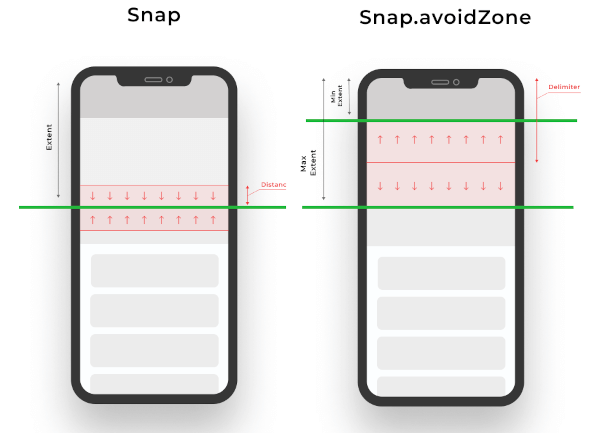
        Snap(200, distance: 50), // If the scroll offset is expected to stop between 150-250 the scroll will snap to 200,
        Snap(200, leadingDistance: 50), // If the scroll offset is expected to stop  between 150-200 the scroll will snap to 200,
        Snap(200, trailingDistance: 50), // If the scroll offset is expected to stop between 150-200 the scroll will snap to 200,
        Snap(200, trailingDistance: 50), // If the scroll offset is expected to stop between 150-200 the scroll will snap to 200,
        Snap.avoidZone(0, 200), // If the scroll offset is expected to stop between 0-200, the scroll will snap to 0 if the expected one is between 0-99, and to 200 if it is between 100-200,
        Snap.avoidZone(0, 200, delimiter: 50), // If the scroll offset is expected to stop between 0-200, the scroll will snap to 0 if the expected one is between 0-49, and to 200 if it is between 50-200
    ]
),
physics: SnapScrollPhysics.cupertinoAppBar, // Default values for the Cupertino appbar

https://user-images.githubusercontent.com/19904063/116775316-b67b8f80-aa62-11eb-9ae1-58da68a381e4.mp4

https://user-images.githubusercontent.com/19904063/116775452-56391d80-aa63-11eb-95ae-f8fd8154cbc9.mp4

IMPORTANT! Sadly ScrollPhysics are not reactivily updated, so if you change the values, they won't be automatically updated. See #80051.

This can be temporaly fixed by this, while is discouraged in production if no changes are needed at runtime:


List<Snap> getSnaps() {
    return [
       Snap(200), // Hot reload works
    ];
}
@override
  Widget build(BuildContext context) {
    return CustomScrollView(
      physics: SnapScrollPhysics.builder(getSnaps),
      slivers: [
       // ....
      ],
    );
  }

所属分类

源码仓库

使用此插件的项目