搜索插件、代码仓与 APP 分类

插件详情v1.0.33

substring_highlight

在字符级别突出显示Flutter文本,以实现简单且可自定义的搜索词高亮。

AndroidiOSWebmacOSWindowsLinux
近 30 天下载
7.5万
喜欢数
200
Pub 分数
150

安装插件

flutter pub add substring_highlight

插件介绍

基于插件公开信息、社区数据与项目使用情况整理的选型参考。

一个 Flutter 包,可实现字符级别的文本高亮,非常适合在文本中突出显示搜索关键词。它提供简单的集成方式和可自定义的匹配子字符串样式选项,适用于搜索界面。该包支持 Android、iOS、Web、macOS、Windows 和 Linux 等多个平台,确保在不同设备上行为一致。通过 pub 命令进行最少配置,开发者可以清晰标记搜索中的相关文本段落,从而提升用户体验。

适合场景

  • 搜索结果预览
  • 带有视觉提示的文本过滤
  • 自定义搜索 UI 组件
  • 实时关键词高亮
  • 表单中的用户输入反馈
  • 文档或内容扫描

主要特点

  • 字符级子字符串匹配
  • 可自定义高亮颜色和样式
  • 简单的 API 用于集成
  • 跨平台兼容性
  • 支持多个文本小部件
  • 可配置的匹配灵敏度

适合对象

  • 开发搜索密集型应用的开发者
  • 需要视觉反馈的UI设计师
  • 需要实时文本高亮的应用程序
  • 教育或文档审查工具
  • 内容发现界面

使用建议

  • 可能会影响非常长文本的性能
  • 需要手动处理文本更新
  • 仅限子字符串匹配(不支持正则表达式)
  • 样式可能需要平台特定的调整
  • 不支持嵌套文本跨度

原始 README

以下为关联源码仓库的 README 原文快照,最新内容请访问源码仓库。

substring_highlight

Highlight Flutter text at the character-level.

Designed for case-insensitive search-term highlighting, a single search term sub-string is highlighted (perhaps multiple times) within a longer string.

Inspired by the existing Flutter package "highlight_text" which supports word matches ('Peter''), but substring_highlight has more granular character-by-character matches (e.g., 't' in 'Peter').

Limitations:

  1. Highlighted text is not clickable
  2. Doesn't solve perplexing world problems like hunger and climate change

The substrings being searched for highlighting don't have to match at the beginning of the longer strings (can be anywhere inside).

Even space characters will match, but not be highlighted, obviously.

Ancestor MUST have textDirection set (required by internal RichText widget), either through MaterialApp widget or explicitly wrapped by a Directionality widget:

Directionality(
    child: SubstringHighlight(text: 'Peter', term: 't'),
    textDirection: TextDirection.ltr)

Pull Requests

Pull requests are welcome and I try to merge them within a few days.

Examples

Default Styling Example

Code:

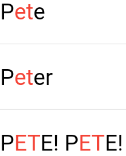
As an example, the following code snippet uses this package to highlight matching characters in each search result:

import 'package:substring_highlight/substring_highlight.dart';

...

  @override
  Widget build(BuildContext context) (
    return Container(
      padding: const EdgeInsets.all(12),
      child: SubstringHighlight(
        text: dropDownItem,     // search result string from database or something
        term: searchTerm,       // user typed "et"
      ),
    );
  )
Output:

Screenshot

Customized Styling Example

Code:

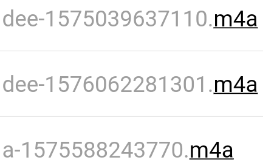
This example adds 'textStyle' and 'textStyleHighlight' to change the colors of the text:

import 'package:substring_highlight/substring_highlight.dart';

...

  @override
  Widget build(BuildContext context) (
    return Container(
      padding: const EdgeInsets.all(12),
      child: SubstringHighlight(
        text: dropDownItem,                         // each string needing highlighting
        term: searchTerm,                           // user typed "m4a"        
        textStyle: TextStyle(                       // non-highlight style                       
          color: Colors.grey,
        ),
        textStyleHighlight: TextStyle(              // highlight style
          color: Colors.black,
          decoration: TextDecoration.underline,
        ),        
      ),
    );
  )
Output:

Screenshot

所属分类

源码仓库

使用此插件的项目