搜索插件、代码仓与 APP 分类

sweetsheet 封面
插件详情v0.4.0

sweetsheet

快速轻松地显示漂亮的底部弹出菜单作为确认对话框。

AndroidiOSWebmacOSWindowsLinux
近 30 天下载
50
喜欢数
231
Pub 分数
140

安装插件

flutter pub add sweetsheet

插件介绍

基于插件公开信息、社区数据与项目使用情况整理的选型参考。

Sweetsheet 是一个 Flutter 包,可让开发者快速轻松地显示吸引人的底部弹窗作为确认对话框。它通过最少的代码简化了创建模态底部弹窗的过程,开箱即用提供简洁现代的用户界面。该包专为跨多个平台的无缝集成而设计,支持 Android、iOS、Web、macOS、Windows 和 Linux。该包通过提供流畅的动画和可自定义的布局来提升用户体验,同时保持设计上的简洁性和一致性。

适合场景

  • 快速确认对话框
  • 用户操作提示
  • 表单提交确认
  • 模态导航
  • 简单的弹出式界面

主要特点

  • 易于使用的 API
  • 漂亮的默认样式
  • 跨平台支持
  • 可自定义内容
  • 平滑动画
  • 最小化样板代码

适合对象

  • 寻求快速底部抽屉实现的开发者
  • 需要轻量级确认对话框的项目
  • 具有统一 UI 模式的应用
  • 注重开发速度的团队
  • Flutter 初学者探索底部表单

使用建议

  • 超出基础样式的定制功能有限
  • 不适合复杂的交互式表单
  • 依赖外部依赖项以实现完整功能
  • 最适合简单用例,而非高级模态框

原始 README

以下为关联源码仓库的 README 原文快照,最新内容请访问源码仓库。

sweetsheet

Show beautiful bottom sheet as confirmation dialog quickly and easily.

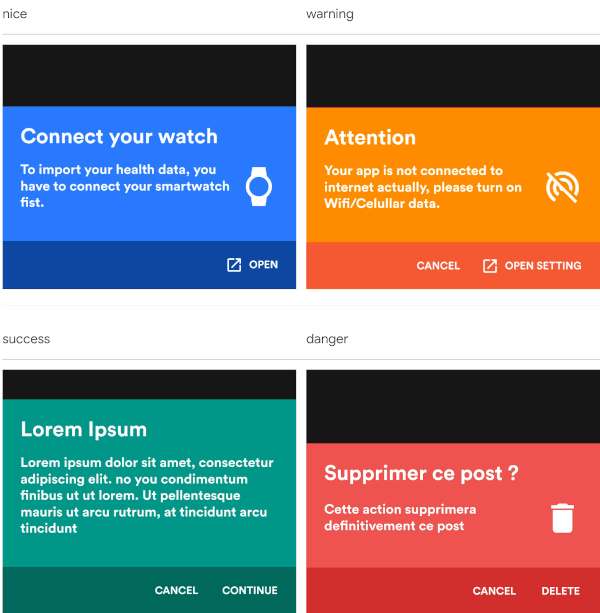
nice warning
nice warning
success danger
success danger

and since version 0.2.0 , it is fully customizable.

custom dark custom light
success danger

Getting Started

With increasingly large smartphones, it has become almost impossible to have good ergonomics in an application using confirmation dialogs. The SweetSheet package allows you to show beautiful bottoms sheets to replace your confirmation dialogs and maintain a good user experience.

How to use?

Add this to your package's pubspec.yaml file:

dependencies:
  sweetsheet: ^0.4.0

And import it:

import 'package:sweetsheet/sweetsheet.dart';

to start using the sheets, you have to create the instance of the SweetSheet class first.

final SweetSheet _sweetSheet = SweetSheet();

Now you can show the bottom sheet by calling the method show() on the instance. This is the signature of the show method

  show({
    required BuildContext context,
    Text? title,
    required Text description,
    required CustomSheetColor color,
    required SweetSheetAction positive,
    EdgeInsets? contentPadding = const EdgeInsets.symmetric(horizontal: 24.0, vertical: 24.0),
    EdgeInsets? actionPadding = const EdgeInsets.all(8.0),
    SweetSheetAction? negative,
    IconData? icon,
    bool useRootNavigator = false,
    bool isDismissible = true,
  }) {}

This is the signature of the SweetSheetAction widget.

class SweetSheetAction extends StatelessWidget {
  final String title;
  final VoidCallback onPressed;
  final IconData icon;
  final Color color;

  SweetSheetAction({
    @required this.title,
    @required this.onPressed,
    this.icon,
    this.color = Colors.white,
  });  
}

Attention : At least one action is required and the icons are IconData for uniformity purpose.

The SweetSheetColor is a class which have four static values and it determine the color of the sheet by creating a CustomSheetColor:

  • SweetSheetColor.SUCCESS (green)
  • SweetSheetColor.DANGER (red)
  • SweetSheetColor.WARNING (orange)
  • SweetSheetColor.NICE (blue)

Customisation

To customise, create a new instance of CustomSheetColor and pass it to the argument color when calling the method show. signature of CustomSheetColor:

class CustomSheetColor {
  Color main;
  Color accent;
  Color icon;

  CustomSheetColor({@required this.main, @required this.accent, this.icon});
}

To customise the action, pass a new color to color argument of SweetSheetAction.

Example:

Warning
_sweetSheet.show(
    context: context,
    title: Text("Attention"),
    description: Text(
        'Your app is not connected to internet actually, please turn on Wifi/Celullar data.'),
    color: SweetSheetColor.WARNING,
    icon: Icons.portable_wifi_off,
    positive: SweetSheetAction(
      onPressed: () {
        Navigator.of(context).pop();
      },
      title: 'OPEN SETTING',
      icon: Icons.open_in_new,
    ),
    negative: SweetSheetAction(
      onPressed: () {
        Navigator.of(context).pop();
      },
      title: 'CANCEL',
    ),
);
Custom Light
_sweetSheet.show(
    context: context,
    description: Text(
      'Place your order. Please confirm the placement of your order : Iphone X 128GB',
      style: TextStyle(color: Color(0xff2D3748)),
    ),
    color: CustomSheetColor(
      main: Colors.white,
      accent: Color(0xff5A67D8),
      icon: Color(0xff5A67D8),
    ),
    icon: Icons.local_shipping,
    positive: SweetSheetAction(
      onPressed: () {
        Navigator.of(context).pop();
      },
      title: 'CONTINUE',
    ),
    negative: SweetSheetAction(
      onPressed: () {
        Navigator.of(context).pop();
      },
      title: 'CANCEL',
  ),
);
That is all. Have fun!

所属分类

源码仓库

使用此插件的项目

暂无相关数据。