搜索插件、代码仓与 APP 分类

swipe_cards 封面
插件详情v2.0.0+1

swipe_cards

类似 Tinder 的滑动卡片。

AndroidiOSWebmacOSWindowsLinux
近 30 天下载
64
喜欢数
117
Pub 分数
130

安装插件

flutter pub add swipe_cards

插件介绍

基于插件公开信息、社区数据与项目使用情况整理的选型参考。

Swipe Cards 是一个 Flutter 包,可帮助开发者创建类似 Tinder 的可滑动卡片界面。它支持水平滑动和直观的手势操作,允许用户向左或向右滑动卡片。该包设计简洁且易于自定义,非常适合需要卡片式导航的应用程序,例如约会应用、产品展示或内容发现功能。它可在 Android、iOS、Web、macOS、Windows 和 Linux 等多个平台上运行。

适合场景

  • 约会应用界面
  • 产品或商品发现
  • 内容浏览
  • 用户偏好收集
  • 交互式入门屏幕

主要特点

  • Tinder风格的滑动手势
  • 可自定义的卡片外观
  • 跨平台支持
  • 流畅的动画过渡
  • 手势识别
  • 与 Flutter 的轻松集成

适合对象

  • 开发基于滑动的用户界面的开发者
  • 需要用户通过滑动卡片进行交互的应用程序
  • 针对多个平台的项目

使用建议

  • 需要处理状态管理
  • 有限的内置卡数据处理
  • 可能需要额外的样式来处理复杂的布局
  • 未针对无分页的大卡数据集进行优化

原始 README

以下为关联源码仓库的 README 原文快照,最新内容请访问源码仓库。

swipe_cards pub package

A Flutter widget for Tinder like swipe cards. The card can be swiped right, left and up for different responses. Currently it supports the following responses:

  • Right swipe for like
  • Left swipe for nope
  • Up swipe for superlike

Install

To install the package, add the following dependency to your pubspec.yaml

dependencies:
  swipe_cards: ^2.0.0+1

Usage

Basic
import 'package:swipe_cards/swipe_cards.dart';

SwipeCards(
            matchEngine: <MatchEngine>,
            itemBuilder: (BuildContext context, int index) {},
            onStackFinished: () {},
            itemChanged: (SwipeItem item, int index) {},
            upSwipeAllowed: <bool>,
            fillSpace: <bool>,
);
Attributes of SwipeCards
Key Description
matchEngine An instance of MatchEngine that acts as controller for trigerring swipes manually.
itemBuilder A function that returns the view inside a swipe card.
likeTag Widget appears in like/right area during swipe.
nopeTag Widget appears in nope/left area during swipe.
superLikeTag Widget appears in super-like/up area during swipe.
onStackFinished A function that is triggered as soon as all the cards have been swiped.
itemChanged A function that is triggered when item in the stack changes (moves to next card).
leftSwipeAllowed To enable/disable left swipe. (Default: true)
rightSwipeAllowed To enable/disable right swipe. (Default: true)
upSwipeAllowed To enable/disable up swipe. (Default: false)
fillSpace Config weather to fill up the space or not. (Default: true)
MatchEngine

MatchEngine is the controller for the swipe cards. It takes swipeItems as an argument and is used to trigger the swipes manually, for example on button press. The data type of swipeItems is List<SwipeItem>.

MatchEngine _matchEngine = MatchEngine(swipeItems: List<SwipeItem>);
Functions in MatchEngine
Key Description
_matchEngine.currentItem.like(); To trigger right swipe manually.
_matchEngine.currentItem.nope(); To trigger left swipe manually.
_matchEngine.currentItem.superLike(); To trigger up swipe manually.
SwipeItem

SwipeItem contains the actual data that can be rendered in the swipe card. Actually it is a wrapper over any dynamic object and just adds the functionality of like, nope and superlike to that object.

SwipeItem(
            content: "Anup Kumar Panwar",
            likeAction: () {
                log("Like");
            },
            nopeAction: () {
                log("Nope");
            },
            superlikeAction: () {
                log("Superlike");
            },
            onSlideUpdate: (SlideRegion? region){
                log("Region $region");
            }
);
Attributes of SwipeItem
Key Description
content An object that contains the actual data to be rendered in the swipe card.
likeAction A function that is triggered when the card is liked.
nopeAction A function that is triggered when the card is not liked / swiped left.
superlikeAction A function that is triggered when the card is superliked.
onSlideUpdate A function that is triggered when the card is being dragged and tells about the current region of the card.
Example
List<SwipeItem> _swipeItems = List<SwipeItem>();
  MatchEngine _matchEngine;
  GlobalKey<ScaffoldState> _scaffoldKey = GlobalKey();
  List<String> _names = ["Red", "Blue", "Green", "Yellow", "Orange"];
  List<Color> _colors = [
    Colors.red,
    Colors.blue,
    Colors.green,
    Colors.yellow,
    Colors.orange
  ];

  @override
  void initState() {
    for (int i = 0; i < _names.length; i++) {
      _swipeItems.add(SwipeItem(
          content: Content(text: _names[i], color: _colors[i]),
          likeAction: () {
            ScaffoldMessenger.of(context).showSnackBar(SnackBar(
              content: Text("Liked ${_names[i]}"),
              duration: Duration(milliseconds: 500),
            ));
          },
          nopeAction: () {
            ScaffoldMessenger.of(context).showSnackBar(SnackBar(
              content: Text("Nope ${_names[i]}"),
              duration: Duration(milliseconds: 500),
            ));
          },
          superlikeAction: () {
            ScaffoldMessenger.of(context).showSnackBar(SnackBar(
              content: Text("Superliked ${_names[i]}"),
              duration: Duration(milliseconds: 500),
            ));
          },
          onSlideUpdate: (SlideRegion? region) async {
            print("Region $region");
          }));
    }

    _matchEngine = MatchEngine(swipeItems: _swipeItems);
    super.initState();
  }

  @override
  Widget build(BuildContext context) {
    return Scaffold(
        key: _scaffoldKey,
        appBar: AppBar(
          title: Text(widget.title),
        ),
        body: Container(
            child: Column(children: [
          Container(
            height: 550,
            child: SwipeCards(
              matchEngine: _matchEngine,
              itemBuilder: (BuildContext context, int index) {
                return Container(
                  alignment: Alignment.center,
                  color: _swipeItems[index].content.color,
                  child: Text(
                    _swipeItems[index].content.text,
                    style: TextStyle(fontSize: 100),
                  ),
                );
                  },
                  onStackFinished: () {
                    ScaffoldMessenger.of(context).showSnackBar(SnackBar(
                      content: Text("Stack Finished"),
                      duration: Duration(milliseconds: 500),
                    ));
                  },
                  itemChanged: (SwipeItem item, int index) {
                    print("item: ${item.content.text}, index: $index");
                  },
                  upSwipeAllowed: true,
                  fillSpace: true,
                ),
              ),
              Row(
                mainAxisAlignment: MainAxisAlignment.spaceEvenly,
                children: [
                  RaisedButton(
                      onPressed: () {
                        _matchEngine.currentItem.nope();
                      },
                      child: Text("Nope")),
                  RaisedButton(
                      onPressed: () {
                        _matchEngine.currentItem.superLike();
                      },
                      child: Text("Superlike")),
                  RaisedButton(
                      onPressed: () {
                        _matchEngine.currentItem.like();
                      },
                      child: Text("Like"))
                ],
              )
            ])));
  }
  class Content {
    final String text;
    final Color color;

    Content({this.text, this.color});
  }

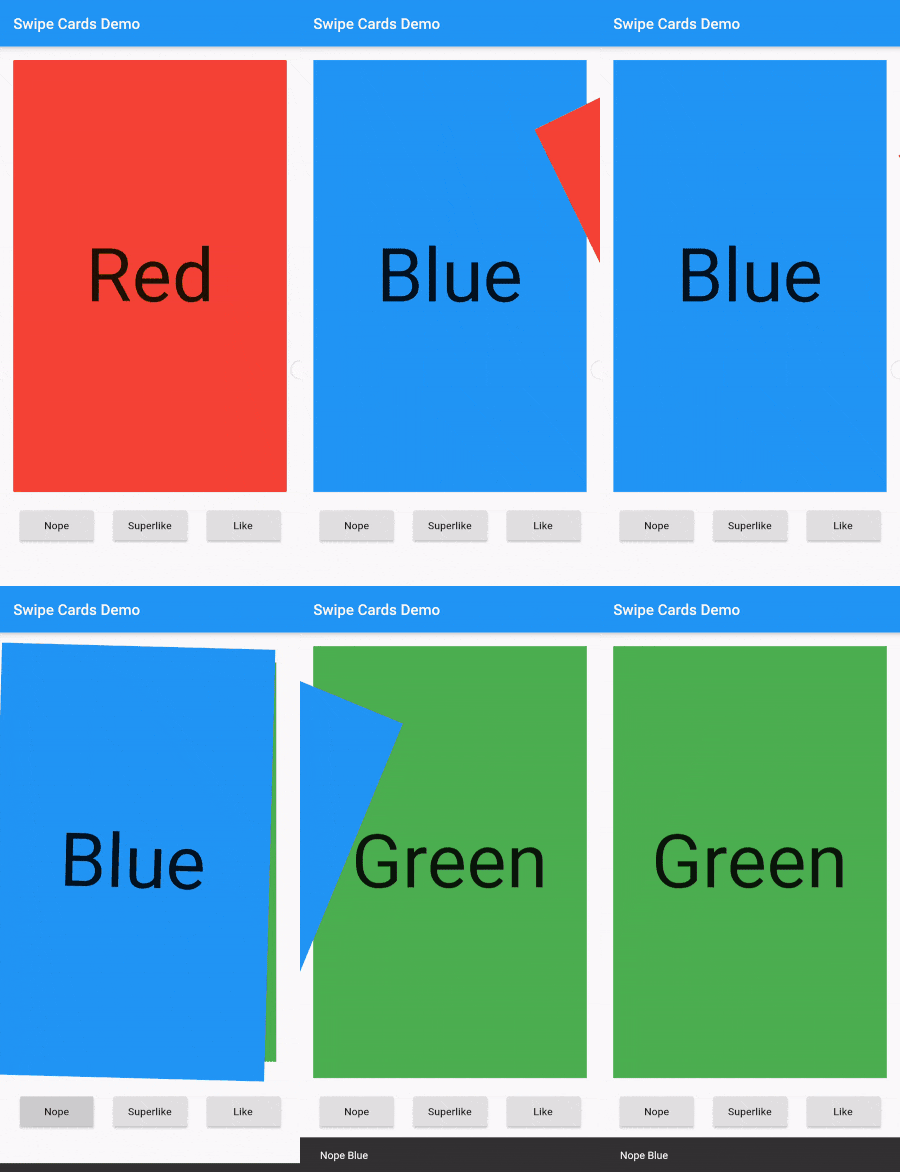
Screenshot

Screenshot

所属分类

源码仓库

使用此插件的项目

暂无相关数据。