搜索插件、代码仓与 APP 分类

插件详情v1.2.5

universal_widget

一个通用小部件,可放置在您的小部件树中的任何位置,并完全支持动画和辅助功能。

近 30 天下载
26
喜欢数
52
Pub 分数
35

安装插件

flutter pub add universal_widget

插件介绍

基于插件公开信息、社区数据与项目使用情况整理的选型参考。

一个功能多样的 Flutter 小部件,可无缝集成到小部件树中的任何位置。它支持完整的动画功能和无障碍功能,确保在不同上下文中提供一致且包容的用户体验。非常适合需要动态行为和屏幕阅读器兼容性的可重用组件。该包增强了小部件的灵活性,同时不牺牲性能或可用性。

适合场景

  • 可重用的 UI 组件
  • 动态内容渲染
  • 符合无障碍访问的界面
  • 跨平台 widget 集成
  • 动画UI元素

主要特点

  • 完整的动画支持
  • 内置可访问性
  • 在组件树中的灵活定位
  • 轻量且高效
  • 可扩展的设计

适合对象

  • 开发可重用组件的开发者
  • 注重可访问性的团队
  • 需要动画UI的应用
  • 具有复杂 Widget 层次结构的项目
  • 跨平台 Flutter 应用

使用建议

  • 需要理解 Flutter 的 widget 生命周期
  • 可能需要额外配置以支持高级动画
  • 未针对高频更新进行优化
  • 有限的平台特定自定义
  • 依赖于在状态管理流程中的正确集成

原始 README

以下为关联源码仓库的 README 原文快照,最新内容请访问源码仓库。

The Mighty UniversalWidget

I'm just so excited to introduce to you my superhero widget: UniversalWidget

You can find the package at: https://pub.dartlang.org/packages/universal_widget

  • Changelog: https://github.com/mrgoonie/flutter_universal_widget/blob/master/CHANGELOG.md

Why?

With UniversalWidget, you will have full control with it in the widget tree.

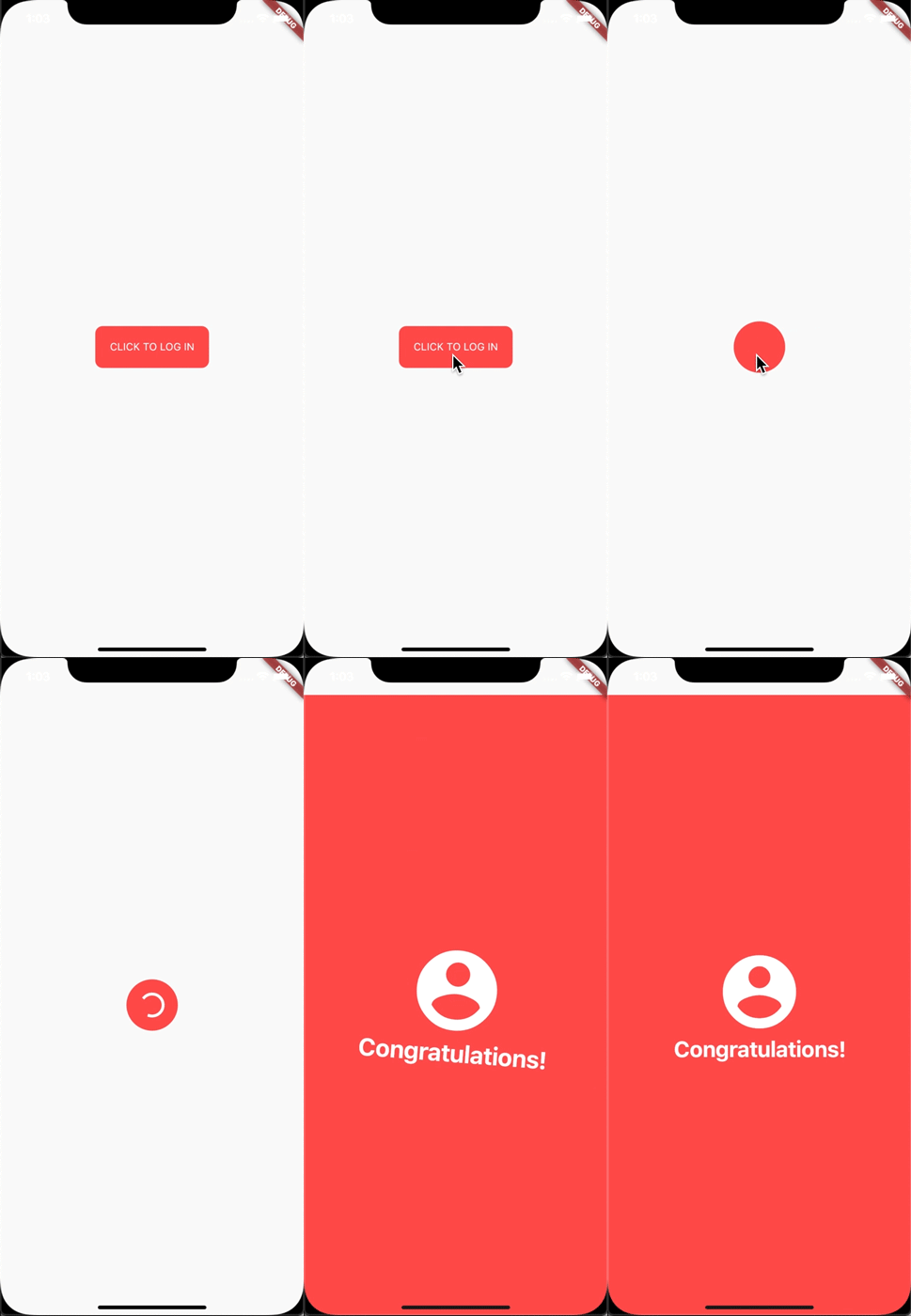
alt text

I made this login animation with UniversalWidget in only 8 lines of code. If you want to know how to do it with Flutter, see this cool tutorial: https://blog.geekyants.com/flutter-login-animation-ab3e6ed4bd19

Write less, do more.

For example, instead of:

Positioned(
  top: 10,
  left: 20,
  child: Container(
    height: 50,
    padding: EdgeInsets.all(20),
    decoration: BoxDecoration(
      color: Colors.blueAccent,
      borderRadius: BorderRadius.circular(10)
    ),
    transform: Matrix4()..identity()
      ..translate(20, 40)
      ..rotation(45 * math.pi),
    child: Text("Hello World")
  )
)

You can write:

UniversalWidget(
  x: 20,
  y: 40,
  rotation: 45, // degrees
  top: 10,
  left: 20,
  height: 50,
  padding: EdgeInsets.all(20)
  color: Colors.blueAccent,
  borderRadius: BorderRadius.circular(10),
  child: Text("Hello World")
)

Much shorter, right? Not stop from that, it's more helpful than you think. Please continue reading the next paragraph.

Flexibility

Let's say I have a widget in red:

UniversalWidget myWidget = UniversalWidget(
  color: Colors.red
);

What if I want to change its color into BLUE when I pressed a button? Easy as pie:

RaisedButton(
  child: Text("Change Me!"),
  onPressed: (){
    myWidget.update(
      color: Colors.blue
    )
  }
);

Think about how you will do this with StatefulWidget, I bet it would cost you at least 20 lines of code. Now looks back...

There are a lot more features that can unlock the true power of UniversalWidget. Such as:

To manage the UniversalWidget's visibility:

myWidget.update(visible: false);
// turns its visibility on by: myWidget.update(visible: true);

You can even change the child widget of UniversalWidget:

myWidget.update(
  child: Text("Holy Shiettttt!")
);

Masking (clipping) the child widget of UniversalWidget by setting mask flag:

myWidget.update(
  mask: true,
  child: Text("Holy Shiettttt!")
);

Animation

I admit that AnimatedContainer does a good job. But UniversalWidget can do animation much better:

UniversalWidget myWidget = UniversalWidget(
  color: Colors.red,
  height: 50
);
// let animate it:
myWidget.update(
  duration: 0.5 // seconds
  color: Colors.blue
);

It's just simple like that!

Advanced Animation

Apply easing type to the animation, listen to the widget to see when the animation is finished, see the progress of the animation, or make the animation repeated. Here you go:

myWidget.update(
  duration: 0.5, // in seconds
  delay: 2, // in seconds - wait 2 seconds then play the animation
  height: 100,
  ease: Curve.elasticEaseOut, // or your can use Ease.elasticEaseOut, it's the same
  onComplete: (widget){
    print("I finished changing my height!");
  },
  onUpdate: (progress){
    print("Animation progress is $progress");
  }
);

If you want to repeat the animation 5 times:

myWidget.update(
  ...
  repeat: 5,
  ...
);

If you want the animation to play in reverse after it's finish: (like the way playing Yoyo in real life)

myWidget.update(
  ...
  yoyo: true,
  ...
);

If you want to repeat the animation forever:

myWidget.update(
  ...
  repeat: -1,
  ...
);

Combining "repeat" and "yoyo", you will have the animation go forward & backward forever:

myWidget.update(
  ...
  repeat: -1,
  yoyo: true,
  ...
);

To stop the widget from animation:

myWidget.killAllTweens();

Additional Animation Easing Types

Yes, UniversalWidget has more easing type than Flutter framework, it supports:

  • Ease.backIn
  • Ease.backOut
  • Ease.backInOut
  • Ease.slowMo
  • Ease.sineIn
  • Ease.sineOut
  • Ease.sineInOut

Let play with it yourself! ;)

Accessibility

Let's take full control of your UniversalWidget, you can access to it everywhere, EVERYWHERE. (as long as it's still on your screen)

By give it a name:

UniversalWidget(
  name: "TheMightyWidgetEver",
  width: 100.0, height: 50.0
);

Now what if you want this widget to animate the height to zero when pressing on the button?

RaisedButton(
  child: Text("Collapse Me!"),
  onPressed: (){
    UniversalWidget.find("TheMightyWidgetEver").update(
      duration: 0.8,
      height: 0.0
    )
  }
);

Or just want to check for its properties:

UniversalWidget widget = UniversalWidget.find("TheMightyWidgetEver");
print(widget.get().width); // 100.0

Notes that the given name should be unique, if you have many UniversalWidget with the same name, only the latest one in the widget tree can be accessible by a name, the others won't. So please name it wisely.

Wait, there's more. If you want to check for the size of the widget, do this:

UniversalWidget(
  child: Text("Hello World!"),
  // because the widget size can only be calculated after the widget are build, you need to listen on this event:
  onWidgetBuilt: (context){
    print("My size is ${context.size}");
  }
);

Check whether the widget located on the screen:

UniversalWidget widget = UniversalWidget.find("TheMightyWidgetEver");
//...
print(widget.globalPosition);

Summary

Phewwww... that's it for now. Now you guys might understand why I called it "The Mighty Widget", not too brag, eh? Hopefully it will save you a bunch of time, as it's saving me right now.

If you have any feedback, or meet any troubles while using this widget, please feel free to reach me via this Github repo.

Happy Coding with Flutter guys! I'll be back.

所属分类

源码仓库

使用此插件的项目

暂无相关数据。