搜索插件、代码仓与 APP 分类

插件详情v1.0.2

use_optimistic

一个易于使用的钩子,可乐观地更新通用状态,然后通过 `accept`、`acceptAs` 或 `reject` 异步解析。

AndroidiOSWebmacOSWindowsLinux
近 30 天下载
16
喜欢数
5
Pub 分数
160

安装插件

flutter pub add use_optimistic

插件介绍

基于插件公开信息、社区数据与项目使用情况整理的选型参考。

一个 Flutter/Dart 包,提供了一个简单的钩子,用于乐观地更新状态。它允许开发者立即在 UI 中反映更改,然后通过 accept、acceptAs 或 reject 方法异步处理这些更改。适用于表单提交、开关操作或任何需要在服务器确认前立即反馈以提升用户体验的场景。该钩子可平稳管理状态转换,并支持多个平台。

适合场景

  • 实时表单更新
  • 切换操作并立即获得反馈
  • 带有乐观 UI 的异步操作
  • 具有回滚功能的数据提交
  • 用户交互模拟

主要特点

  • 乐观状态更新
  • 对 accept/acceptAs/reject 的支持
  • 简单的 API,最小化样板代码
  • 跨平台兼容性
  • 内置状态管理
  • 与现有钩子的轻松集成

适合对象

  • 寻求即时 UI 反馈的开发者
  • 需要临时状态更改的项目
  • 频繁异步交互的应用程序
  • 注重用户体验响应速度的团队
  • 使用函数式组件的Flutter应用

使用建议

  • 需要理解异步状态处理
  • 不适用于关键数据,除非有备用方案
  • 拒绝时需要适当的错误处理
  • 最好配合清晰的用户反馈机制使用
  • 可能需要额外的逻辑来处理复杂的工作流

原始 README

以下为关联源码仓库的 README 原文快照,最新内容请访问源码仓库。

Flutter hook: useOptimistic 🪝

An easy-to-use hook to optimistically update generic state and then resolve it later (async or sync) by accept, acceptAs, or reject-ing.


Documentation
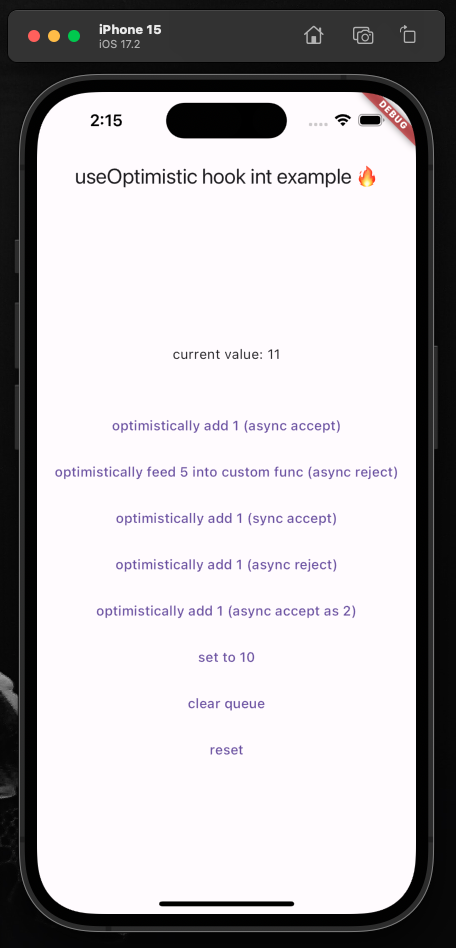
  • Full example of using this hook to manage integer state.
  • GitHub repo found here.
  • Package found here.

Documentation is largely found in the package itself via doc-comments (i.e. hover over package functions in your editor and it'll tell you what they do). First, however, view the above full example to get started.

Simple usage

demo image

Initialize the hook:

  final UseOptimistic<int> useOptimistic = UseOptimistic<int>(initialState: 0)

Ensure your widget listens to its state changes:

@override
void initState() {
  super.initState();
  useOptimistic.addListener(() => setState(() => debugPrint("state changed to: ${useOptimistic.state}")));
}

Ensure the hook will be disposed when your widget is:

@override
void dispose() {
  super.dispose();
  useOptimistic.dispose();
}

Update your state optimistically:

TextButton(
  onPressed: () async {

    Resolver r = useOptimistic.fn(
      1, // the [newValue] to be passed to functions below
      todo: (currentState, newValue) => currentState + newValue,
      undo: (currentState, oldValue) => currentState - oldValue,
    );

    // simulating an API call
    await Future.delayed(const Duration(seconds: 1));

    // three mutually exclusive ways to deal with result
    r.acceptAs(2); // [undo] original function, then [todo] with new value
    r.accept(); // accept the original optimistic update
    r.reject(); // reject the original optimistic update and [undo] original function

  },
  child: const Text("optimistically add 1"),
),

You can call useOptimistic.fn( ... ) multiple times with different todo and undo functions and it'll execute the proper todo/undo associated with fn at the moment you called it. This means you can call multiple separate useOptimistic.fn( ... )s safely together. It does not mean you can have a single fn like this (pseudo-code): useOptimistic.fn( if x todo: () => {...} else todo: () => {...} ) that has conditionally rendered todo/undo functions.

Listen to the state:

Text("current value: ${useOptimistic.state}"),
Extra
  • The package is always open to improvements, [suggestions](mailto:me@matthewtrent.me), and additions!
  • I'll look through GitHub PRs and Issues as soon as I can.

analytics

所属分类

依赖

依赖清单 1 项

源码仓库

使用此插件的项目

暂无相关数据。