variable_app_icon
A plugin to use multiple app icon on Android and iOS.
If you don't know yet, you can use multiple app icon in an iOS app from 10.3. in android, you can do this using activity-alias. You can accomplish
this in your flutter app by using this plugin
Getting Started
First, add variable_app_icon as a dependency in your pubspec.yaml file.
dependencies:
  variable_app_icon: ^0.0.1
Don't forget to flutter pub get.
Usage
1. Setting the app icons (Android)
Drop your app icons into mipmap folders. Then configure android/app/src/main/AndroidManifest.xml as follows.
Why this layout? Activity-aliases are how Android serves multiple launcher icons from one APK, but two known issues require extra care:
- Flutter's tooling does not properly follow
<activity-alias> for flutter run (flutter/flutter#38965). To make flutter run work, MainActivity must declare android:exported="true" (Android 12+ rule, since it is reachable from adb shell am start) and carry a MAIN + LAUNCHER intent-filter in the source manifest. The LAUNCHER category is then stripped at merge time via tools:node="remove" so MainActivity does not appear as a duplicate launcher icon next to the aliases at runtime.
- Some OEM launchers (e.g. Huawei) read app metadata from
<application> for the uninstall prompt and system dialogs — see issue #5. Keep android:icon and android:label on <application>.
Use this template (replace your_app_name / mipmap names / activity-alias ids as needed):
<manifest xmlns:android="http://schemas.android.com/apk/res/android"
xmlns:tools="http://schemas.android.com/tools">
<application
android:name="${applicationName}"
android:icon="@mipmap/ic_launcher"
android:label="your_app_name">
<activity-alias
android:name="appicon.DEFAULT"
android:enabled="true"
android:exported="true"
android:icon="@mipmap/ic_launcher"
android:label="your_app_name"
android:targetActivity=".MainActivity">
<intent-filter>
<action android:name="android.intent.action.MAIN" />
<category android:name="android.intent.category.LAUNCHER" />
</intent-filter>
</activity-alias>
<activity
android:name=".MainActivity"
android:exported="true"
android:launchMode="singleTop"
android:taskAffinity=""
android:theme="@style/LaunchTheme"
android:configChanges="orientation|keyboardHidden|keyboard|screenSize|smallestScreenSize|locale|layoutDirection|fontScale|screenLayout|density|uiMode"
android:hardwareAccelerated="true"
android:windowSoftInputMode="adjustResize">
<meta-data
android:name="io.flutter.embedding.android.NormalTheme"
android:resource="@style/NormalTheme" />
<intent-filter>
<action android:name="android.intent.action.MAIN" />
<category android:name="android.intent.category.LAUNCHER"
tools:node="remove" />
</intent-filter>
</activity>
<meta-data
android:name="flutterEmbedding"
android:value="2" />
</application>
</manifest>
Notes per icon:
android:name is the icon id (must contain at least one dot — e.g. appicon.DEFAULT, appicon.TEAL). You pass this id from Dart when calling VariableAppIcon.changeAppIcon.android:enabled="true" on the default icon's alias, android:enabled="false" on the rest.
See example/android/app/src/main/AndroidManifest.xml in this repo for a complete working example with three icons.
2. Setting the app icons (iOS)
Open your ios project i.e. Runner in Xcode, then go to Build Settings tab.
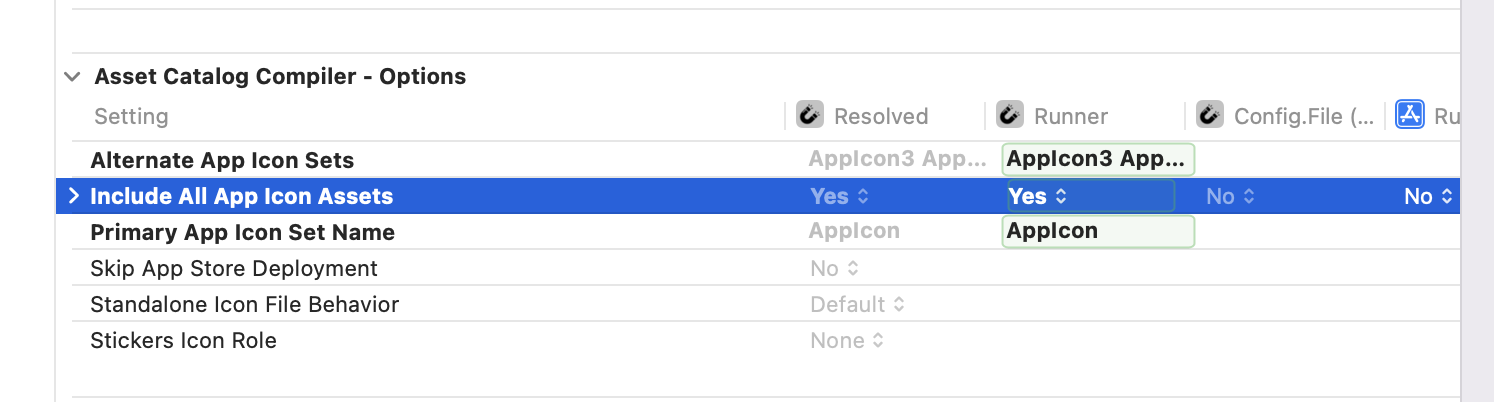
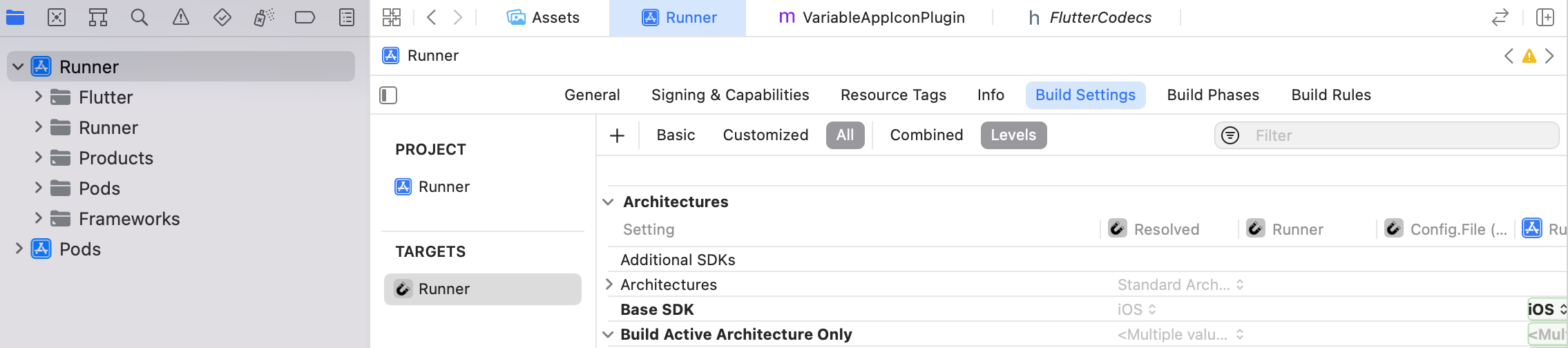 Now search icon, you will find Assets Catalog Compiler Options. Set Include All App Icon
Assets to Yes.
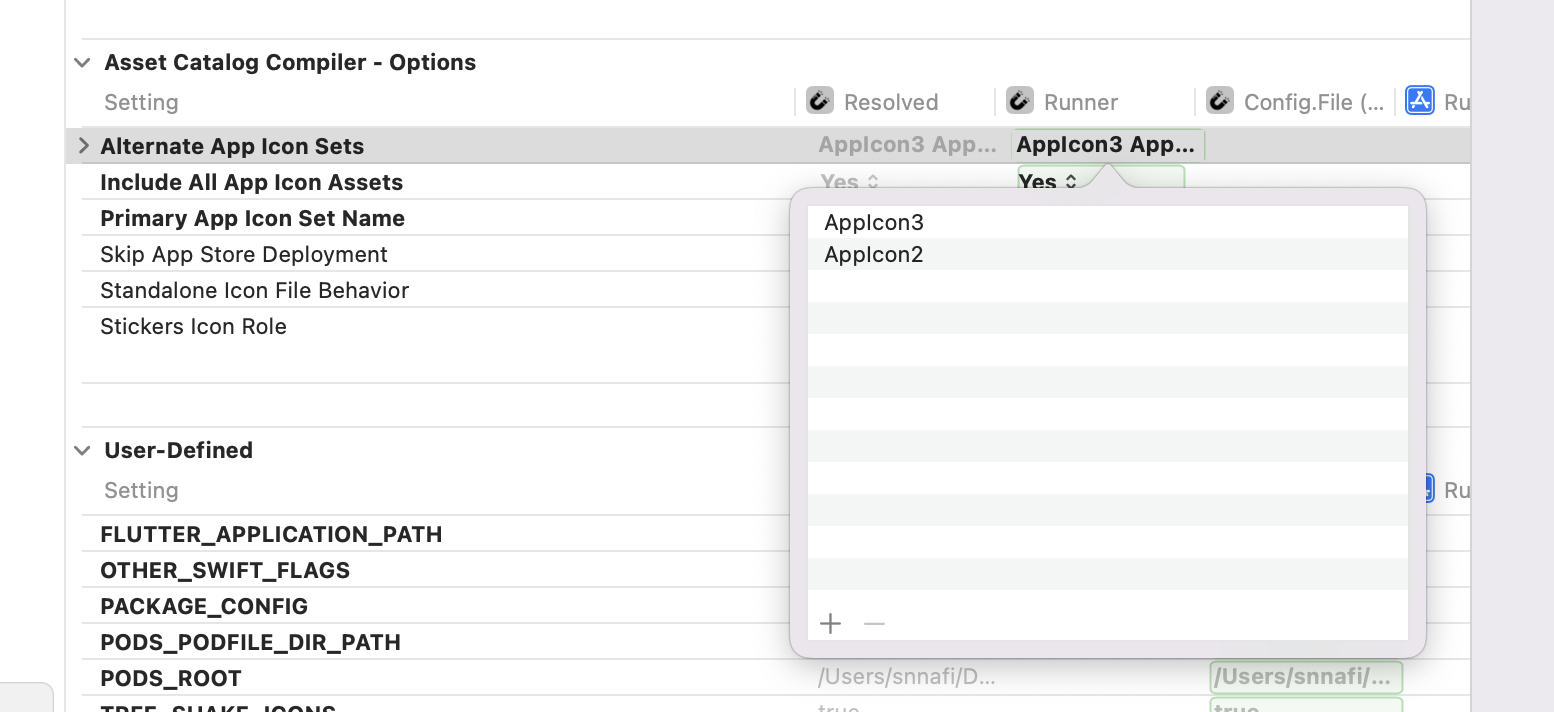
 Then add all the icons name to the Alternate App Icon Sets.
3. From the flutter side
In main function set this two variable,
VariableAppIcon.iOSDefaultAppIcon = iosAppIcons[0];
VariableAppIcon.androidAppIconIds = androidIconIds;
Call this method to change app icon.
 await VariableAppIcon.changeAppIcon(
androidIconId: "appicon.TEAL",
iosIcon: "AppIcon2);
See the example app for complete example.
You are done. Enjoy!
Demo
Android
https://user-images.githubusercontent.com/22527366/191311548-c46fac40-e39f-4286-88c5-05fd6765b5e9.mp4
iOS
https://user-images.githubusercontent.com/22527366/191091356-817b69f0-1a84-4620-87ae-5969d519b4eb.MP4
Support the package (optional)
If you find this package useful, you can support it by giving it a star.
Credits
This package is created by Shahriar Nasim Nafi
