搜索插件、代码仓与 APP 分类

插件详情v0.2.0

wave_slider

一个在拖动时会产生波浪效果的 Flutter 滑块。释放时会轻微弹跳。

近 30 天下载
11
喜欢数
131
Pub 分数
30

安装插件

flutter pub add wave_slider

插件介绍

基于插件公开信息、社区数据与项目使用情况整理的选型参考。

Wave Slider 是一个 Flutter 包,它通过在拖动时添加动态波浪动画以及释放时的细微弹跳效果,增强了标准滑块。专为富有乐趣、引人入胜的用户界面设计,为滑块交互提供视觉反馈,使其感觉更加响应迅速且有趣。适用于希望凭借生动、触觉动画脱颖而出的应用程序。该包可无缝集成到 Flutter 项目中,并由 FunWithFlutter 维护。

适合场景

  • 交互式表单滑块
  • 游戏化应用界面
  • 设置中的视觉反馈
  • 引人入胜的入门体验
  • 创意UI原型设计

主要特点

  • 拖动时的波浪动画
  • 释放时的弹跳效果
  • 平滑、流畅的运动
  • 使用 pub add 的最小设置
  • 可自定义波形外观

适合对象

  • 寻求表达性用户界面的设计人员
  • 开发交互式应用程序的开发者
  • 强调用户参与度的项目
  • 面向年轻受众的应用程序
  • 需要动画反馈的原型

使用建议

  • 可能会影响低端设备的性能
  • 超出波浪样式之外的自定义功能有限
  • 不适合极简或严肃的用户界面
  • 需要 Flutter 3.0+ 才能获得最佳性能
  • 无内置方向波支持

原始 README

以下为关联源码仓库的 README 原文快照,最新内容请访问源码仓库。

A Flutter slider that makes a wave effect when dragged. Does a little bounce when dropped.

Demo

Getting Started

To use this plugin, add wave_slider as a dependency in your pubspec.yaml file.

The color can be set with the color property. The slider size is dependent on the size of its parent. The height of the wave slider can be set with the sliderHeigth property - which is constrained with a minimum of 50 and a maximum of 600.

An option displayTrackball property can be set to true to show a trackball along with the slider. The default is false

Values are retrieved by passing in an onChanged callback, which returns a value between 0 and 1 to indicate the current drag completion percentage.

The onChangeStart and onChangeEnd callbacks can be used to retrieve the start and end drag percentages respectively.

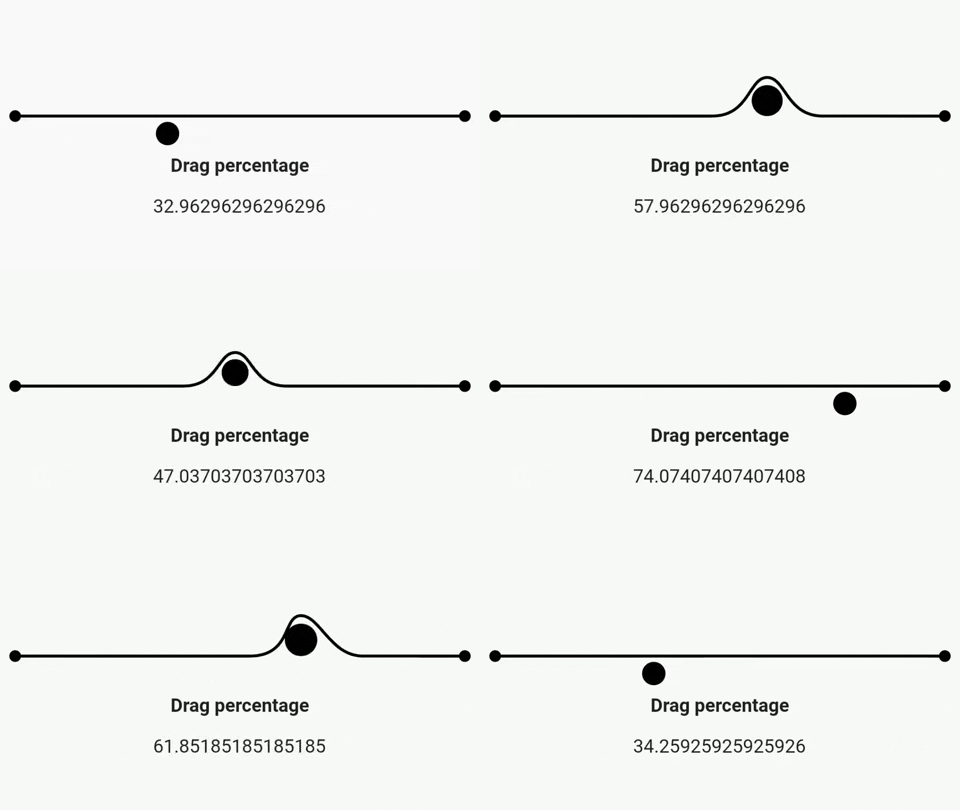
Example
import 'package:flutter/material.dart';
import 'package:wave_slider/wave_slider.dart';

void main() => runApp(MaterialApp(
      home: App(),
    ));

class App extends StatefulWidget {
  @override
  _AppState createState() => _AppState();
}

class _AppState extends State<App> {
  double _dragPercentage = 0;

  @override
  Widget build(BuildContext context) {
    return Scaffold(
      body: Column(
        mainAxisAlignment: MainAxisAlignment.center,
        children: <Widget>[
          WaveSlider(
            displayTrackball: false,
            onChanged: (double dragUpdate) {
              setState(() {
                _dragPercentage = dragUpdate *
                    100; // dragUpdate is a fractional value between 0 and 1
              });
            },
          ),
          Padding(
            padding: const EdgeInsets.all(8.0),
            child: Text(
              'Drag percentage',
              style: TextStyle(fontSize: 16, fontWeight: FontWeight.bold),
            ),
          ),
          Padding(
            padding: const EdgeInsets.all(8.0),
            child: Text(
              '$_dragPercentage',
              style: TextStyle(fontSize: 16),
            ),
          )
        ],
      ),
    );
  }
}
Interested in how the package was made?

Check out this playlist on the Fun with Flutter YouTube channel!

所属分类

源码仓库

使用此插件的项目

暂无相关数据。