搜索插件、代码仓与 APP 分类

widget_to_marker 封面
插件详情v1.0.6

widget_to_marker

一个将任何 Flutter Widget 转换为 BitmapDescriptor 的包,可用于 google_maps_flutter 图标标记。

AndroidiOSWeb
近 30 天下载
1.7万
喜欢数
133
Pub 分数
155

安装插件

flutter pub add widget_to_marker

插件介绍

基于插件公开信息、社区数据与项目使用情况整理的选型参考。

widget_to_marker 包使开发者能够将任何 Flutter 小部件转换为 BitmapDescriptor,从而通过 google_maps_flutter 插件将自定义设计的小部件用作 Google 地图标记上的图标。这对于创建视觉丰富、动态的标记非常有用,这些标记超越了标准图标。该包支持 Android、iOS 和 Web 平台,确保跨平台的一致性。它简化了在地图上直接渲染复杂 UI 元素(如头像、徽章或自定义形状)的过程。

适合场景

  • 带有动态内容的自定义地图标记
  • 在地图上显示用户头像
  • 创建品牌或主题标记
  • 实时标记更新与动画小部件
  • 在地图上叠加交互式用户界面元素

主要特点

  • 将任何 Flutter widget 转换为 BitmapDescriptor
  • 支持 Android、iOS 和 Web
  • 与 google_maps_flutter 的简单集成
  • 复杂控件的高效渲染
  • 跨平台兼容性

适合对象

  • 开发交互式地图的开发者
  • 需要品牌化或个性化标记的应用程序
  • 使用动态或动画标记内容的项目
  • 优先考虑跨平台的视觉一致性
  • 寻找静态图标图像替代方案的用户

使用建议

  • 复杂或频繁更新的部件对性能的影响
  • 位图生成可能带来的内存开销
  • 需要妥善处理生成的描述符
  • 仅限静态快照(非交互式小部件)
  • 可能需要针对高频更新进行优化

原始 README

以下为关联源码仓库的 README 原文快照,最新内容请访问源码仓库。

Features

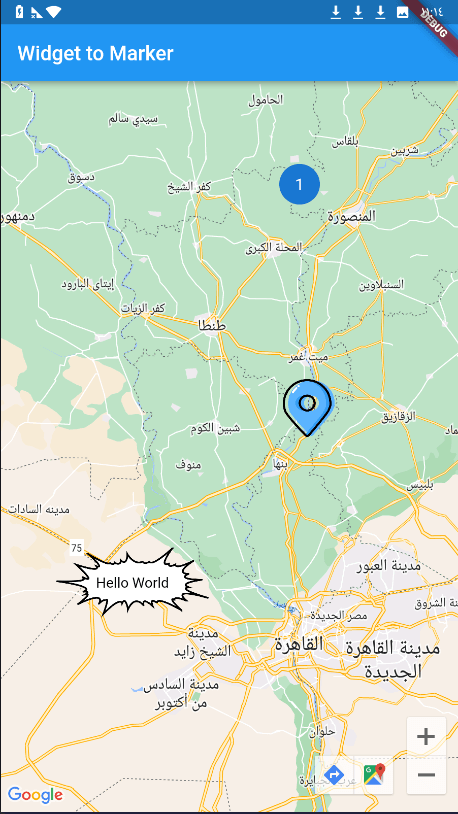
When using Google Maps, we always have a problem with adding a marker on the map, and the available tools were either drawing the marker through canvas path or using an image, but the problem is if we want to add words or data or add custom edit to this marker, but this package has solved the problem and now you can use any widget in flutter as a marker for google map ! using the .toBitmapDescriptor() function on the widget to use it as a marker icon!

Getting started

Add dependency

dependencies:
  widget_to_marker: ^1.0.6

1 - Create Your Widget To Make it as Marker:

import 'package:widget_to_marker/widget_to_marker.dart';

class TextOnImage extends StatelessWidget {
  const TextOnImage({
    super.key,
    required this.text,
  });
  final String text;
  @override
  Widget build(BuildContext context) {
    return Stack(
      alignment: Alignment.center,
      children: [
        Image(
          image: const AssetImage(
            "assets/marker.png",
          ),
          height: 150,
          width: 150,
        ),
        Text(
          text,
          style: TextStyle(color: Colors.black),
        )
      ],
    );
  }
}

2 - Add it to the marker with .toBitmapDescriptor():

Marker(
      markerId: const MarkerId("3"),
      position: const LatLng(30.01124477440843, 30.78459296375513),
      icon: await TextOnImage(
        text: "Hello World",
      ).toBitmapDescriptor(
         logicalSize: const Size(150, 150), imageSize: const Size(150, 150)
      ),
    )

Note

You Can Use waitToRender Attribute to set duration for rendering large network and asset images

Enjoy!!

image

所属分类

依赖

依赖清单 1 项

源码仓库

使用此插件的项目

暂无相关数据。