搜索插件、代码仓与 APP 分类

adaptive_dialog 封面
插件详情v3.1.0

adaptive_dialog

根据平台自适应显示警报对话框或模态操作表。

AndroidiOSWebmacOSWindowsLinux
近 30 天下载
4.1万
喜欢数
1080
Pub 分数
160

安装插件

flutter pub add adaptive_dialog

插件介绍

基于插件公开信息、社区数据与项目使用情况整理的选型参考。

自适应对话框是一个Flutter包,可以以平台适当的方式显示警报对话框或模态操作表。它会自动为每个目标平台选择最佳的UI模式——在Android和iOS上使用原生样式对话框,在其他平台上使用一致的网页/桌面布局。这确保了跨设备的一致用户体验,而无需手动进行平台检查。该包通过最少的代码简化了跨平台对话框的实现,支持从简单警告到复杂操作的各种场景。它可以无缝集成到现有的Flutter应用中。

适合场景

  • 跨平台对话一致性
  • 原生对话框在移动设备上
  • 统一的网页和桌面对话处理
  • 简化平台特定对话逻辑
  • 通过自适应UI模式提升用户体验

主要特点

  • 自动平台检测
  • Android 和 iOS 的原生对话框样式
  • Web 和桌面端的一致行为
  • 最小化样板代码
  • 同时支持警报和操作表

适合对象

  • 面向多个平台的开发者
  • 需要原生对话框外观的应用
  • 注重用户体验一致性的团队
  • 频繁使用对话框的项目
  • Flutter 初学者寻找简单的对话框解决方案

使用建议

  • 超出基本选项的自定义功能有限
  • 依赖于底层平台的渲染
  • 可能需要额外的样式设置以适应复杂布局
  • 不太适合高度自定义的对话框设计
  • 最适合标准警告和操作表场景

原始 README

以下为关联源码仓库的 README 原文快照,最新内容请访问源码仓库。

adaptive_dialog

Show alert dialog or modal action sheet adaptively according to platform.

Web Demo: https://mono0926.com/adaptive_dialog/

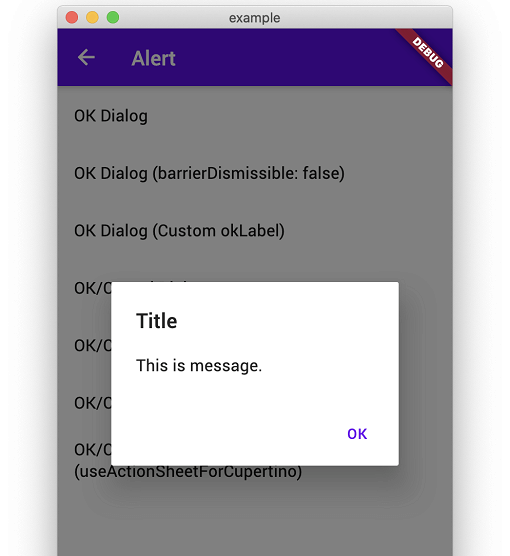
showOkAlertDialog

Convenient wrapper of showAlertDialog.

iOS Android
n1 n2

showOkCancelAlertDialog

Convenient wrapper of showAlertDialog.

iOS Android
n3 n4
n5 n6

showConfirmationDialog

Show Confirmation Dialog. For Cupertino, fallback to ActionSheet.

iOS Android
n3 n5

showModalActionSheet

iOS Android
n7 n8
n9 n10
n11 n12

showTextInputDialog

iOS Android
n1 n2
n3 n4

showTextAnswerDialog

Show text input dialog until answer is correct or cancelled. This is useful for preventing very destructive action is executed mistakenly.

iOS Android
n5 n6

FAQ

How can I customize it flexibly?

This packages keeps usage and UI simple like iOS official alert dialog. Therefore, if you need more flexibility than this package provides, I recommend that you build your own directly using standard APIs to meet your requirements without using this package.

  • https://github.com/mono0926/adaptive_dialog/issues/19#issuecomment-754476937
  • https://github.com/mono0926/adaptive_dialog/issues/76#issuecomment-1120686982
  • https://github.com/mono0926/adaptive_dialog/issues/108#issuecomment-1543068734

The getter modalBarrierDismissLabel was called on null

adaptive_dialog uses Cupertino-style widgets internally on iOS, so GlobalCupertinoLocalizations.delegate is required under certain conditions.

import 'package:flutter/material.dart';
import 'package:flutter_localizations/flutter_localizations.dart';

class App extends StatelessWidget {
  const App({Key key}) : super(key: key);

  @override
  Widget build(BuildContext context) {
    return MaterialApp(
      //...
      localizationsDelegates: const [
        GlobalMaterialLocalizations.delegate,
        GlobalWidgetsLocalizations.delegate,
        GlobalCupertinoLocalizations.delegate, // This is required
      ],
    );
  }
}

The input text color same with backgound when using CupertinoTextInputDialog

This fixes the problem.

import 'package:flutter/cupertino.dart';
import 'package:flutter/material.dart' hide Router;

class App extends StatelessWidget {
  const App({Key key}) : super(key: key);

  @override
  Widget build(BuildContext context) {
    return MaterialApp(
      darkTheme: ThemeData(
        cupertinoOverrideTheme: const CupertinoThemeData(
          textTheme: CupertinoTextThemeData(), // This is required
        ),
      ),
    );
  }
}

macOS style and Web / WASM compatibility

AdaptiveStyle.macOS utilizes macos_ui widgets on native macOS. On Web platforms (both JavaScript and WASM), macos_ui is excluded to ensure Web and WASM compatibility, and dialogs configured with macOS style automatically fall back to Cupertino (iOS-style) dialogs.

所属分类

依赖

依赖清单 7 项

源码仓库

使用此插件的项目