搜索插件、代码仓与 APP 分类

animated_hint_textfield 封面
插件详情v1.3.0

animated_hint_textfield

用于动画化文本框提示/标签文本的 Flutter 包,通过动态且引人注目的过渡效果提升用户体验。

AndroidiOSWebmacOSWindowsLinux
近 30 天下载
3460
喜欢数
107
Pub 分数
160

安装插件

flutter pub add animated_hint_textfield

插件介绍

基于插件公开信息、社区数据与项目使用情况整理的选型参考。

一个 Flutter 包,可为文本字段的提示或标签文字添加动画效果,在字段获得或失去焦点时创建流畅且动态的过渡效果。通过细微的动画提供视觉反馈,提升用户体验,使输入字段更具吸引力和直观性。非常适合注重美学和交互性的现代 UI。该包支持 Android、iOS、Web、macOS、Windows 和 Linux 多个平台,确保在各种设备上行为一致。

适合场景

  • 通过视觉反馈增强表单输入
  • 创建现代且交互式的登录界面
  • 改进移动和网络应用的用户体验
  • 向文本字段添加微交互
  • 设计视觉上吸引人的数据输入表单

主要特点

  • 流畅的聚焦和模糊动画
  • 可自定义的动画持续时间和曲线
  • 对多平台的支持
  • 与现有文本字段的轻松集成
  • 动态提示定位和缩放

适合对象

  • 寻求交互元素的UI/UX设计师
  • 开发人员构建精美的表单
  • 注重用户参与度的应用程序
  • 跨平台 Flutter 项目
  • 需要微妙但有效的动画的项目

使用建议

  • 可能会影响低端设备的性能
  • 需要仔细调整动画参数
  • 仅限提示/标签文本动画
  • 不适用于复杂的表单验证逻辑
  • 依赖正确的控件层级以获得最佳效果

原始 README

以下为关联源码仓库的 README 原文快照,最新内容请访问源码仓库。

pub package pub points

Animated Hint TextField

A Flutter package designed to animate the label/hint text of a textfield, providing suggestive guidance to the user regarding what to input. Try out our example app.


Platform Support

Android iOS MacOS Web Linux Windows
✅ ✅ ✅ ✅ ✅ ✅


Installing

1. Depend on it

Add this to your package's pubspec.yaml file:

dependencies:
  animated_hint_textfield: ^1.0.0
2. Install it

You can install packages from the command line:

with pub:

$ pub get

with Flutter:

$ flutter pub get
3. Import it

Now in your Dart code, you can use:

import 'package:animated_hint_textfield/animated_hint_textfield.dart';


Animations

Currently this package supports 3 animations, more animations will be added in the future.

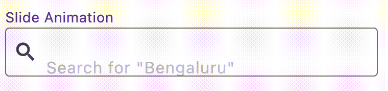
Slide

AnimatedTextField(
  animationType: Animationtype.slide, // Use Animationtype.slide for Slide animations
  decoration: InputDecoration(
    prefixIcon: Icon(Icons.search),
    border: OutlineInputBorder(
      borderSide: BorderSide(color: Colors.red, width: 2,
      ),
      borderRadius: BorderRadius.circular(4),
    ),
    focusedBorder: OutlineInputBorder(
      borderSide: BorderSide(color: Colors.black, width: 2,
      ),
      borderRadius: BorderRadius.circular(4),
    ),
    contentPadding: EdgeInsets.all(12),
  ),
  staticHintText: 'Search for ',
  hintTexts: [
    '"Bengaluru"',
    '"Mumbai"',
    '"Chennai"',
  ],
);

Fade

AnimatedTextField(
  animationType: Animationtype.fade, // Use Animationtype.fade for Fade animations
  decoration: InputDecoration(
    prefixIcon: Icon(Icons.search),
    border: OutlineInputBorder(
      borderSide: BorderSide(color: Colors.red, width: 2,
      ),
      borderRadius: BorderRadius.circular(4),
    ),
    focusedBorder: OutlineInputBorder(
      borderSide: BorderSide(color: Colors.black, width: 2,
      ),
      borderRadius: BorderRadius.circular(4),
    ),
    contentPadding: EdgeInsets.all(12),
  ),
  hintTexts: [
    'Search for "Bengaluru"',
    'Search for "Mumbai"',
    'Search for "Chennai"',
  ],
);

Typer

AnimatedTextField(
  animationType: Animationtype.typer, // Use Animationtype.typer for Type Write Style animations
  hintTextStyle: const TextStyle(
    color: Colors.deepPurple,
    overflow: TextOverflow.ellipsis,
  ),
  hintTexts: const [
    'How is the weather today?',
    'Will it rain today?',
    'What is the temperature',
  ],
  decoration: InputDecoration(
    suffixIcon: const Icon(Icons.search),
    filled: true,
    border: OutlineInputBorder(
      borderSide: const BorderSide(color: Colors.red, width: 2),
      borderRadius: BorderRadius.circular(25),
    ),
    focusedBorder: OutlineInputBorder(
      borderSide: const BorderSide(color: Colors.black, width: 2),
      borderRadius: BorderRadius.circular(25),
    ),
    contentPadding: const EdgeInsets.all(12),
  ),
);
💡 Tip

Use staticHintText when part of the hint should stay fixed while only the animated part changes:

AnimatedTextField(
  staticHintText: 'Search for ',
  hintTexts: const ['Bengaluru', 'Mumbai', 'Chennai'],
);

For suffix-style hints, set staticHintTextPosition:

AnimatedTextField(
  staticHintText: ' nearby',
  staticHintTextPosition: StaticHintTextPosition.suffix,
  hintTexts: const ['Cafe', 'Hotel', 'Restaurant'],
);

By default, the animated hint text can span multiple lines if the text is long. If you want to keep the hint on a single line and show overflow with ellipses (...), set the overflow property in hintTextStyle:

hintTextStyle: TextStyle(
  overflow: TextOverflow.ellipsis,
),

Contributors


Deekshith Shetty

Torregrossa François

所属分类

依赖

依赖清单 1 项

源码仓库

使用此插件的项目

暂无相关数据。