Flutter Heatmap Calendar
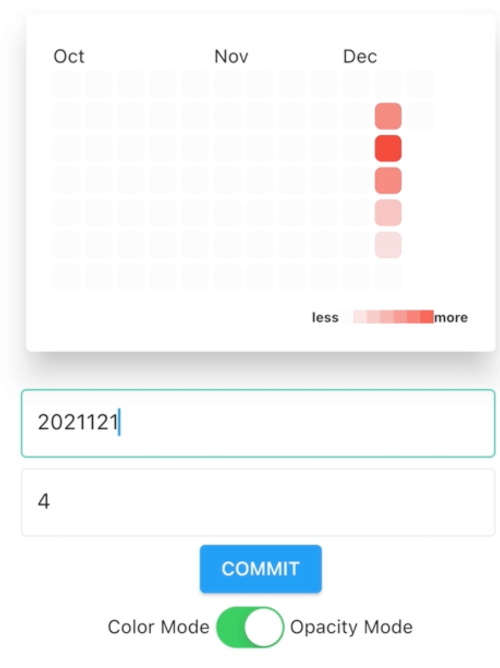
Flutter Heatmap Calendar inspired by github contribution chart.
Flutter Heatmap Calendar provides traditional contribution chart called HeatMap and calendar version of it called HeatMapCalendar.


Getting started
Depend on it.
flutter pub add flutter_heatmap_calendar
or
Add below line to your personal package's pubspec.yaml.
dependencies:
  flutter_heatmap_calendar: ^1.0.5
And run flutter pub get to install.
Import it.
import 'package:flutter_heatmap_calendar/flutter_heatmap_calendar.dart';
Props
HeatMap
| Props |
Types |
Default |
Description |
| startDate |
DateTime? |
1 year before of the endDate |
Start date of HeatMap. |
| endDate |
DateTime? |
Today
( DateTime.now() ) |
Last day of HeatMap. |
| datasets |
Map<DateTime, int>? |
null |
Sets of data which to be displayed. |
| colorsets |
Map<int, Color> |
required |
Sets of color values for its thresholds key value.
At least one Color is required.
Be aware that only first color will be used if ColorMode is ColorMode.opacity. |
| defaultColor |
Color? |
 Color(0xFFF8F9FA) |
Default color of every block. |
| textColor |
Color? |
 Color(0xFF8A8A8A) |
Color value of every text. |
| colorMode |
ColorMode |
ColorMode.opacity |
ColorMode.opacity requires just one colorsets value and changes color dynamically based on hightest value of datasets.
ColorMode.color changes colors based on colorsets thresholds key value. |
| size |
double? |
20 |
The size of every block. |
| fontSize |
double? |
null |
The size of every text. |
| onClick |
Function(DateTime)? |
null |
Callback function which will be called if user clicks the block. |
| margin |
EdgeInsets? |
EdgeInsets.all(2) |
The margin value of block. |
| borderRadius |
double? |
5 |
Border radius value of block. |
| scrollable |
bool |
false |
Make HeatMap scrollable if scrollable is true. |
| showText |
bool? |
false |
Show day text in every block if showText is true. |
| showColorTip |
bool? |
true |
Show color tip if showColorTip is true. |
| colorTipHelper |
List<Widget?>? |
null |
Widgets which are shown at left and right side of colorTip.
First value is the left side widget and second value is the right side widget.
Give null value makes default 'less' and 'more' text. |
| colorTipCount |
int? |
7 |
Length of colorTip block. |
| colorTipSize |
double? |
10 |
The size of colorTip. |
HeatMapCalendar
| Props |
Types |
Default |
Description |
| initDate |
DateTime? |
Today
( DateTime.now() ) |
Initialized Year/Month value of HeatMapCalendar. |
| datasets |
Map<DateTime, int>? |
null |
Sets of data which to be displayed. |
| colorsets |
Map<int, Color> |
required |
Sets of color values for its thresholds key value.
At least one Color is required.
Be aware that only first color will be used if ColorMode is ColorMode.opacity. |
| defaultColor |
Color? |
Color(0xFFF8F9FA) |
Default color of every block. |
| textColor |
Color? |
Color(0xFF8A8A8A) |
Color value of every text. |
| colorMode |
ColorMode |
ColorMode.opacity |
ColorMode.opacity requires just one colorsets value and changes color dynamically based on hightest value of datasets.
ColorMode.color changes colors based on colorsets thresholds key value. |
| size |
double? |
42 |
The size of every block. |
| fontSize |
double? |
null |
The size of every text. |
| monthFontSize |
double? |
12 |
The size of month label. |
| weekFontSize |
double? |
12 |
The size of week label. |
| weekTextColor |
Color? |
 Color(0xFF758EA1) |
Default color of every block. |
| onClick |
Function(DateTime)? |
null |
Callback function which will be called if user clicks the block. |
| margin |
EdgeInsets |
EdgeInsets.all(2) |
The margin value of block. |
| borderRadius |
double? |
5 |
Border radius value of block. |
| flexible |
bool? |
false |
Makes HeatMapCalendar's size dynamically fit on screen.
If flexible is true then, size props will be ignored. |
| showColorTip |
bool? |
true |
Show color tip if showColorTip is true. |
| colorTipHelper |
List<Widget?>? |
null |
Widgets which are shown at left and right side of colorTip.
First value is the left side widget and second value is the right side widget.
Give null value makes default 'less' and 'more' text. |
| colorTipCount |
int? |
7 |
Length of colorTip block. |
| colorTipSize |
double? |
10 |
The size of colorTip. |
Example
HeatMap
import 'package:flutter_heatmap_calendar/flutter_heatmap_calendar.dart';
...
HeatMap(
  datasets: {
    DateTime(2021, 1, 6): 3,
    DateTime(2021, 1, 7): 7,
    DateTime(2021, 1, 8): 10,
    DateTime(2021, 1, 9): 13,
    DateTime(2021, 1, 13): 6,
  },
  colorMode: ColorMode.opacity,
  showText: false,
  scrollable: true,
  colorsets: {
    1: Colors.red,
    3: Colors.orange,
    5: Colors.yellow,
    7: Colors.green,
    9: Colors.blue,
    11: Colors.indigo,
    13: Colors.purple,
  },
  onClick: (value) {
    ScaffoldMessenger.of(context).showSnackBar(SnackBar(content: Text(value.toString())));
  },
);
HeatMapCalendar
import 'package:flutter_heatmap_calendar/flutter_heatmap_calendar.dart';
...
HeatMapCalendar(
  defaultColor: Colors.white,
  flexible: true,
  colorMode: ColorMode.color,
  datasets: {
    DateTime(2021, 1, 6): 3,
    DateTime(2021, 1, 7): 7,
    DateTime(2021, 1, 8): 10,
    DateTime(2021, 1, 9): 13,
    DateTime(2021, 1, 13): 6,
  },
  colorsets: const {
    1: Colors.red,
    3: Colors.orange,
    5: Colors.yellow,
    7: Colors.green,
    9: Colors.blue,
    11: Colors.indigo,
    13: Colors.purple,
  },
  onClick: (value) {
    ScaffoldMessenger.of(context).showSnackBar(SnackBar(content: Text(value.toString())));
  },
);
License
MIT License

Copyright (c) 2021 Kim Seung Hwan

Permission is hereby granted, free of charge, to any person obtaining a copy
of this software and associated documentation files (the "Software"), to deal
in the Software without restriction, including without limitation the rights
to use, copy, modify, merge, publish, distribute, sublicense, and/or sell
copies of the Software, and to permit persons to whom the Software is
furnished to do so, subject to the following conditions:

The above copyright notice and this permission notice shall be included in all
copies or substantial portions of the Software.

THE SOFTWARE IS PROVIDED "AS IS", WITHOUT WARRANTY OF ANY KIND, EXPRESS OR
IMPLIED, INCLUDING BUT NOT LIMITED TO THE WARRANTIES OF MERCHANTABILITY,
FITNESS FOR A PARTICULAR PURPOSE AND NONINFRINGEMENT. IN NO EVENT SHALL THE
AUTHORS OR COPYRIGHT HOLDERS BE LIABLE FOR ANY CLAIM, DAMAGES OR OTHER
LIABILITY, WHETHER IN AN ACTION OF CONTRACT, TORT OR OTHERWISE, ARISING FROM,
OUT OF OR IN CONNECTION WITH THE SOFTWARE OR THE USE OR OTHER DEALINGS IN THE
SOFTWARE.