搜索插件、代码仓与 APP 分类

flutter_instagram_stories 封面
插件详情v1.0.3+4

flutter_instagram_stories

显示故事(视频和图片),类似于 WhatsApp 和 Instagram。

近 30 天下载
69
喜欢数
176
Pub 分数
80

安装插件

flutter pub add flutter_instagram_stories

插件介绍

基于插件公开信息、社区数据与项目使用情况整理的选型参考。

一个 Flutter 包,使开发者能够展示支持图片和视频的故事,模仿 Instagram 和 WhatsApp 的外观和感觉。它提供了一个简洁、可自定义的界面,用于以全屏滑动格式呈现顺序媒体内容。该包设计简单,易于集成到现有应用中。它支持故事之间的自动推进,并允许自定义外观和行为。非常适合社交应用、消息平台或任何需要类似故事体验的应用。

适合场景

  • 社交媒体应用
  • 消息应用
  • 内容分享平台
  • 用户资料亮点
  • 互动叙事功能

主要特点

  • 图像和视频故事支持
  • 滑动导航
  • 自动切换故事
  • 可自定义的用户界面
  • 全屏演示
  • 通过 pub.dev 的简单集成

适合对象

  • 开发社交功能的开发者
  • 需要类似故事界面的应用程序
  • 包含丰富媒体内容的项目
  • 移动优先的设计实现
  • 快速原型设计交互式信息流

使用建议

  • 有限的平台特定优化
  • 无内置分析跟踪
  • 需要手动处理故事完成事件
  • 最基本的使用之外的最小文档
  • 不支持故事回复或表情反应

原始 README

以下为关联源码仓库的 README 原文快照,最新内容请访问源码仓库。

flutter_instagram_stories Pub

If you need a help to implement stories in your app, contact me https://github.com/awaik

A Flutter package for displaying stories just like Whatsapp & Instagram. Built-in groups (multiple stories with one icon), cache, video, gifs.

The package can be used in any app for displaying news, educational content and etc. Look the sample app here.

Note: This package is under active development, and there are some known bugs and a lot of features to implement. Please, add issues or feature requests here: issue

The project was initially copied from https://github.com/blackmann/story_view - great thanks for this excellent package. In case, you need more flexible functionality, you can check the original repository.

Showcase|100x100, 10%

Important notes:

  1. For now, the package works with Firebase only.
  2. This is a first beta version, please add all issues and feature requests here: issue

Features

  • Only one line of code to implement this package to the app.
  • Display images, gifs, videos.
  • Adjustable titles on icons.
  • Preliminary caching after app started.
  • Multilanguage support.
  • Callback when a user closed stories - helps to implement subscriptions after first launch and etc.

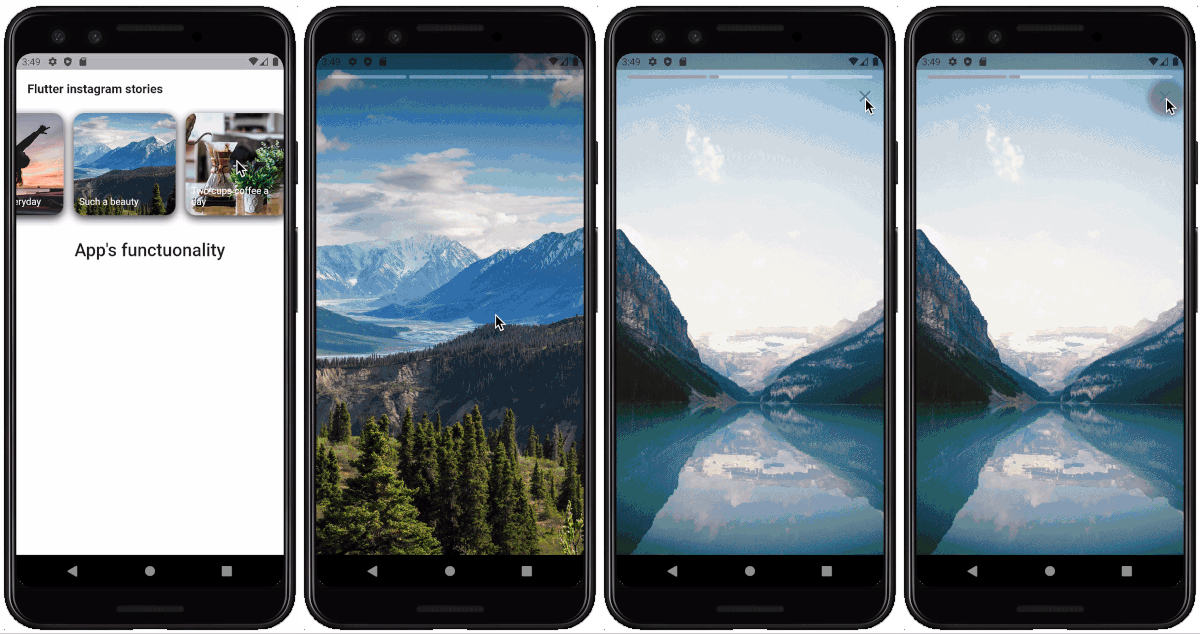
Installing

Look how to install here https://pub.dev/packages/flutter_instagram_stories#-installing-tab-

Now in your Dart code, you can use:

import 'package:flutter_instagram_stories/flutter_instagram_stories.dart';

iOS

For playing video, the package uses official video_player https://pub.dev/packages/video_player

From documentation:

  1. Warning: The video_player plugin doesn’t work on iOS simulators. You must test videos on real iOS devices.

  2. For iOS, add the following to the Info.plist file found at /ios/Runner/Info.plist.

<key>NSAppTransportSecurity</key>
  <dict>
    <key>NSAllowsArbitraryLoads</key>
    <true/>
  </dict>

Usage

You can find a complete working example here https://github.com/awaik/flutter_instagram_stories/tree/master/example

Dart code

Connect to the collection where you keep stories

    static String collectionDbName = 'instagram_stories_db';
    CollectionReference dbInstance =
      Firestore.instance.collection(collectionDbName);

And add stories full functionality to your app.

    FlutterInstagramStories(
        collectionDbName: collectionDbName,
        showTitleOnIcon: true,
        backFromStories: () {
          _backFromStoriesAlert();
        },
        iconTextStyle: TextStyle(
          fontSize: 14.0,
          color: Colors.white,
        ),
        iconImageBorderRadius: BorderRadius.circular(15.0),
        iconBoxDecoration: BoxDecoration(
          borderRadius: BorderRadius.all(Radius.circular(15.0)),
          color: Color(0xFFffffff),
          boxShadow: [
            BoxShadow(
              color: Color(0xff333333),
              blurRadius: 10.0,
              offset: Offset(
                0.0,
                4.0,
              ),
            ),
          ],
        ),
        iconWidth: 150.0,
        iconHeight: 150.0,
        textInIconPadding:
            EdgeInsets.only(left: 8.0, right: 8.0, bottom: 12.0),
        //how long story lasts in seconds
        imageStoryDuration: 7,
        progressPosition: ProgressPosition.top,
        repeat: true,
        inline: false,
        languageCode: 'en',
        backgroundColorBetweenStories: Colors.black,
        closeButtonIcon: Icon(
          Icons.close,
          color: Colors.white,
          size: 28.0,
        ),
        closeButtonBackgroundColor: Color(0x11000000),
        sortingOrderDesc: true,
        lastIconHighlight: true,
        lastIconHighlightColor: Colors.deepOrange,
        lastIconHighlightRadius: const Radius.circular(15.0),
        captionTextStyle: TextStyle(
          fontSize: 22,
          color: Colors.white,
        ),
        captionMargin: EdgeInsets.only(
          bottom: 50,
        ),
        captionPadding: EdgeInsets.symmetric(
          horizontal: 24,
          vertical: 8,
        ),
      ),

Firestore database

The package works with Firestore database and package https://pub.dev/packages/cloud_firestore already included into the package.

You can use example with the sample database in the example folder, or, create your own database.

Steps to create:

  1. Add Firebase to your app
  • Android https://firebase.google.com/docs/flutter/setup?platform=android
  • iOS https://firebase.google.com/docs/flutter/setup?platform=ios
  1. Create Firestore database
  • Create a collection with any name. After you will use this name in dart code only once.
  • Create documents inside the collection with exact structure, like on the image below

Showcase|100x100, 10%

Important! Pay attention to array, map types. Otherwise you will have a null error https://github.com/awaik/flutter_instagram_stories/issues/20

Data structure

That's it! Now your app has instagram stories with caching and other powerful features.

Use cases in real apps

App for Android and iOS - https://lifext.app/

Lifext app

所属分类

依赖

源码仓库

使用此插件的项目

暂无相关数据。