搜索插件、代码仓与 APP 分类

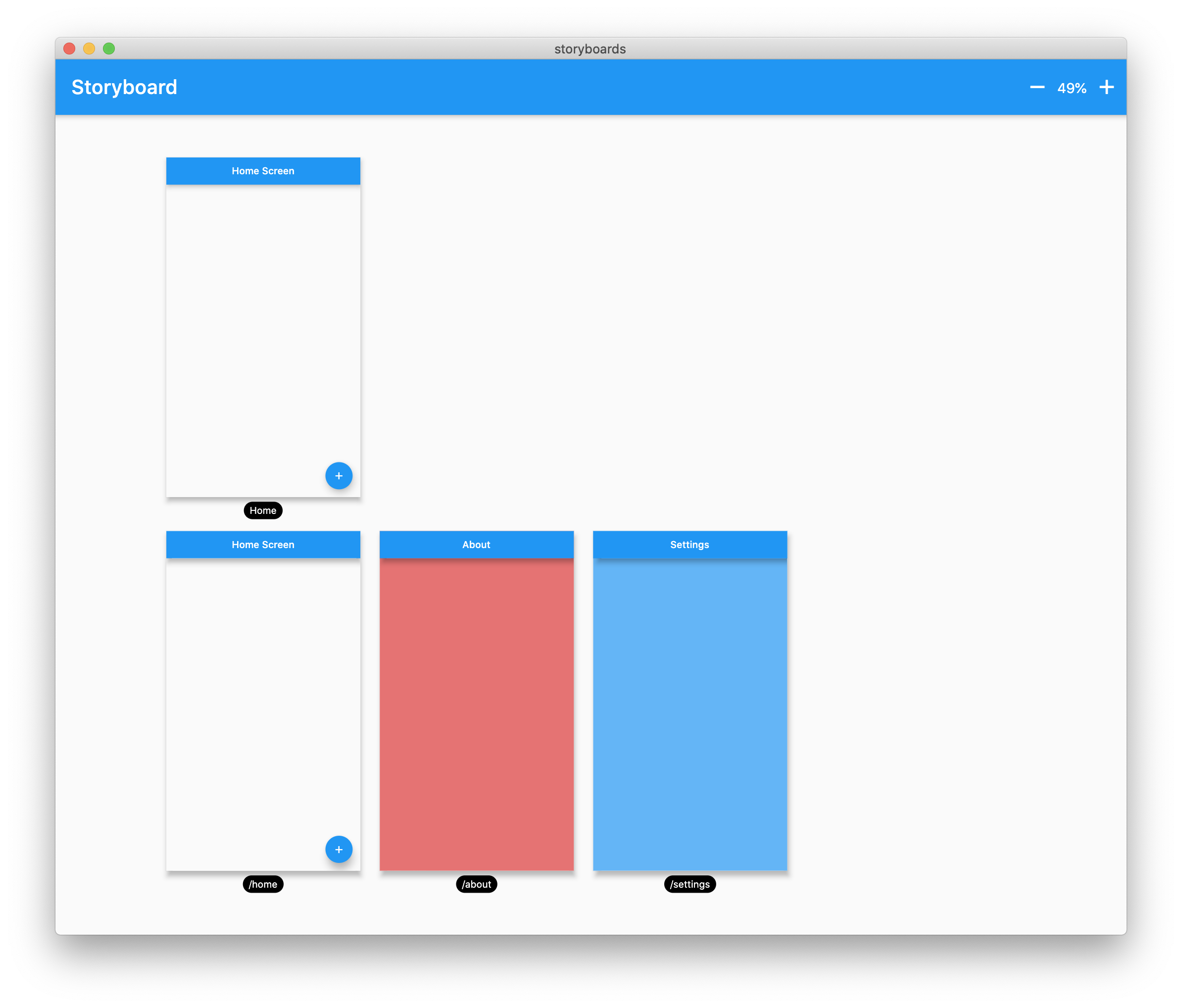
flutter_storyboard 封面
插件详情v0.1.7

flutter_storyboard

一个用于展示所有小部件故事板的 Flutter 包。

近 30 天下载
122
喜欢数
133
Pub 分数
40

安装插件

flutter pub add flutter_storyboard

插件介绍

基于插件公开信息、社区数据与项目使用情况整理的选型参考。

Flutter Storyboard 是一个调试工具,可将 Flutter 应用中的所有小部件可视化为故事板,使开发者能够检查小部件层次结构和布局结构。它提供了清晰的小部件树层级视图,有助于识别性能瓶颈、布局问题或意外的小部件嵌套。非常适合开发和测试阶段,无需手动追踪代码即可增强对复杂 UI 组合的理解。该包可通过 pub add 轻松集成到 Flutter 项目中。

适合场景

  • 调试复杂的部件树
  • 在开发过程中可视化 UI 层次结构
  • 识别布局效率低下
  • 测试 UI 结构更改
  • 改进UI设计中的团队协作

主要特点

  • 实时小部件树可视化
  • 所有 Widget 的层级显示
  • 通过 pub add 的简单集成
  • 生产环境无运行时开销
  • 用于 UI 检查的简洁、可读界面

适合对象

  • Flutter 开发者
  • 使用 Flutter 的 UI/UX 设计师
  • 团队调试复杂布局
  • 初学者学习 Flutter widget 结构
  • 测试人员验证UI一致性

使用建议

  • 不适用于生产环境
  • 可能会减慢开发构建
  • 有限的自定义选项
  • 在检查期间不支持热重载
  • 在调试模式下需要手动激活

原始 README

以下为关联源码仓库的 README 原文快照,最新内容请访问源码仓库。

Buy Me A Coffee Donate github pages GitHub stars flutter_storyboard

storyboard

A Flutter Debug tool to see and test all your screens at once.

Online Demo: https://rodydavis.github.io/storyboard/

screenshot

Examples

Custom Lane Builder

Dynamic Screen Sizes

Material App Example

Widget Example

Multiple Custom Lanes Example

Getting Started

Wrap your MaterialApp with Storyboard.

return StoryBoard.material(
      child: MaterialApp(
        debugShowCheckedModeBanner: false,
        title: 'Flutter Storyboard Example',
        theme: ThemeData.light().copyWith(
          visualDensity: VisualDensity.adaptivePlatformDensity,
        ),
        darkTheme: ThemeData.dark().copyWith(
          visualDensity: VisualDensity.adaptivePlatformDensity,
        ),
        themeMode: ThemeMode.light,
        home: HomeScreen(),
        routes: {
          '/home': (_) => HomeScreen(),
          '/about': (_) => AboutScreen(),
          '/settings': (_) => SettingsScreen(),
        },
      ),
    );

Wrap your WidgetsApp with Storyboard.widgets(). Wrap your CupertinoApp with Storyboard.cupertino().

Custom Routes and Widgets

You can add any number of custom widgets to the canvas, including custom routes. You can add dummy data to the constructors here as it will render all default values.

customScreens: [
  SettingsScreen(),
  AboutScreen(),
  CustomWidget(title: 'Dummy Data'),
],
customRoutes: [
  RouteSettings(name: '/about'),
],

Misc

Now you can test all your screens with a hot reload! You can also disable the widget at any time by setting enabled to false. You will need to do a hot restart after you change this value.

所属分类

依赖

依赖清单 2 项

源码仓库

使用此插件的项目

暂无相关数据。