搜索插件、代码仓与 APP 分类

unity_ads_plugin 封面
插件详情v0.5.0

unity_ads_plugin

适用于 Flutter 应用程序的 Unity Ads 插件。此插件可显示 Unity 横幅广告和 Unity 视频广告。

AndroidiOS
近 30 天下载
5820
喜欢数
176
Pub 分数
160

安装插件

flutter pub add unity_ads_plugin

插件介绍

基于插件公开信息、社区数据与项目使用情况整理的选型参考。

unity_ads_plugin 插件使 Flutter 应用能够集成 Unity 广告,支持 Android 和 iOS 上的横幅和视频广告格式。它提供了一个简单的接口,用于在应用中加载和显示广告,帮助开发者通过 Unity 的广告平台实现项目变现。该插件设计为与 Flutter 的原生集成功能无缝配合,能够在无需深入了解特定平台知识的情况下实现流畅的广告渲染。对于希望以最少设置获得可靠应用内广告解决方案的应用来说,这是一个理想选择。

适合场景

  • 移动游戏变现
  • 在应用中显示横幅广告
  • 播放激励视频广告
  • 集成 Unity 的广告网络
  • 通过应用内广告提升应用收入

主要特点

  • 支持 Unity 横幅广告
  • 支持 Unity 视频广告
  • 跨平台(Android 和 iOS)
  • 与 Flutter 的简单集成
  • 实时广告加载和展示

适合对象

  • 使用 Unity Ads 的 Flutter 开发人员
  • 寻求变现的移动游戏开发者
  • 需要激励视频广告的应用
  • 面向 Android 和 iOS 的开发者
  • 需要轻量级广告集成的项目

使用建议

  • 需要 Unity Ads 账户设置
  • 依赖于 Unity Ads SDK 版本
  • 在 Android 上可能需要额外的权限
  • 广告可用性取决于地区和库存
  • 广告加载延迟带来的性能影响

原始 README

以下为关联源码仓库的 README 原文快照,最新内容请访问源码仓库。

Unity Ads Plugin

Pub License Pub likes Monthly downloads Pub points Flutter platform

Buy Me A Coffee PayPal

📢 Follow for updates: t.me/pavelzaichyk_dev

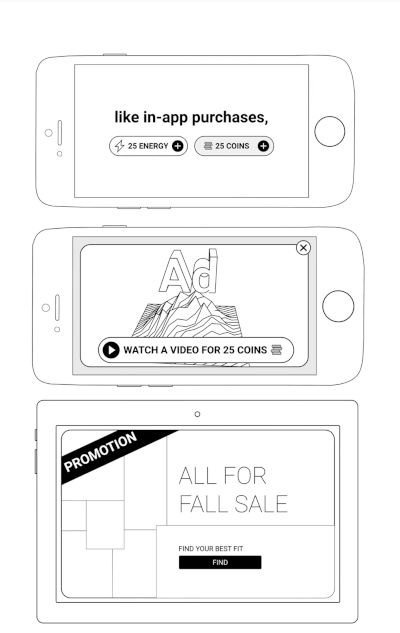
A Flutter plugin for integrating Unity Ads into your mobile applications. Easily display Unity Banner Ads and Unity Video Ads (Rewarded & Interstitial) with simple Dart APIs.


Features

  • Display Unity Banner, Rewarded, and Interstitial Video Ads
  • Simple initialization and ad loading
  • Server-to-server reward callback support
  • Privacy consent management
  • Firebase Test Lab support (Android)
  • Null safety

Table of Contents


Installation

Add the plugin to your pubspec.yaml:

dependencies:
  unity_ads_plugin: ^<latest_version>

Then run:

flutter pub get

Usage Example

Here is a minimal example of using the plugin:

import 'package:unity_ads_plugin/unity_ads_plugin.dart';

void main() {
  UnityAds.init(
    gameId: 'YOUR_GAME_ID',
    testMode: true,
    onComplete: () => print('Unity Ads Initialized'),
    onFailed: (error, message) => print('Unity Ads Initialization Failed: $error $message'),
  );
}

For more detailed usage, see the Getting Started section.


Getting Started

1. Initialization
UnityAds.init(
  gameId: 'PROJECT_GAME_ID',
  onComplete: () => print('Initialization Complete'),
  onFailed: (error, message) => print('Initialization Failed: $error $message'),
);

Set your Game ID. For testing purposes, set testMode to true.

UnityAds.isInitialized() can be used to check if the SDK has initialized successfully.


Android only: To change ad behavior in Firebase Test Lab, use the firebaseTestLabMode parameter. Possible values:

Mode Description
disableAds Ads are not displayed in Firebase Test Lab (default)
showAdsInTestMode Ads are displayed in test mode.
showAds Real ads are displayed if testMode is false.
2. Show Rewarded/Interstitial Video Ad

Rewarded Video Ad Interstitial Video Ad

Load a video ad before showing it.

UnityAds.load(
  placementId: 'PLACEMENT_ID',
  onComplete: (placementId) => print('Load Complete $placementId'),
  onFailed: (placementId, error, message) => print('Load Failed $placementId: $error $message'),
);

Show a loaded ad.

UnityAds.showVideoAd(
  placementId: 'PLACEMENT_ID',
  onStart: (placementId) => print('Video Ad $placementId started'),
  onClick: (placementId) => print('Video Ad $placementId click'),
  onSkipped: (placementId) => print('Video Ad $placementId skipped'),
  onComplete: (placementId) => print('Video Ad $placementId completed'),
  onFailed: (placementId, error, message) => print('Video Ad $placementId failed: $error $message'),
);
Server-to-server Redeem Callbacks

UnityAds.showVideoAd has a serverId parameter. To use server-to-server callbacks, set this parameter. Read more at docs.unity.com.

3. Show Banner Ad

Banner Ad

Place the UnityBannerAd widget in your app.

UnityBannerAd(
  placementId: 'PLACEMENT_ID',
  onLoad: (placementId) => print('Banner loaded: $placementId'),
  onClick: (placementId) => print('Banner clicked: $placementId'),
  onShown: (placementId) => print('Banner shown: $placementId'),
  onFailed: (placementId, error, message) => print('Banner Ad $placementId failed: $error $message'),
)
Privacy Consent

Read more about privacy consent in the Unity Ads documentation.

Use the following code to pass the appropriate consent flags to the Unity Ads SDK:

UnityAds.setPrivacyConsent(<Privacy Consent type>, true)

Troubleshooting

Android: the ad shows up as a separate app in Recent Apps

Symptom. While a fullscreen ad is playing, Recent Apps shows two cards for your app — your app and the ad. Users can swipe the ad away before it completes, so the impression is lost.

Fix. Remove one line from your app's android/app/src/main/AndroidManifest.xml:

<activity
    android:name=".MainActivity"
    android:taskAffinity=""     <!-- remove this line -->
    ...>

Flutter's template adds that blank affinity; Unity's ad screen keeps the default one. Android puts screens with different affinities in different tasks — hence the second card. Removing it puts the ad back in your app's task.

Trade-off. The attribute guards against task hijacking (flutter#144018), which Android patches at the OS level from API 30. On minSdk 30+ removing it costs nothing; below that, users on Android 7–10 lose partial protection — raising minSdk to 30 fixes both concerns at once.

Adding excludeFromRecents to Unity's ad activity does not work as an alternative. See issue #70.


Donate

If you find this package helpful and would like to support its continued development, please consider making a donation. Your contributions are greatly appreciated and motivate the further enhancement of this and other plugins.

Donate Buy Me A Coffee PayPal

Your support helps maintain and improve this package, ensuring it remains up-to-date and useful for the community.

Thank you for your generosity!

所属分类

源码仓库

使用此插件的项目