搜索插件、代码仓与 APP 分类

kanban_board 封面
插件详情v1.0.0+2

kanban_board

可自定义且可拖动的看板组件,适用于 Flutter。使用流畅的拖拽功能和灵活的任务管理构建类似 Trello 的任务看板。

AndroidiOSmacOSWindowsLinux
近 30 天下载
187
喜欢数
44
Pub 分数
140

安装插件

flutter pub add kanban_board

插件介绍

基于插件公开信息、社区数据与项目使用情况整理的选型参考。

一个可自定义且可拖动的看板小部件,适用于 Flutter,支持创建类似 Trello 的任务看板,并具备流畅的拖放功能。它支持跨列的灵活任务管理,非常适合项目跟踪和工作流程可视化。该组件注重性能与易用性,可无缝集成到跨多个平台的 Flutter 应用中。

适合场景

  • 项目管理仪表板
  • 任务跟踪应用程序
  • 工作流可视化工具
  • 敏捷开发板
  • 团队协作界面

主要特点

  • 拖拽任务重新排序
  • 可自定义的列布局
  • 适用于所有平台的响应式设计
  • 内置动画以实现过渡
  • 可扩展的任务卡片自定义

适合对象

  • 开发生产力应用的开发者
  • 使用敏捷或看板方法的团队
  • 需要交互式画板的UI设计师
  • 需要视觉任务管理的Flutter应用

使用建议

  • 复杂的流程需要仔细的状态管理
  • 可能需要额外的样式以实现品牌一致性
  • 使用超大数据集时的性能影响
  • 有限的内置筛选或搜索功能
  • 依赖外部包以实现高级数据持久化

原始 README

以下为关联源码仓库的 README 原文快照,最新内容请访问源码仓库。

Flutter KanbanBoard

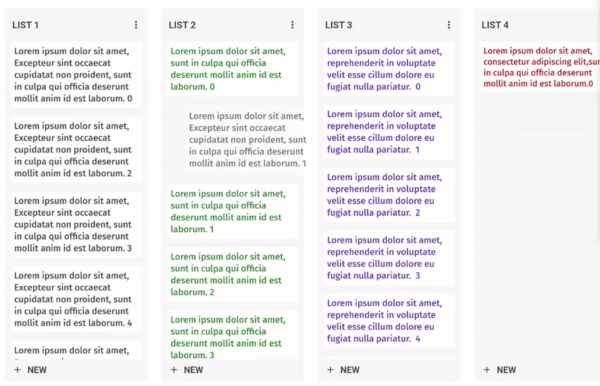
A fully customizable and draggable Kanban Board widget for Flutter. Perfect for building Kanban tools like Trello, it offers smooth drag-and-drop interactions and flexible task management for an intuitive workflow experience.

Example

Installation

Just add kanban_board to the pubspec.yaml file.

🚀 Create Your First Board

Let's define our KanbanGroupItem which can hold custom properties, and can be done by extending KanbanBoardGroupItem.

  class KanbanGroupItem extends KanbanBoardGroupItem {
  final String itemId;
  final String title;

  KanbanGroupItem({
    required this.itemId,
    required this.title,
  });

  @override
  String get id => itemId;
  
}

Then let's generate some random tasks:

import 'dart:math' as math;

List<KanbanBoardGroup<String,KanbanGroupItem>> kanbanGroups = List.generate(
_kanbanData.length,
  (index) => KanbanBoardGroup(
    id: "group_$index",
    name: "Group $index",
    items: List.generate(
      math.Random().nextInt(10),
      (itemIndex) => KanbanGroupItem(
         itemId: "group_item_$itemIndex",
         title: "Item $itemIndex",
      ),
    ),
  ),
);

And, Here comes the Kanban Board:

void main() {
  runApp(MaterialApp(home: KanbanBoardPage()));
}

class KanbanBoardPage extends StatelessWidget {
  final _controller = KanbanBoardController();

  @override
  Widget build(BuildContext context) {
    return Scaffold(
      appBar: AppBar(title: const Text("Flutter Kanban Board")),
      body: KanbanBoard(
        controller: _controller,
        groups: kanbanGroups,
        groupItemBuilder: groupItemBuilder,
        onGroupItemMove:
            (oldGroupIndex, oldItemIndex, newGroupIndex, newItemIndex) {},
        onGroupMove: (oldGroupIndex, newGroupIndex) {},
      ),
    );
  }

  BoxConstraints get groupConstraints => const BoxConstraints(
        minWidth: 300,
        maxWidth: 300,
      );

  Widget groupItemBuilder(context, groupId, itemIndex) {
    final groupItem = kanbanGroups
        .firstWhere((element) => element.id == groupId)
        .items[itemIndex];
    return Container(
      padding: const EdgeInsets.all(10),
      decoration: BoxDecoration(
        borderRadius: BorderRadius.circular(8),
      ),
      child: Text(groupItem.title),
    );
  }
}

✨ Want to Customize Your Board?

Make it uniquely yours with extensive customization options by exploring range of customization properties in KanbanBoard, including:

image

⚡ Fine-tune Board Scrolling Dynamics

Tailor the scrolling experience to match your application's feel:

KanbanBoard(
   ...
   boardScrollConfig: BoardScrollConfig(
        curve: // The animation curve
        farBoundary: Boundary(
          boundary: // The distance from the edge of the board at which auto-scrolling starts when dragging near the edge.
          offset: // The amount of scroll movement when the draggable reaches this boundary.
          duration: // The time duration for each scroll step when within this boundary.
        ),
        midBoundary: Boundary( ... ), // A middle-range boundary that triggers auto-scrolling at a moderate speed.
        nearBoundary: Boundary( ... ), // The closest range to the edge, where scrolling is most responsive.
   ),
   ...
);

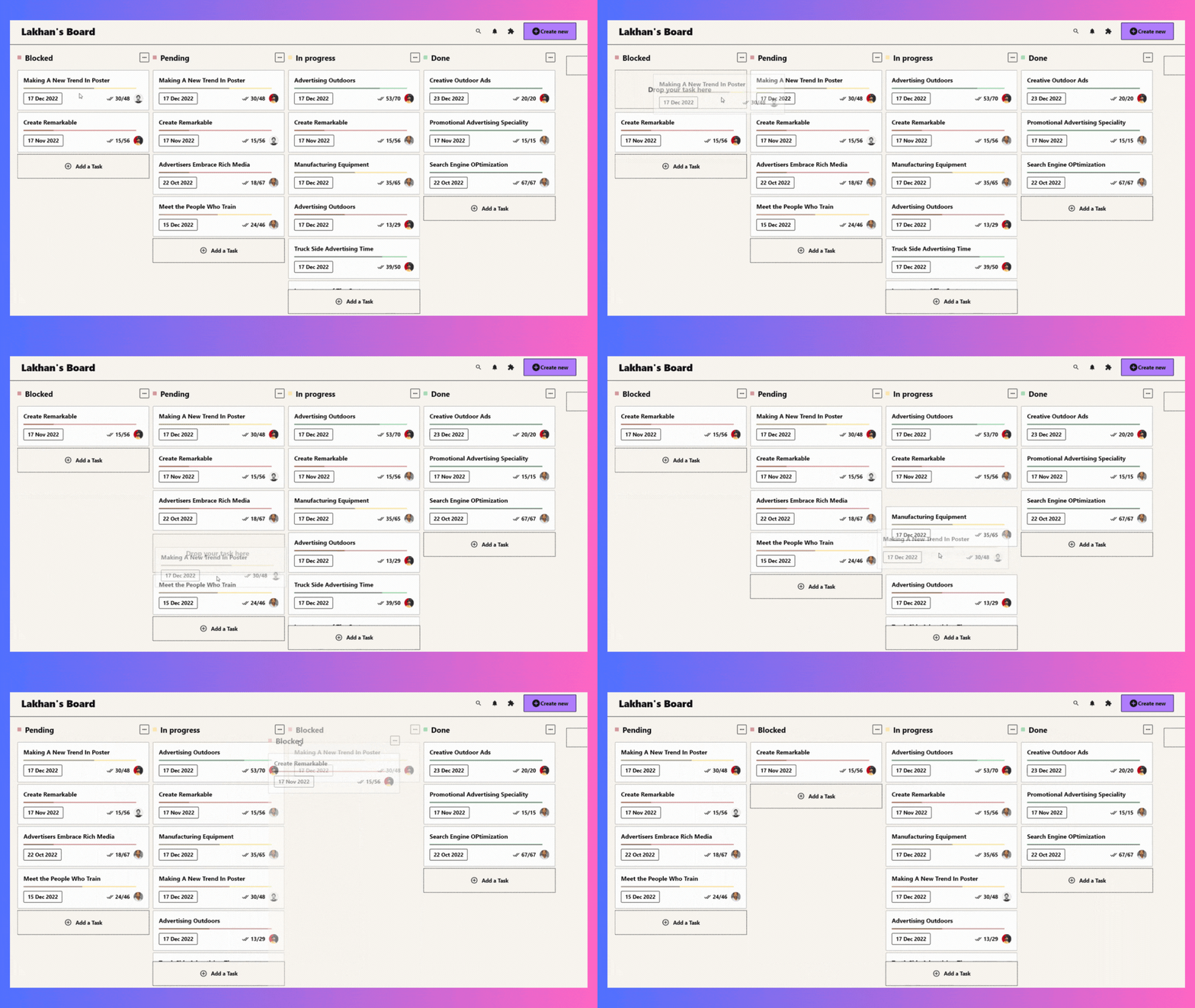
📱 See It In Action

Check out the example app to see all features in action.

🤝 Your Contribution Is Welcome!

Join our community of developers:

  1. Fork the repository
  2. Create your feature branch: git checkout -b amazing-feature
  3. Commit your changes: git commit -m 'Add some amazing feature'
  4. Push to the branch: git push origin amazing-feature
  5. Open a pull request

📄 License

This project is licensed under the MIT License - see the LICENSE file for details.

所属分类

依赖

依赖清单 3 项

源码仓库

使用此插件的项目

暂无相关数据。