Search packages, repositories and app categories

ansicolor cover
Package detailsv2.0.3

ansicolor

Looking to add some color to your terminal logs? `ansicolor` is an xterm-256 color support library that lets you change the foreground and background color of your text.

AndroidiOSWebmacOSWindowsLinux
30-day downloads
3.3M
Likes
171
Pub points
160

Install package

flutter pub add ansicolor

Package Overview

Package selection guidance compiled from public package information, community data, and project usage.

ansicolor is a Dart library providing xterm-256 color support for terminal output, enabling developers to customize text foreground and background colors in console logs. It integrates seamlessly with Flutter applications across multiple platforms, enhancing debug visibility and log readability. The package is ideal for developers who want to add visual distinction to their terminal output without relying on external tools. With straightforward syntax, it supports a wide range of colors and formatting options directly in the terminal.

Use cases

  • Enhancing terminal debug output
  • Color-coding log messages
  • Improving CLI tool readability
  • Adding visual feedback in console apps
  • Customizing command-line interface appearance

Key features

  • Supports xterm-256 colors
  • Easy-to-use color formatting
  • Cross-platform terminal support
  • Simple API for foreground/background colors
  • Lightweight and dependency-free

Suitable for

  • Developers building CLI tools
  • Flutter apps with console logging
  • Debugging environments requiring visual cues
  • Teams improving log clarity
  • Educational or tutorial projects

Considerations

  • Limited to terminal output only
  • Not suitable for UI rendering
  • Requires terminal that supports ANSI colors
  • May not render consistently on all terminals
  • No runtime color customization beyond code

Original README

Original README snapshot from the linked source repository. Visit the repository for the latest content.

ANSI / Xterm 256 color library for Dart

Feel like you're missing some color in your terminal programs? Use AnsiPen to add ANSI color codes to your log messages.

Easy to disable for production, just set color_disabled = true and all codes will be empty - no re-writing debug messages.

Note: color_disabled is a global variable for all pen colors.

Example

Note: Be mindful of contrasting colors. If you set "bright white" foreground and don't adjust the background, you'll have a bad time with lighter terminals.

Foreground to bright white with default background:

AnsiPen pen = AnsiPen()..white(bold: true);
print(pen("Bright white foreground") + " this text is default fg/bg");

Background as a peach, foreground as white:

AnsiPen pen = AnsiPen()..white()..rgb(r: 1.0, g: 0.8, b: 0.2, bg: true);
print(pen("White foreground with a peach background"));

Note

If color isn't working for you; try setting ansiColorDisabled = false;. We're relying on the stdio object to inform us of ANSI terminal support. Sometimes this is wrong.

Prior versions of this library just turned on color by default.

Rainbow Demo

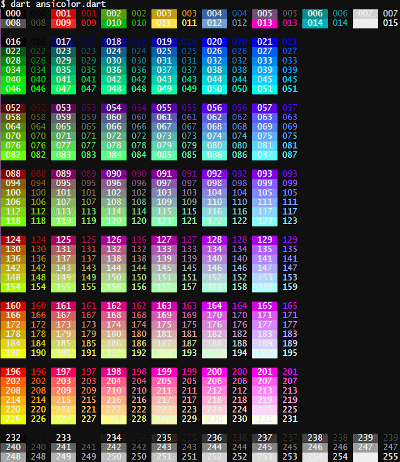
If you want a specific color, you can call the xterm() with the index listed in the rainbow below. To show the rainbow on your own terminal, pub run examples/ansicolor.dart

alt tag

Categories

Source repository

Projects using this package

Rankings