Search packages, repositories and app categories

arc_sidebar cover
Package detailsv0.0.4

arc_sidebar

A Sidebar/Drawer for flutter pps.

AndroidiOSWebmacOSWindowsLinux
30-day downloads
60
Likes
14
Pub points
145

Install package

flutter pub add arc_sidebar

Package Overview

Package selection guidance compiled from public package information, community data, and project usage.

ArcSidebar is a customizable sidebar or drawer component for Flutter applications, designed to enhance navigation with a modern, arc-shaped design. It supports multiple platforms including Android, iOS, Web, macOS, Windows, and Linux. The package offers smooth animations, responsive layouts, and easy integration via a simple pub add command. Ideal for apps requiring intuitive navigation with a distinctive visual style, it provides developers with flexibility in styling and behavior. Built with performance and usability in mind, ArcSidebar simplifies the implementation of elegant side navigation across diverse device types.

Use cases

  • Mobile and desktop app navigation
  • Web application sidebars
  • Customizable drawer interfaces
  • Cross-platform UI consistency
  • Enhanced user experience with arc design

Key features

  • Arc-shaped design
  • Cross-platform support
  • Smooth animations
  • Customizable appearance
  • Responsive layout
  • Easy integration via pub

Suitable for

  • Developers seeking unique drawer designs
  • Apps needing consistent navigation across platforms
  • Projects emphasizing modern UI aesthetics
  • Teams prioritizing rapid UI development
  • Design-focused Flutter applications

Considerations

  • May require additional styling for complex layouts
  • Limited documentation beyond basic usage
  • Potential performance impact with heavy content
  • Not ideal for minimalistic designs
  • Depends on external dependencies for full functionality

Original README

Original README snapshot from the linked source repository. Visit the repository for the latest content.

arc_sidebar

by: Eliezer António

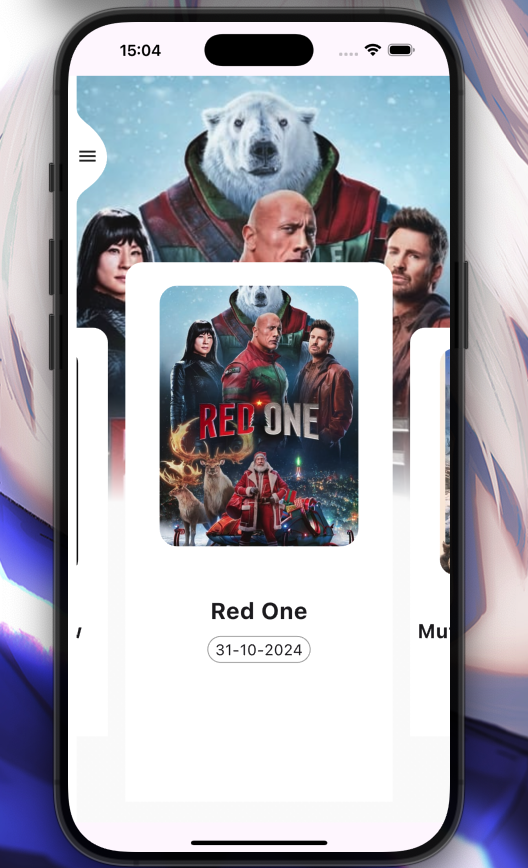
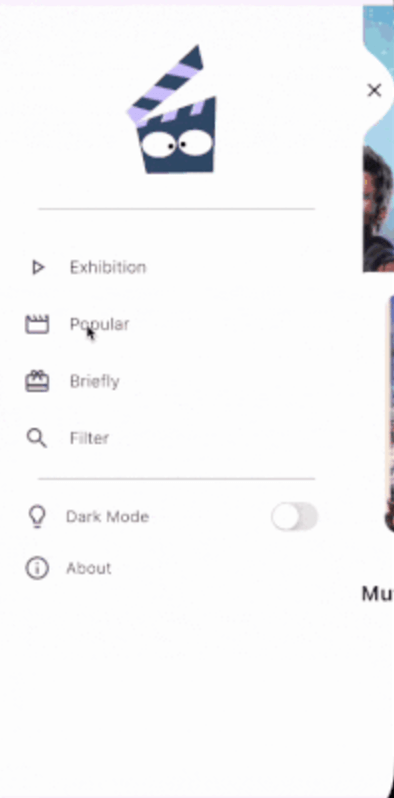
Imagem 1 Gif Exemplo

Installation

Add arc_sidebar: ^0.0.4 to your pubspec.yaml dependencies. And import it:

import 'package:arc_sidebar/arc_sidebar.dart';

How to use

 ArcSideBar(
            body: [
              SideBarItem(
                icon: Icons.play_arrow_outlined,
                title: 'Exhibition Screen',
                onTap: (){

                },
              ),
              SideBarItem(
                title: 'Popular Screen',
                icon: Icons.movie_outlined,
               onTap: (){
                  
                },
              ),
              SideBarItem(
                title: 'Briefly Screen',
                icon: Icons.card_giftcard,
               onTap: (){
                  
                },
              ),
            ],
      
          );
All SliderItem parameters

  Key? key,
  IconData? icon,
  TextStyle? style,
  Color? iconColor,
  String title,
  void Function()? onTap,
  

General Example

Preview


class Home extends StatefulWidget {
  const Home({super.key});

  @override
  State<Home> createState() => _HomeState();
}

class _HomeState extends State<Home> {
  int _currentIndex = 0;
  final List<Widget> _currentScreen = [
    Container(color: Colors.red, width: 500, height: 1000),
    Container(color: Colors.purpleAccent, width: 500, height: 1000),
    Container(color: Colors.orange, width: 500, height: 1000),
    Container(color: Colors.greenAccent, width: 500, height: 1000),
  ];
  void onIconPressed(int index) async {
       if (_currentIndex == index) return; //* Prevent reconstruction of the current screen 
    setState(() {
      _currentIndex = index;
    });
  }

  @override
  Widget build(BuildContext context) {
    return Scaffold(
      body: Stack(
        children: [
          _currentScreen[_currentIndex],
          ArcSideBar(
            background: Colors.white,
            header: Center(
              child: Column(
                mainAxisAlignment: MainAxisAlignment.center,
                crossAxisAlignment: CrossAxisAlignment.center,
                children: [
                  SizedBox(height: 50),
                  Icon(
                    Icons.flutter_dash,
                    size: 100,
                    color: Colors.blueAccent,
                  ),
                ],
              ),
            ),
            body: [
              SideBarItem(
                icon: Icons.play_arrow_outlined,
                title: 'Exhibition Screen',
                onTap: () => onIconPressed(0),
              ),
              SideBarItem(
                title: 'Popular Screen',
                icon: Icons.movie_outlined,
                onTap: () => onIconPressed(1),
              ),
              SideBarItem(
                title: 'Briefly Screen',
                icon: Icons.card_giftcard,
                onTap: () => onIconPressed(2),
              ),
            ],
            footer: Column(
              children: [
                ListTile(
                  title: Text("Dark Mode", style: TextStyle(fontWeight: FontWeight.w300, fontSize: 17)),
                  leading: Icon(Icons.lightbulb_outline, size: 30),
                  trailing: Switch.adaptive(
                    value: false,
                    onChanged: (value) {},
                  ),
                ),
              ],
            ),
          ),
        ],
      ),
    );
  }
}


🤝 Contributing to ArcSideBar
  1. Fork the Repository: Create your copy.

  2. Create a Branch:

    git checkout -b my-feature-branch
    
  3. Make Changes: Implement your feature or fix.

  4. Commit Changes:

    git commit -m "Add a new feature"
    
  5. Push to Your Fork:

    git push origin my-feature-branch
    
  6. Create a Pull Request: Submit your changes for review.

Categories

Dependencies

Dependency list 1 items

Source repository

Projects using this package

No data available yet.