Package selection guidance compiled from public package information, community data, and project usage.
Auto Store Translate is a Flutter/Dart package that automates the translation and registration of app metadata—such as titles, descriptions, and keywords—for the Apple App Store and Google Play Store. It streamlines localization workflows by integrating with translation services and managing metadata updates across multiple languages. Designed for developers aiming to efficiently publish apps in global markets, it reduces manual effort and minimizes errors in multilingual app listings. The package supports Android, iOS, macOS, Windows, and Linux platforms.
Use cases
Automating app store metadata localization
Streamlining international app launches
Reducing manual translation work
Updating metadata across multiple languages
Integrating with CI/CD pipelines
Key features
Automated metadata translation
Support for App Store and Play Store
Multi-platform compatibility
Integration with translation APIs
CI/CD-ready workflow
Suitable for
Global app publishers
Dev teams managing multilingual apps
CI/CD automation enthusiasts
Localization specialists
Considerations
Requires API keys for translation services
Dependent on external translation provider quality
May need manual review of translated content
Limited to metadata, not app UI or content
Platform-specific metadata constraints
Original README
Original README snapshot from the linked source repository. Visit the repository for the latest content.
Auto Store Translate
A library that automates translation/registration of metadata (title, description, etc.) in the App Store/Play Store.
playstore & appstore translated screenshot
How to Use?
1. Setup the config file
dependencies:auto_store_translate:
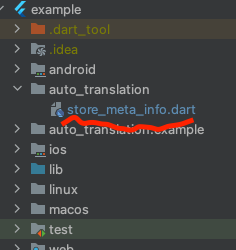
2. Create a dart file in your project and paste the code below.
create dart file in your project
project path > auto_translation > store_meta_info.dart please fill in all the information below.
import'package:auto_store_translate/auto_store_translate.dart';
/// write your store info here.MyStoreInfo myStoreInfo = MyStoreInfo(
// Play Store Title 30 characters or less
playStoreTitle: "",
// Play Store Short Description 80 characters or less
playStoreShortDescription: "",
// Play Store Long Description 4000 characters or less
playStoreFullDescription: '''
''',
// Play Store Translation Start Language
playStoreStartLanguage: "en",
// Play Store Title Translation
translatePlayStoreName: true,
// App Store Title 30 characters or less
appStoreTitle: "",
// App Store Subtitle 30 characters or less
appStoreSubTitle: "",
// App Store Description 4000 characters or less
appStringDescription: '''
''',
// App Store Keywords 100 characters or less , separated by commas, SEO
appStoreKeywords: "",
// App Store Translation Start Language
appStoreStartLanguage: "en",
// App Store Title Translation
translateAppStoreName: true,
// Whether to display the first letter of the App Store title in uppercase
onlyFirstCharacterUpperAppName: true,
// App Store Update Notes
releaseNote: "fix small bug :)",
// Home Page URL
homepageLink: "",
// Privacy Policy URL
policyPageLink: "",
);
main() {
AutoStoreTranslate.translateStoreInfo(
myStoreInfo: myStoreInfo,
// google translate api key
googleTranslateApiKey: "INPUT_YOUR_GOOGLE_TRANSLATE_API_KEY",
// true: translate only title, false: translate title + all
onlyAppNameTranslate: false);
}
It works even if you don't put the Google Translate api key, but you will soon reach the free limit.
For a guide to getting the Google Translate api key, please refer to this document.
3. Run the code above and wait for the translation to complete.
4. you will see the translated folder in the project.
5. Set up fastlane for each android/ios and register the information in the play store/app store.


 playstore & appstore translated screenshot