Search categories, packages and repositories

awesome_dropdown cover
Package detailsv0.0.4

awesome_dropdown

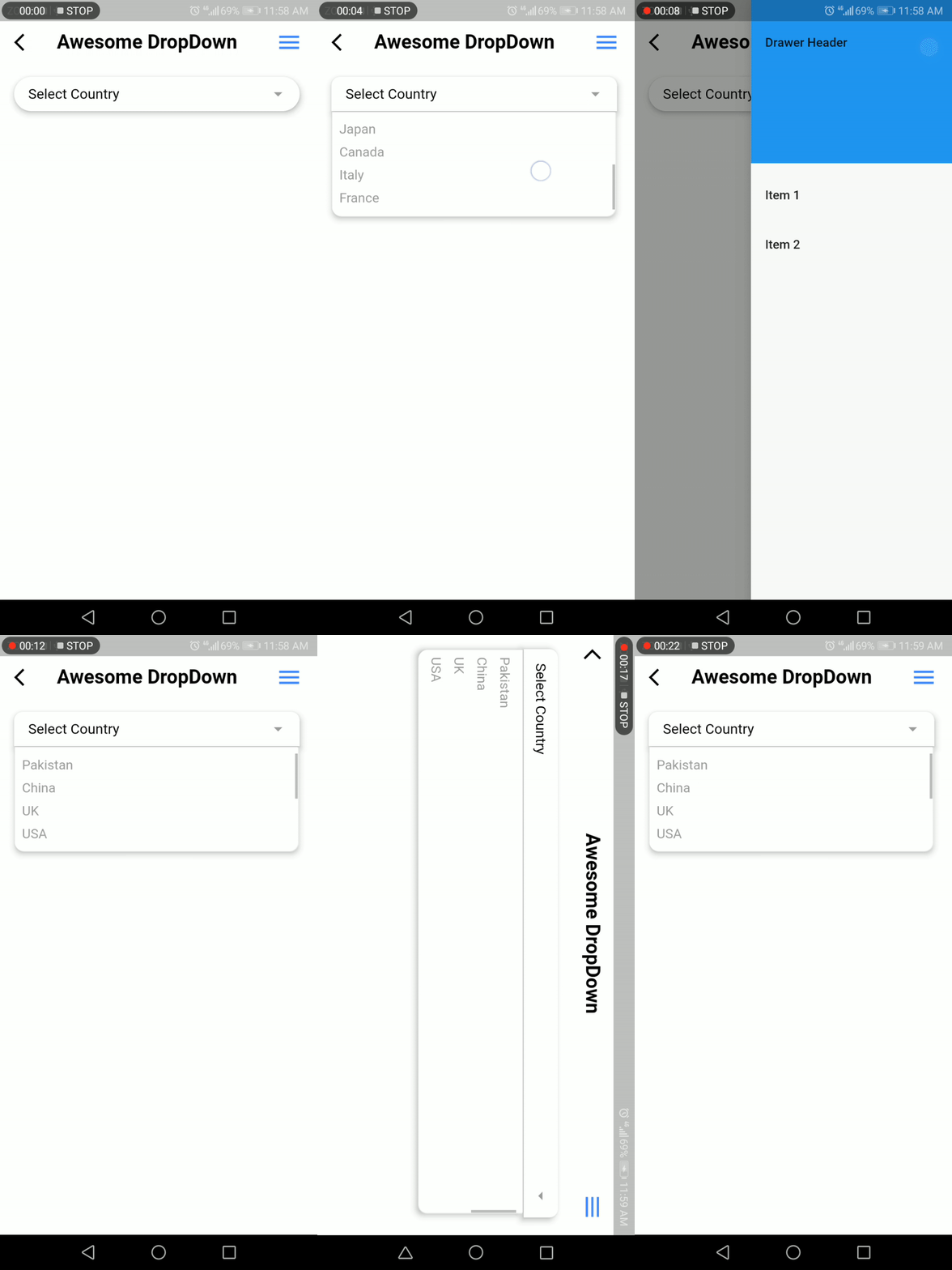
A simple dropdown library with custom style and control all touch events.

30-day downloads
661
Likes
116
Pub points
70

Install package

flutter pub add awesome_dropdown

Package Overview

Package selection guidance compiled from public package information, community data, and project usage.

Awesome Dropdown is a Flutter package that provides a customizable dropdown widget with full control over touch events and styling. It allows developers to create sleek, interactive dropdowns with ease, supporting custom themes, animations, and responsive behavior. The library is designed for simplicity and flexibility, making it ideal for forms, filters, and selection interfaces. With no platform restrictions, it works seamlessly across mobile, web, and desktop. Its lightweight nature ensures fast performance without sacrificing functionality.

Use cases

  • Form inputs
  • Filter selection
  • Customizable UI components
  • User preference pickers
  • Dynamic data selection
  • Mobile and web interfaces

Key features

  • Fully customizable styling
  • Touch event control
  • Lightweight and performant
  • Cross-platform compatibility
  • Easy integration
  • Supports animations

Suitable for

  • Developers seeking simple dropdowns
  • UI designers wanting custom controls
  • Projects requiring touch event handling
  • Apps with form-heavy workflows
  • Teams prioritizing quick implementation

Considerations

  • No built-in validation
  • Limited to basic dropdown functionality
  • Requires manual handling of state
  • No internationalization support
  • Depends on external styling knowledge
  • No advanced filtering options

Original README

Original README snapshot from the linked source repository. Visit the repository for the latest content.

Awesome DropDown

A customizable drop-down library that handles all the touch and clicks events, including iOS and mobile back-pressed callbacks.

Installation

Add following dependency in pubspec.yaml file. And add this import to your file.

awesome_dropdown:^0.0.4

import 'package:awesome_dropdown/awesome_dropdown.dart';

Quick Start

Add AwesomeDropdown to the widget tree

AwesomeDropDown(
                  isPanDown: _isPanDown,
                  dropDownList: _list,
                  dropDownIcon: Icon(Icons.arrow_drop_down, color: Colors.grey, size: 23,),
                  selectedItem: _selectedItem,
                  onDropDownItemClick: (selectedItem) {
                    _selectedItem = selectedItem;
                  },
                  dropStateChanged: (isOpened) {
                    _isDropDownOpened = isOpened;
                    if (!isOpened) {
                      _isBackPressedOrTouchedOutSide = false;                    }
                  },
                ),                ​

Custom Body


AwesomeDropDown(
                   ​isPanDown: _isPanDown,
                   ​isBackPressedOrTouchedOutSide:
                   ​_isBackPressedOrTouchedOutSide,
                   ​dropDownBGColor: Colors.white,
                    dropDownOverlayBGColor: Colors.transparent,
                   ​padding: 8,
                   ​dropDownIcon: Icon(Icons.arrow_drop_down, color: Colors.grey, size: 23,),
                   ​elevation: 5,
                   ​dropDownBorderRadius: 10,
                   ​dropDownTopBorderRadius: 50,
                   ​dropDownBottomBorderRadius: 50,
                   ​dropDownIconBGColor: Colors.transparent,
                   ​dropDownList: _list,
                   ​selectedItem: _selectedItem,
                   ​numOfListItemToShow: 4,
                   ​selectedItemTextStyle: TextStyle(
                       ​color: Colors.black,
                       ​fontSize: 16,
                       ​fontWeight: FontWeight.normal),
                   ​dropDownListTextStyle: TextStyle(
                       ​color: Colors.grey,
                       ​fontSize: 15,
                       ​backgroundColor: Colors.transparent),
                   ​onDropDownItemClick: (selectedItem) {
                     ​_selectedItem = selectedItem;
                   ​},
                   ​dropStateChanged: (isOpened) {
                     ​_isDropDownOpened = isOpened;
                     ​if (!isOpened) {
                       ​_isBackPressedOrTouchedOutSide = false;
                     ​}
                   ​},
                 ​),

Screenshot

Developer Team

Faiza Farooqui & my team members (Hina Hussain, Kamran Khan, Abdul Sattar)

License

MIT

Categories

Source repository

Projects using this package

No data available yet.