Search packages, repositories and app categories

Package detailsv1.1.1

awesome_shake_widget

A Flutter widget that provides shake animation and optional vibration effects, great for invalid forms, attention prompts, and user interaction feedback.

AndroidiOS
30-day downloads
1.1K
Likes
21
Pub points
160

Install package

flutter pub add awesome_shake_widget

Package Overview

Package selection guidance compiled from public package information, community data, and project usage.

A Flutter widget that adds shake animations and optional vibration feedback to UI elements. Ideal for drawing attention to invalid form inputs, prompting user action, or providing interactive feedback. The widget is easy to integrate and supports both Android and iOS platforms. It enhances user experience by offering visual and haptic responses with minimal setup. Designed for simplicity and effectiveness in common interaction scenarios.

Use cases

  • Form validation alerts
  • User input prompts
  • Interactive button feedback
  • Error state notifications
  • Onboarding guidance

Key features

  • Shake animation effect
  • Optional vibration support
  • Cross-platform compatibility
  • Simple API integration
  • Customizable animation duration
  • Responsive design support

Suitable for

  • Developers building interactive forms
  • UX designers enhancing feedback mechanisms
  • Apps requiring attention-grabbing cues
  • Mobile applications targeting Android and iOS
  • Projects focused on intuitive user interactions

Considerations

  • May cause distraction if overused
  • Vibration requires permission on some devices
  • Animation performance depends on device capabilities
  • Not suitable for accessibility-critical components
  • Best used sparingly to maintain UX clarity

Original README

Original README snapshot from the linked source repository. Visit the repository for the latest content.

🚀 awesome_shake_widget

A customizable Flutter widget that adds shake animations with haptic and vibration feedback. Perfect for invalid forms, error indicators, or drawing attention to UI components.

Pub Version Platform License


✨ Features

  • Shake any widget on demand
  • Built-in presets: light, medium, heavy
  • Optional vibration (custom or haptic)
  • Fully customizable offset, pattern & intensities
  • Easy to trigger using a GlobalKey

📦 Installation

dependencies:
  awesome_shake_widget: ^1.0.1

Run:

flutter pub get

🧪 Usage

1️⃣ Standard (Shake + Vibration)

By using the built-in presets — light, medium, heavy and custom — you can quickly apply different vibration intensities and patterns, perfectly paired with UI shake animations for a dynamic and responsive user experience.

final shakeKey = GlobalKey<ShakeWidgetState>();

ShakeWidget(
  key: shakeKey,
  preset: ShakePreset.medium,
  child: Text("Tap Me"),
);

// Somewhere else, e.g., on button press:
shakeKey.currentState?.shake();

2️⃣ Shake Only (No Vibration)

If you only want the visual shake effect without vibration, you can set vibrationType to VibrationType.none using the ShakeConfig. To customize the intensity of the shake, adjust the offset value — higher values will produce a stronger visual effect.

ShakeWidget(
  key: shakeKey,
  customConfig: ShakeConfig(
    offset: 20,
    vibrationType: VibrationType.none,
  ),
  child: Icon(Icons.info),
);

3️⃣ Advanced Configuration: Full Control Over Visual and Vibration Effects

You can also create custom vibration patterns by setting vibrationType to VibrationType.custom, and providing your own pattern and intensities. This gives you full control over the vibration behavior.

ShakeWidget(
key: shakeKey,
customConfig: ShakeConfig(
offset: 32,
pattern: [0, 50, 100, 50],
intensities: [255, 0, 255, 0],
vibrationType: VibrationType.custom,
),
child: Text("Custom Shake!"),
);

Trigger it via:

shakeKey.currentState?.shake();

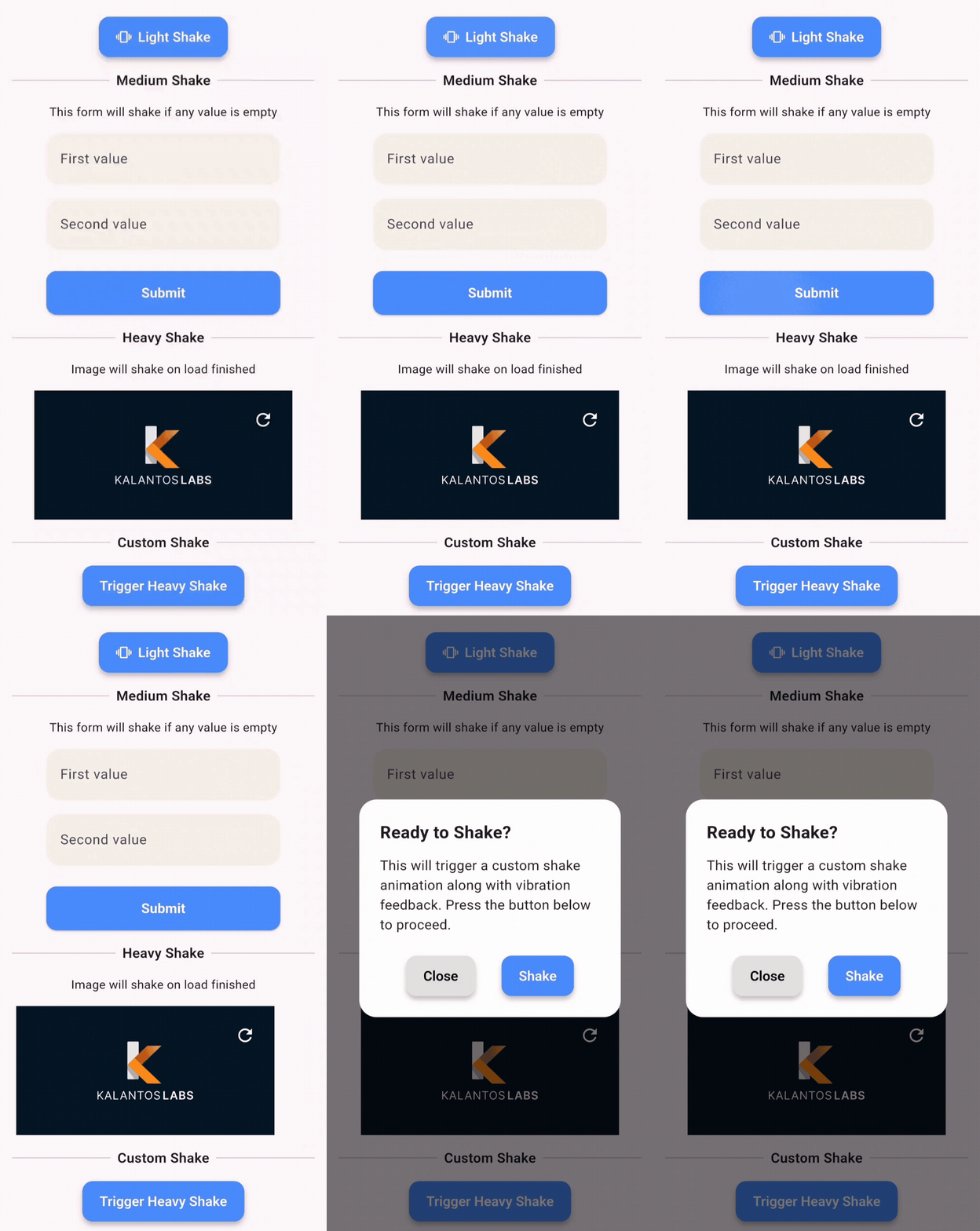
🎥 Demo

This demo shows how you can apply shake animations to:

  • ✅ Buttons
  • 💬 Dialogs
  • 🖼️ Images
  • ✏️ Text fields
  • 📦 Any widget

🧩 API Reference

Enum: ShakePreset
Value Offset Vibration
light 8 Haptic
medium 16 Haptic
heavy 24 Patterned Vibe
custom User-defined Custom

Enum: VibrationType
  • none – no vibration
  • haptic – system haptic feedback
  • custom – vibration with pattern/intensity (Android only)

ShakeConfig
ShakeConfig({
  required double offset,
  List<int>? pattern,
  List<int>? intensities,
  VibrationType vibrationType = VibrationType.haptic,
});

💡 Example App

Clone and run the example:

cd example
flutter run

Example main.dart:

import 'package:flutter/material.dart';
import 'package:awesome_shake_widget/shake_widget.dart';

void main() => runApp(const MyApp());

class MyApp extends StatelessWidget {
  const MyApp({super.key});

  @override
  Widget build(BuildContext context) {
    return MaterialApp(
      home: ShakeDemo(),
    );
  }
}

class ShakeDemo extends StatelessWidget {
  final shakeKey = GlobalKey<ShakeWidgetState>();

  @override
  Widget build(BuildContext context) {
    return Scaffold(
      appBar: AppBar(title: const Text('Shake Demo')),
      body: Center(
        child: Column(
          mainAxisAlignment: MainAxisAlignment.center,
          children: [
            ShakeWidget(
              key: shakeKey,
              preset: ShakePreset.heavy,
              child: const Icon(Icons.warning, size: 64),
            ),
            const SizedBox(height: 32),
            ElevatedButton(
              onPressed: () => shakeKey.currentState?.shake(),
              child: const Text("Shake it!"),
            ),
          ],
        ),
      ),
    );
  }
}

📄 License

MIT © Juanma Del Boca

Categories

Dependencies

Dependency list 1 items

Source repository

Projects using this package

No data available yet.