Package selection guidance compiled from public package information, community data, and project usage.
The background_task package enables Flutter applications to perform operations, particularly location updates, even when the app is in the background. It is designed for Android and iOS, allowing developers to maintain continuous functionality such as tracking user movement without interruption. The package integrates with native platform features to ensure reliable execution during background states. It is especially useful for apps requiring real-time location monitoring or periodic data collection. The solution is built with minimal overhead and supports both platforms through dedicated native implementations.
Use cases
Real-time location tracking
Periodic data synchronization
Background geofencing
Long-running task execution
Battery-efficient background processing
Key features
Supports Android and iOS
Handles location updates in background
Minimal battery impact
Native platform integration
Simple API for task scheduling
Suitable for
Fitness and navigation apps
Logistics and delivery tracking
Field service management
Apps requiring persistent background activity
Location-based services
Considerations
Requires proper permissions on both platforms
May be restricted by OS power-saving modes
Needs testing on actual devices
Background execution limits vary by OS version
User must grant location access
Original README
Original README snapshot from the linked source repository. Visit the repository for the latest content.
Enable developers to continue processing even when the application transitions to the background, we have created a package that allows processing to continue using location updates.This package was created with reference to background_location.
Can be used when you want to run the program periodically in the background.
Monitor and notify the distance walked and steps.
Notification of destination arrival.
Tracking location information (sending it to a server).
Usage
// Monitor notifications of background processes.// However, Cannot be used while the app is in task kill.BackgroundTask.instance.stream.listen((event) {
// Implement the process you want to run in the background.// ex) Check health data.
});
// Start background processing with location updates.awaitBackgroundTask.instance.start();
// Stop background processing and location updates.awaitBackgroundTask.instance.stop();
// Define callback handler at the top level.@pragma('vm:entry-point')
voidbackgroundHandler(Location data) {
// Implement the process you want to run in the background.// ex) Check health data.
}
voidmain() {
WidgetsFlutterBinding.ensureInitialized();
BackgroundTask.instance.setBackgroundHandler(backgroundHandler); // 👈 Set callback handler.runApp(constMyApp());
}
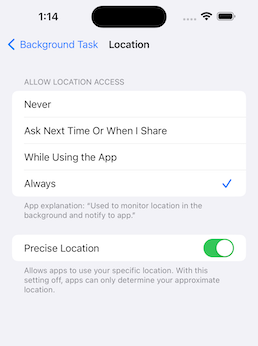
To get the latest location information in a task-killed status, set the app to Always.
This is an implementation for when you want to stop using the application when it is killed.
final status = awaitPermission.location.request();
final statusAlways = awaitPermission.locationAlways.request();
if (status.isGranted && statusAlways.isGranted) {
awaitBackgroundTask.instance.start();
}
Setup
pubspec.yaml
dependencies:background_task:
iOS: Info.plist
<key>NSLocationAlwaysAndWhenInUseUsageDescription</key><string>Used to monitor location in the background and notify to app.</string><key>NSLocationAlwaysUsageDescription</key><string>Used to monitor location in the background and notify to app.</string><key>NSLocationWhenInUseUsageDescription</key><string>Used to monitor location in the background and notify to app.</string><key>UIBackgroundModes</key><array><string>fetch</string><string>location</string></array>
To use an external package (shared_preference etc..) in callback handler, register DispatchEngine in AppDelegate.