Search packages, repositories and app categories

Package detailsv2.4.6

bluetooth_print_plus

bluetooth_print_plus is a flutter plugin for bluetooth thermal printer, support Android & iOS, supports tspl/tsc、cpcl、esc pos.

AndroidiOSWebmacOSLinux
30-day downloads
2.2K
Likes
65
Pub points
135

Install package

flutter pub add bluetooth_print_plus

Package Overview

Package selection guidance compiled from public package information, community data, and project usage.

bluetooth_print_plus is a Flutter plugin enabling communication with Bluetooth thermal printers on Android and iOS. It supports multiple printer languages including TSPL/TSC, CPCL, and ESC/POS, making it suitable for printing receipts, labels, and tickets. The package provides a straightforward API for sending print commands and managing device connections. It also offers cross-platform compatibility with Web, macOS, and Linux, though functionality may be limited on non-mobile platforms. Ideal for retail, hospitality, and logistics applications requiring reliable mobile printing.

Use cases

  • Receipt printing in retail apps
  • Label printing for inventory systems
  • Ticket generation in event management
  • Mobile POS integration
  • On-the-go document printing

Key features

  • Supports TSPL/TSC, CPCL, and ESC/POS languages
  • Cross-platform support (Android, iOS, Web, macOS, Linux)
  • Simple API for sending print commands
  • Bluetooth device discovery and pairing
  • Real-time status monitoring

Suitable for

  • Retail and point-of-sale applications
  • Logistics and warehouse management
  • Event ticketing systems
  • Mobile printing solutions
  • Developers building cross-platform printing features

Considerations

  • Limited functionality on non-Android/iOS platforms
  • Requires proper permissions for Bluetooth access
  • Printer-specific command syntax may require testing
  • Not all printer models may fully support all languages
  • Web support may have restricted Bluetooth capabilities

Original README

Original README snapshot from the linked source repository. Visit the repository for the latest content.

Bluetooth Print Plus

pub package GitHub stars GitHub forks qq_group tg_group

Introduction

Bluetooth Print Plus is a Bluetooth plugin used to print thermal printers in Flutter, a new mobile SDK to help developers build bluetooth thermal printer apps for iOS and Android.

Important, important, important. First, you need to run the demo to confirm the printer command type ! ! ! now support tspl/tsc、cpcl、esc pos. If this plugin is helpful to you, please give it a like, Thanks.

Buy Me A Coffee/请我喝杯咖啡

Plan

Version plan
1.1.x blue and tsc command, esc print image command
1.5.x support cpcl command
2.x.x improve esc command
3.x.x support zpl command

Features

Android iOS Description
scan :white_check_mark: :white_check_mark: Starts a scan for Bluetooth Low Energy devices.
connect :white_check_mark: :white_check_mark: Establishes a connection to the device.
disconnect :white_check_mark: :white_check_mark: Cancels an active or pending connection to the device.
state :white_check_mark: :white_check_mark: Stream of state changes for the Bluetooth Device.

Usage

Example

To use this plugin :
dependencies:
  flutter:
    sdk: flutter
  bluetooth_print_plus: ^2.4.5
Add permissions for Bluetooth

We need to add the permission to use Bluetooth and access location:

Android

In the android/app/src/main/AndroidManifest.xml let’s add:

<uses-permission android:name="android.permission.BLUETOOTH" />
<uses-permission android:name="android.permission.BLUETOOTH_SCAN" />
<uses-permission android:name="android.permission.BLUETOOTH_CONNECT" />
<uses-permission android:name="android.permission.BLUETOOTH_ADMIN" />
<uses-permission android:name="android.permission.ACCESS_FINE_LOCATION"/>
<uses-permission android:name="android.permission.ACCESS_COARSE_LOCATION"/>
IOS

In the ios/Runner/Info.plist let’s add:

<key>NSBluetoothAlwaysUsageDescription</key>
<string>Need BLE permission</string>
<key>NSBluetoothPeripheralUsageDescription</key>
<string>Need BLE permission</string>
import
import 'package:bluetooth_print_plus/bluetooth_print_plus.dart';
BluetoothPrintPlus useful property
BluetoothPrintPlus.isBlueOn;
BluetoothPrintPlus.isScanning;
BluetoothPrintPlus.isConnected;
listen

late StreamSubscription<bool> _isScanningSubscription;
late StreamSubscription<BlueState> _blueStateSubscription;
late StreamSubscription<ConnectState> _connectStateSubscription;
late StreamSubscription<Uint8List> _receivedDataSubscription;
late StreamSubscription<List<BluetoothDevice>> _scanResultsSubscription;
late List<BluetoothDevice> _scanResults;
  • scan results
/// listen scanResults
_scanResultsSubscription = BluetoothPrintPlus.scanResults.listen((event) {
  if (mounted) {
    setState(() {
      _scanResults = event;
    });
  }
});
  • state
/// listen isScanning
_isScanningSubscription = BluetoothPrintPlus.isScanning.listen((event) {
  print('********** isScanning: $event **********');
  if (mounted) {
    setState(() {});
  }
});

/// listen blue state
_blueStateSubscription = BluetoothPrintPlus.blueState.listen((event) {
  print('********** blueState change: $event **********');
  /// blue state changed, do something...
});

/// listen connect state
_blueStateSubscription = _BluetoothPrintPlus.connectState.listen((event) {
  print('********** connectState change: $event **********');
  /// connect state changed, do something...
});
  • received Data
_BluetoothPrintPlus.receivedData.listen((data) {
  print('********** received data: $data **********');
  /// received data, do something...
});
scan

// begin scan
await BluetoothPrintPlus.startScan(timeout: Duration(seconds: 10));

// get devices
_scanResultsSubscription = BluetoothPrintPlus.scanResults.listen((event) {
  if (mounted) {
    setState(() {
      _scanResults = event;
    });
  }
});
connect

await BluetoothPrintPlus.connect(_device);
disconnect

await BluetoothPrintPlus.disconnect();
print/write

final ByteData bytes = await rootBundle.load("assets/dithered-image.png");

/// write tsc command, for example:
final Uint8List image = bytes.buffer.asUint8List();
await tscCommand.cleanCommand();
await tscCommand.size(width: 76, height: 130);
await tscCommand.cls(); // most after size
await tscCommand.image(image: image, x: 50, y: 60);
await tscCommand.print(1);
final cmd = await tscCommand.getCommand();
if (cmd == null) return;
BluetoothPrintPlus.write(cmd);

/// write cpcl command, for example:
await cpclCommand.cleanCommand();
await cpclCommand.size(width: 76 * 8, height: 76 * 8);
await cpclCommand.image(image: image, x: 10, y: 10);
await cpclCommand.print();
final cmd = await cpclCommand.getCommand();
if (cmd == null) return;
BluetoothPrintPlus.write(cmd);

/// write esc command, for example:
await escCommand.cleanCommand();
await escCommand.print();
await escCommand.image(image: image);
await escCommand.print();
final cmd = await escCommand.getCommand();
if (cmd == null) return;
BluetoothPrintPlus.write(cmd);
Cancel Subscription
@override
void dispose() {
  super.dispose();
  _isScanningSubscription.cancel();
  _blueStateSubscription.cancel();
  _connectStateSubscription.cancel();
  _receivedDataSubscription.cancel();
  _scanResultsSubscription.cancel();
  _scanResults.clear();
  _device = null;
}

Troubleshooting

error:'State restoration of CBCentralManager is only allowed for applications that have specified the "bluetooth-central" background mode'

info.plist add:

<key>NSBluetoothAlwaysUsageDescription</key>
<string>Allow App use bluetooth?</string>
<key>NSBluetoothPeripheralUsageDescription</key>
<string>Allow App use bluetooth?</string>
<key>UIBackgroundModes</key>
<array>
    <string>bluetooth-central</string>
    <string>bluetooth-peripheral</string>
</array>

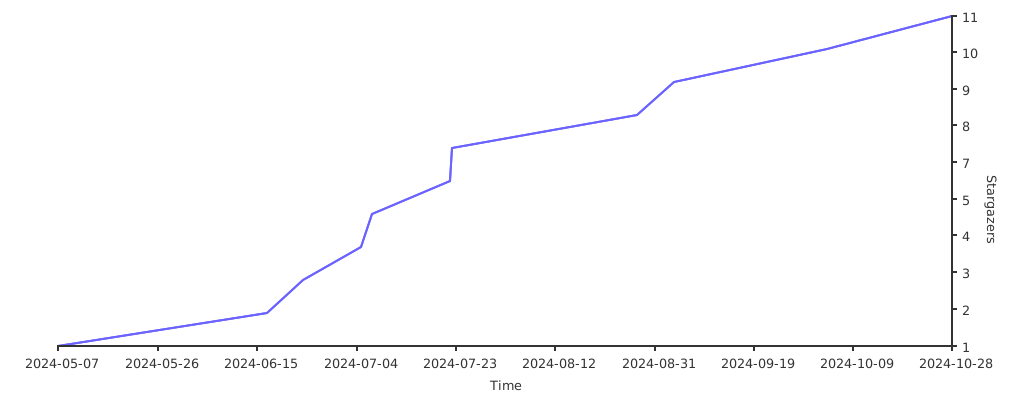
Stargazers over time

Stargazers over time

Categories

Dependencies

Dependency list 1 items

Source repository

Projects using this package

No data available yet.