Package selection guidance compiled from public package information, community data, and project usage.
A Flutter package designed to create interactive seat booking layouts for transportation and event venues such as buses, theatres, and airplanes. It provides customizable UI components to represent seats, allowing users to select, highlight, and manage bookings with ease. The package supports multiple platforms including Android, iOS, Web, macOS, Windows, and Linux, making it ideal for cross-platform applications requiring intuitive seat selection interfaces.
Use cases
Bus ticket booking
Theatre seat reservation
Airplane seating layout
Event ticketing systems
Multi-venue booking apps
Interactive seating charts
Key features
Customizable seat styling
Real-time seat selection
Support for multiple seating arrangements
Cross-platform compatibility
Built-in seat state management
Responsive design for all devices
Suitable for
Travel and transport apps
Event and venue management software
Ticketing platforms
Mobile and web booking interfaces
Developers needing reusable seat UI components
Considerations
Requires manual integration of booking logic
Limited built-in validation for seat conflicts
Best suited for static or semi-dynamic seat layouts
May need additional state management for complex workflows
Depends on external data for seat availability
Original README
Original README snapshot from the linked source repository. Visit the repository for the latest content.
book_my_seat
This is a flutter package to create seat booking layout for bus, theatre, aeroplane etc. This gives you facility to select a seat by gestures like zoom-in, zoom-out, pan etc.
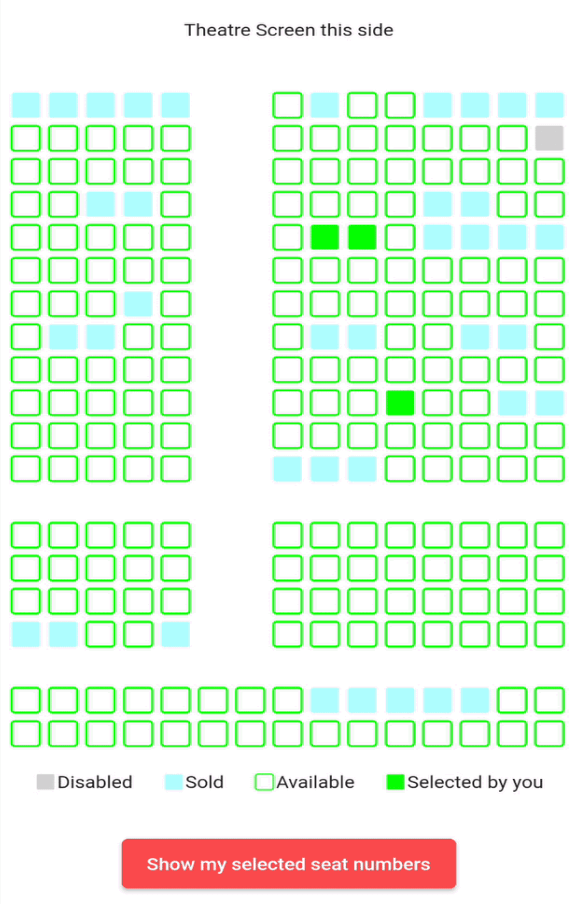
Some examples(below is for theatre but you can implement the package for bus etc also)
" "
Example project and blog for better understanding 🚀
onSeatStateChanged: - This is a callback method which gets called when user clicks on a seat which has current state equals to either SeatState.selected or SeatState.unselected.
The params in this method are: rowIndex - the index of the row where this seat is situated colIndex - the index of the column where this seat is situated updatedSeatState - this is the updated state of the seat after user clicks on the seat. It is an enum of type SeatState
stateModel: - It is an object of class SeatLayoutStateModel which describes the initial state of the whole layout(maybe bus or aeroplane or theatre). The params in this method are: rows - number of rows in the area(I will refer bus/aeroplane/theatre etc as area from now onwards) cols - number of columns in the area. seatSvgSize - size of individual seat pathUnSelectedSeat, pathSelectedSeat, pathSoldSeat, pathDisabledSeat - path of the svg assets you want to show for unselected(available), selected(by you right now), already sold and disabled(non-choosable) seats respectively currentSeatsState - this is the main parameter. It is a 2D list i.e. of type List<List<SeatState>> (SeatState enum is explained below). This describes the initial state of the area i.e. state of each seat whether it is already sold or unselected(available) or selected by you or disabled(non-selectable).
SeatState enum:
It is a dart enum. This describes the current state of individual seat. This currently holds 5 states unselected, selected, sold, disabled and empty.
Brief description of each:
unselected - state when a seat is available and user can select it
selected - state when user has selected an unselected(available) seat (i.e. a seat which had its state == unselected)
sold - state when it is already sold to some other user
disabled - state when a seat is disabled and nobody can select it
empty - state of the cell in 2D area which is an empty place(consider vacant ground) in the bus/theatre/aeroplane etc. This can mimic staircase or aisle or some other place in the area where there are no seats
NOTE: User can only click on seats which have state equals to SeatState.selected or SeatState.unselected.
Example project and blog for better understanding 🚀

 " "