Package selection guidance compiled from public package information, community data, and project usage.
A simple and customizable Flutter package for selecting a country or its dialing code, featuring built-in search functionality. Designed to enhance user experience in forms requiring country selection, it supports multiple platforms including Android, iOS, Web, macOS, Windows, and Linux. The picker is lightweight, easy to integrate, and allows developers to customize appearance and behavior according to their app’s needs.
Use cases
User registration with country selection
Phone number input with country code
International form fields
Travel or shipping address collection
Multi-language support in country names
Key features
Searchable country list
Customizable UI
Supports dialing codes
Cross-platform compatibility
Lightweight and fast
Easy integration with Flutter forms
Suitable for
Mobile and web apps requiring country selection
Apps targeting international users
Forms needing phone number input
Developers seeking a simple country picker
Projects with minimal dependencies
Considerations
Limited to predefined country data
No real-time country updates
Customization may require additional styling knowledge
Does not include geolocation features
May need manual updates for new country additions
Original README
Original README snapshot from the linked source repository. Visit the repository for the latest content.
A Simple, Customizable Flutter Country picker for picking a Country or Dialing code with Search functionality.
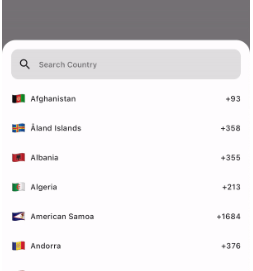
Preview
How to use
If you want to show the country picker bottom sheet, use:
If you want to show the country list as a UI component, use the CountryCodeSelector widget:
CountryCodeSelector(
   onCountryCodeTap: (CountryCode code) {
      /// Specify country code tap event
   },
    //Note: Cannot provide both onCountryCodeTap and codeBuilder, as onCountryCodeTap will not work if you have provided codeBuilder.
)
How to get a country code from the country alpha-2:,
CountryCode code = CountryCode.getCountryCodeByAlpha2(
    countryAlpha2Code:"IN", // its case-insensitive you can use both IN or in
);
You can use await Alpha2CountryCode,getCurrentCountryCode() to obtain the current alpha-2 code:
Note: Using await Alpha2CountryCode.getCurrentCountryCode() will return the current country alpha-2 code based on the IP location from the 'http://ip-api.com/json/' API.
You can also get the current country alpha-2 code based on the user's device region, using PlatformDispatcher locale.
CountryCode code = CountryCode.getCountryCodeByAlpha2(
    countryAlpha2Code: WidgetsBinding.instance.platformDispatcher.locale.countryCode,
    /// if you have context, use View.of(context).platformDispatcher.locale.countryCode
);
Note: WidgetsBinding and View.of(context) are provided by the Flutter SDK.
How to get a country code from the country dial code,
For customizations, we are providing the CustomizationBuilders class to customize each section.
customizationBuilders: CustomizationBuilders(
codeBuilder: (CountryCode code) {
// Return something to change the country list item UI.// Note: onCountryCodeTap will be overridden by codeBuilder in customizationBuilders.// If want to do some customization in default country code view, you can usereturnDefaultCountryCodeListItemView(
onCountryCodeTap: () {},
code: code,
locale: 'US', // To show a localized country name,
);
},
codeSeparatorBuilder: (BuildContext context, int index) {
// Return something to add a separator between country codes.returnconstSizedBox(); // Default
},
countryListBuilder: (List<CountryCode> codes, ScrollController? controller) {
// Return something to customize the country list
},
textFieldBuilder: (voidFunction(String)? filter) {
// Return the search text field widget//// If you want to do some customization in the default text field, you can usereturnDefaultCountryCodeFilterTextField(
filter: filter,
);
// Use filter(searchText); to update the country code list.
},
),
Bugs and Feedback
For bugs, feedback, questions and discussions please use the Github Issues.
Credits
Canopas Country Picker is owned and maintained by the Canopas team.
You can follow us on Twitter at @canopassoftware for project updates and releases.
We regularly upload blogs on new topics, which you can read here.