Search packages, repositories and app categories

checkout_screen_ui cover
Package detailsv1.1.0

checkout_screen_ui

A pre built UI representing a checkout screen that is meant to be coupled with your own logic.

AndroidiOSWebmacOSWindowsLinux
30-day downloads
118
Likes
45
Pub points
160

Install package

flutter pub add checkout_screen_ui

Package Overview

Package selection guidance compiled from public package information, community data, and project usage.

A pre-built UI component for a checkout screen designed to integrate seamlessly with custom business logic. It provides a polished, responsive interface for collecting payment details, including card input, expiration dates, and CVV, suitable for e-commerce and subscription apps. The UI is optimized across multiple platforms, ensuring consistent user experience on Android, iOS, Web, macOS, Windows, and Linux. Built with Flutter's flexibility in mind, it allows developers to focus on backend processing while delivering a professional checkout flow.

Use cases

  • E-commerce checkout flows
  • Subscription payment collection
  • Mobile and web payment interfaces
  • Digital product purchases
  • Multi-platform payment apps
  • Quick integration into existing Flutter projects

Key features

  • Pre-designed, responsive checkout layout
  • Cross-platform compatibility
  • Easy integration with custom logic
  • Card input validation hints
  • Clean, modern design language
  • Support for all major platforms

Suitable for

  • Flutter developers building payment features
  • Startups needing rapid checkout implementation
  • Apps requiring consistent cross-platform UX
  • Developers prioritizing design consistency
  • Teams focused on backend logic over UI design

Considerations

  • Does not include payment processing logic
  • Requires integration with backend or payment gateway
  • May need customization for brand-specific styling
  • Not intended for production use without additional security measures
  • Limited to UI; no built-in tokenization or PCI compliance

Original README

Original README snapshot from the linked source repository. Visit the repository for the latest content.

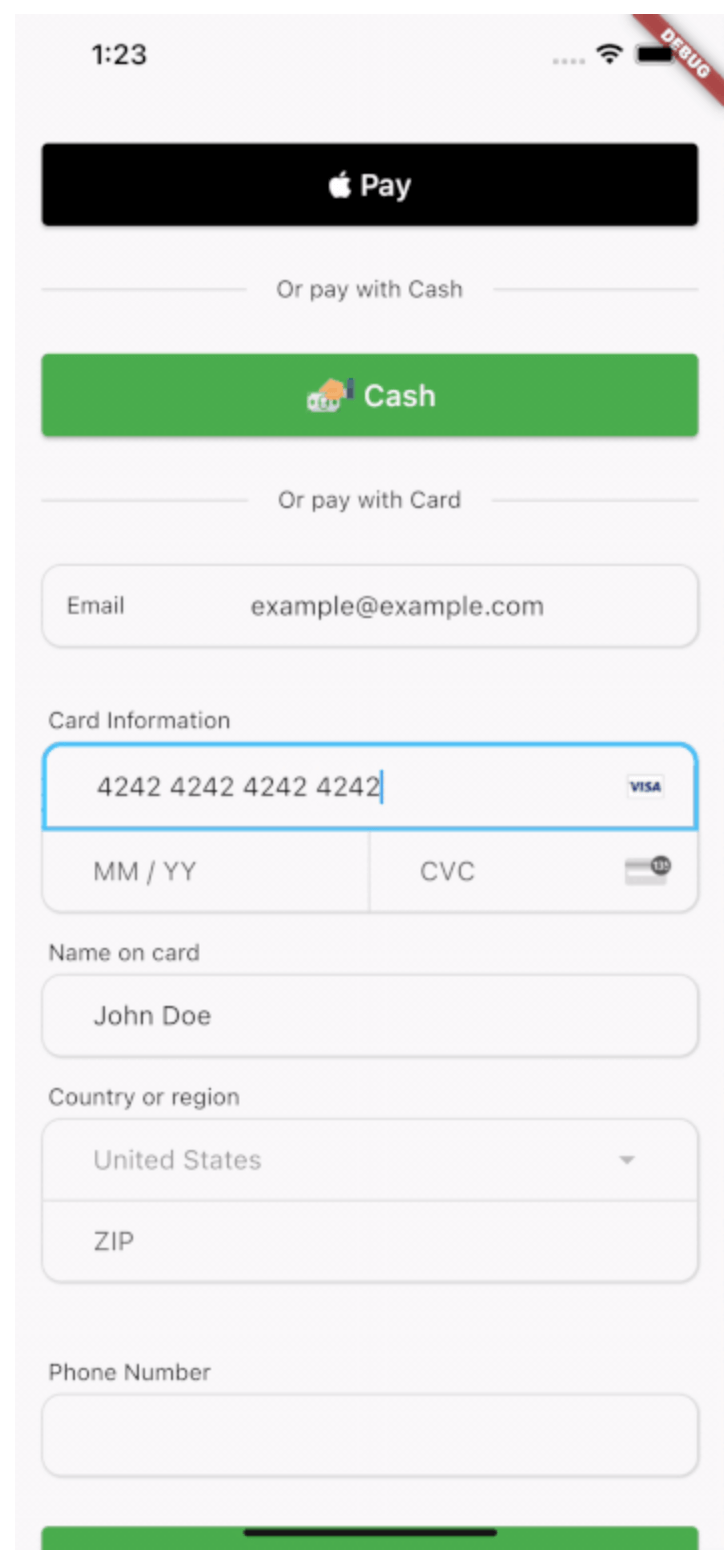
A Widget representing a checkout screen that accepts native and credit card payments along with a button for cash payments if your system has 'in person' payments. This is a UI only widget and is meant to compliment whatever third party transaction api system you are using.

Includes a CreditCardForm widget that allows you to utilize only the credit card form without the rest of the checkout screen if desired.

Security and PCI scope

This package is UI only. Card data exists in memory inside Flutter text controllers while the user types. Never log CardFormResults or raw PAN/CVC in production. In release and profile builds, CardFormResults.toString() is redacted; in debug builds it includes full values for developer convenience—still do not persist it or ship debug logs that contain card data. Send card data only to your PCI-compliant processor (for example Stripe) over TLS, following their integration guidance.

Installation

In the pubspec.yaml of your Flutter project, add:

dependencies:
  checkout_screen_ui: ^1.1.0

Import the barrel (recommended) or specific libraries:

import 'package:checkout_screen_ui/checkout_screen_ui.dart';
// or
import 'package:checkout_screen_ui/checkout_ui.dart';

Usage

The main entry point is CheckoutPage with a CheckoutData object:

final List<PriceItem> priceItems = [
  PriceItem(name: 'Product A', quantity: 1, itemCostCents: 5200),
  PriceItem(name: 'Product B', quantity: 2, itemCostCents: 8599),
];

CheckoutPage(
  data: CheckoutData(
    priceItems: priceItems,
    payToName: 'Vendor Name',
    taxRate: 0.07,
    displayNativePay: true,
    isApple: Platform.isIOS,
    onNativePay: (result) { /* ... */ },
    onCashPay: (result) { /* ... */ },
    onCardPay: (card, result) {
      // card: CardFormResults — never log in production
      // result: CheckOutResult — items, subtotal, tax, total in cents
    },
    onBack: () => Navigator.of(context).pop(),
  ),
  footer: CheckoutPageFooter(
    termsLink: 'https://example.com/terms',
    privacyLink: 'https://example.com/privacy',
  ),
);

Optional theming:

MaterialApp(
  theme: ThemeData(
    extensions: const [
      CheckoutTheme(
        chargeAmountColor: Colors.teal,
        nativePayBackgroundColor: Colors.black,
        nativePayForegroundColor: Colors.white,
      ),
    ],
  ),
  // ...
);

Additional information

If a feature is missing (the Dart language is always evolving) or you'd like an easier or better way to do something, consider opening a pull request. You can always file an issue, but generally speaking feature requests will be on a best-effort basis.

Categories

Dependencies

Dependency list 3 items

  • text_form_field_wrapper^1.0.0
  • url_launcher^6.3.2
  • url_launcher_web^2.4.2

Source repository

Projects using this package

No data available yet.