Search packages, repositories and app categories

circular_reveal_animation cover
Package detailsv2.0.2

circular_reveal_animation

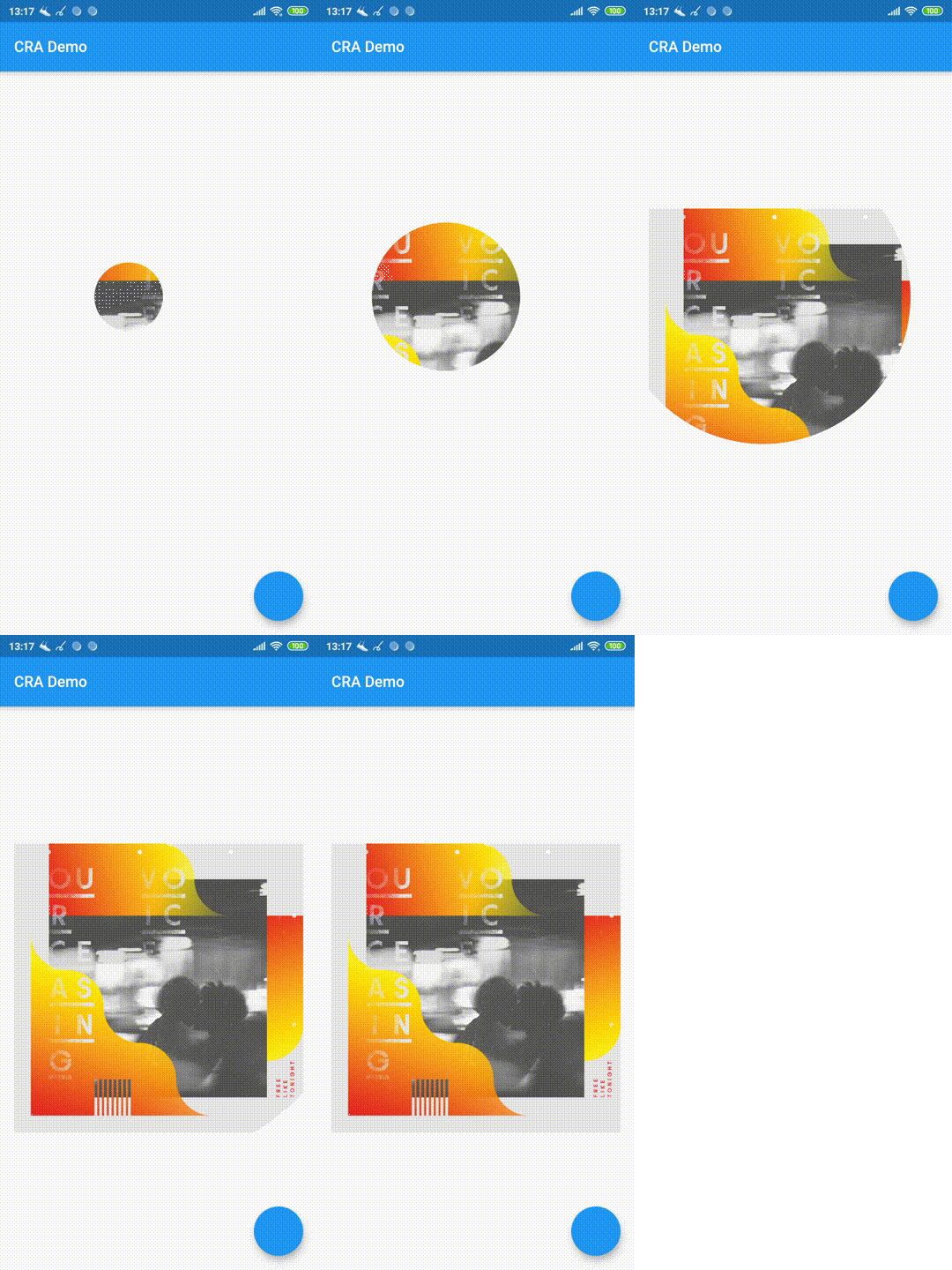
Circular Reveal Animation as Flutter widget! Inspired by Android's ViewAnimationUtils.createCircularReveal(...).

AndroidiOSWebmacOSWindowsLinux
30-day downloads
4.3K
Likes
271
Pub points
160

Install package

flutter pub add circular_reveal_animation

Package Overview

Package selection guidance compiled from public package information, community data, and project usage.

A Flutter widget that enables circular reveal animations, inspired by Android's ViewAnimationUtils.createCircularReveal. It creates a smooth expanding or shrinking circular effect on a target widget, ideal for revealing or hiding content with a natural, fluid motion. The animation is platform-agnostic and works across Android, iOS, Web, macOS, Windows, and Linux. It integrates seamlessly into existing Flutter apps to enhance UI transitions and user engagement.

Use cases

  • Revealing hidden content with a ripple effect
  • Hiding widgets with a closing circular animation
  • Creating interactive buttons with dynamic reveal effects
  • Enhancing splash screens with animated entrances
  • Designing modal dialogs with smooth appearance
  • Adding visual feedback in navigation transitions

Key features

  • Cross-platform compatibility
  • Smooth and customizable circular reveal
  • Supports both expand and shrink animations
  • Easy integration with existing widgets
  • Built-in animation timing controls
  • Works with any child widget

Suitable for

  • UI designers seeking engaging transitions
  • Developers building interactive Flutter apps
  • Apps requiring material design-inspired animations
  • Projects with dynamic content reveal needs
  • Teams targeting multiple platforms with consistent behavior

Considerations

  • Performance may vary with complex child widgets
  • Requires careful positioning for optimal visual results
  • Limited customization beyond radius and center
  • Not suitable for high-frequency animations
  • May need additional layout wrapping for full-screen effects

Original README

Original README snapshot from the linked source repository. Visit the repository for the latest content.

Circular Reveal Animation

pub package

Circular Reveal Animation as Flutter widget!

Inspired by Android's ViewAnimationUtils.createCircularReveal(...).

Статья с описанием (русский).

Article with description (english).

Demo web-site

Usage

CircularRevealAnimation(
  // @required
  child: Container(color: Colors.red),
  // @required [Animation<double>]
  animation: animation,
  // child's center if not specified
  centerAlignment: Alignment.centerRight,
  // 0 if not specified
  minRadius: 12,
  // distance from center to further child's corner if not specified
  maxRadius: 200,
);

Example

import 'package:circular_reveal_animation/circular_reveal_animation.dart';
import 'package:flutter/material.dart';

void main() => runApp(MyApp());

class MyApp extends StatelessWidget {
  @override
  Widget build(BuildContext context) {
    return MaterialApp(
      title: 'CRA Demo',
      theme: ThemeData(
        primarySwatch: Colors.blue,
      ),
      home: MyHomePage(),
    );
  }
}

class MyHomePage extends StatefulWidget {
  @override
  _MyHomePageState createState() => _MyHomePageState();
}

class _MyHomePageState extends State<MyHomePage>
    with SingleTickerProviderStateMixin {
  AnimationController animationController;
  Animation<double> animation;

  @override
  void initState() {
    super.initState();
    animationController = AnimationController(
      vsync: this,
      duration: Duration(milliseconds: 1000),
    );
    animation = CurvedAnimation(
      parent: animationController,
      curve: Curves.easeIn,
    );
  }

  @override
  Widget build(BuildContext context) {
    return Scaffold(
      appBar: AppBar(
        title: Text("CRA Demo"),
      ),
      body: Padding(
        padding: const EdgeInsets.all(16.0),
        child: Center(
          child: Column(
            mainAxisSize: MainAxisSize.min,
            children: <Widget>[
              MaterialButton(
                child: Text("show reveal dialog"),
                onPressed: () => showRevealDialog(context),
                color: Colors.amber,
              ),
              SizedBox(height: 16),
              CircularRevealAnimation(
                child: Image.asset('assets/ocv.jpg'),
                animation: animation,
//                centerAlignment: Alignment.centerRight,
                centerOffset: Offset(130, 100),
//                minRadius: 12,
//                maxRadius: 200,
              ),
            ],
          ),
        ),
      ),
      floatingActionButton: FloatingActionButton(onPressed: () {
        if (animationController.status == AnimationStatus.forward ||
            animationController.status == AnimationStatus.completed) {
          animationController.reverse();
        } else {
          animationController.forward();
        }
      }),
    );
  }

  Future<void> showRevealDialog(BuildContext context) async {
    showGeneralDialog(
      barrierLabel: "Label",
      barrierDismissible: true,
      barrierColor: Colors.black.withOpacity(0.5),
      transitionDuration: Duration(milliseconds: 700),
      context: context,
      pageBuilder: (context, anim1, anim2) {
        return Align(
          alignment: Alignment.bottomCenter,
          child: Container(
            child: Padding(
              padding: const EdgeInsets.all(12.0),
              child: Image.asset('assets/klimt.png'),
            ),
            margin: EdgeInsets.only(top: 50, left: 12, right: 12, bottom: 0),
            decoration: BoxDecoration(
              color: Colors.white,
              borderRadius: BorderRadius.circular(5),
            ),
          ),
        );
      },
      transitionBuilder: (context, anim1, anim2, child) {
        return CircularRevealAnimation(
          child: child,
          animation: anim1,
          centerAlignment: Alignment.bottomCenter,
        );
      },
    );
  }
}

Categories

Source repository

Projects using this package